Skip to content
Parallax Learn

Parallax Learn

  • Welcome
  • Tutorials
        • Tutorial Series head tag

          Tutorial Series
        • Tutorial Series

          The special, classroom-ready series pages are organized collections of tutorials for our most popular hardware and/or languages. The tutorials for each topic are conveniently accessible from a single page, shown in the order it is recommended that they be completed.
        • Robotics Series Head tag

          Robotics Series
        • Robotics Series

          • Artificial Intelligence
          • Cybersecurity: Radio Data tutorialCybersecurity
          • cyber:bot + Python
          • cyber:bot + MakeCode
          • Boe-Bot Tutorial SeriesBoe-Bot
          • Arduino Shield-Bot
          • ActivityBot with C TutorialsActivityBot + C
          • ActivityBot with BlocklyProp Tutorial SeriesActivityBot + BlocklyProp
          • Scribbler 3 Tutorial SeriesScribbler 3
        • Electronics & Programming Series Head tag

          Electronics & Programming Series
          • BS2 Board of Education Tutorial SeriesBS2 Board of Education
          • Propeller C-Language BasicsPropeller C Basics
          • FLiP Try-It Kit C Tutorial SeriesFLiP Try-It Kit + C
          • FLiP Try-It Kit BlocklyProp TutorialsFLiP Try-It Kit + BlocklyProp
          • Badge WX Tutorial SeriesBadge WX
          • Propeller BlocklyProp Basics and ProjectsPropeller BlocklyProp Basics
          • View All Tutorial Series »
        • Browse Tutorials
        • Browse Tutorials

          Individual tutorials sorted by robot or kit, and language.
        • By Robot or Kit
          • ActivityBot
          • SumoBot WX
          • Boe-Bot
          • Shield-Bot
          • cyber:bot
          • Badge WX
          • ELEV-8
          • ARLO
        • By Language
        • By Language

          • Propeller C
          • Arduino
          • BlocklyProp
          • PBASIC
          • Python
          • MakeCode
          • View All Tutorials »
  • Educators
  • Reference
  • Downloads
  • Home
  • All Courses

4×4 Keypad with 7-Segment LED

Curriculum

  • 1 Section
  • 2 Lessons
  • Lifetime
Expand all sectionsCollapse all sections
  • 4x4 Keypad with 7-Segment LED
    2
    • 1.0
      Testing and Programming
    • 1.1
      Personalize the Code

Personalize the Code

First, let’s look at how it actually works. Then, we’ll give some suggestions for how you could make this project better suit your needs.


How it Works

The program initializes the 4×4 matrix keypad using the FLiP module’s first eight pins (P0-P8). It also sets the states of the seven-segment display pins to outputs, while attaching a binary value of 11111111. Next, the code enters an infinite repeat loop containing a variable called keyNumber that gets updated every pass through the loop. Three individual functions are also run every time through the loop: terminalPrint, checkKey, and beep.

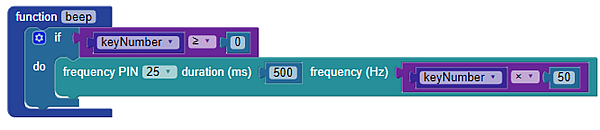
The terminal displays the value from the keypad as -1 if nothing is pressed, or a value ranging from 0-15 if being pressed (depending on which button you are pressing). The checkKey function receives a decimal value from the keypad then set the states of all pins from 8 to 15 to the corresponding binary value. If nothing is pressed, all pins are turned off by making them low (a binary value of 00000000). The “beep” function makes a sound for a half second every time a button is pressed when the value of “keyNumber” greater than or equal to 0.


Try This

Make some modifications to the project to make it work more effectively. Try the following:

  • Change the pause block values to see what effect this has on the program. Try shorter or longer values.
  • Add a red LED to show when a button has been pressed. The BlocklyProp Build LED Circuits tutorial provides an example.
  • Modify the sound played back to be different for each button press. An example of this may be setting the frequency of the speaker to the variable value times 50:

Printer-friendly version
Testing and Programming
Prev

DISCUSSION FORUMS | PARALLAX INC. STORE

About | Terms of Use | Feedback: learn@parallax.com | Copyright©Parallax Inc. 2024

© 2026 Parallax Learn • Built with GeneratePress