Skip to content
Parallax Learn

Parallax Learn

  • Welcome
  • Tutorials
        • Tutorial Series head tag

          Tutorial Series
        • Tutorial Series

          The special, classroom-ready series pages are organized collections of tutorials for our most popular hardware and/or languages. The tutorials for each topic are conveniently accessible from a single page, shown in the order it is recommended that they be completed.
        • Robotics Series Head tag

          Robotics Series
        • Robotics Series

          • Artificial Intelligence
          • Cybersecurity: Radio Data tutorialCybersecurity
          • cyber:bot + Python
          • cyber:bot + MakeCode
          • Boe-Bot Tutorial SeriesBoe-Bot
          • Arduino Shield-Bot
          • ActivityBot with C TutorialsActivityBot + C
          • ActivityBot with BlocklyProp Tutorial SeriesActivityBot + BlocklyProp
          • Scribbler 3 Tutorial SeriesScribbler 3
        • Electronics & Programming Series Head tag

          Electronics & Programming Series
          • BS2 Board of Education Tutorial SeriesBS2 Board of Education
          • Propeller C-Language BasicsPropeller C Basics
          • FLiP Try-It Kit C Tutorial SeriesFLiP Try-It Kit + C
          • FLiP Try-It Kit BlocklyProp TutorialsFLiP Try-It Kit + BlocklyProp
          • Badge WX Tutorial SeriesBadge WX
          • Propeller BlocklyProp Basics and ProjectsPropeller BlocklyProp Basics
          • View All Tutorial Series »
        • Browse Tutorials
        • Browse Tutorials

          Individual tutorials sorted by robot or kit, and language.
        • By Robot or Kit
          • ActivityBot
          • SumoBot WX
          • Boe-Bot
          • Shield-Bot
          • cyber:bot
          • Badge WX
          • ELEV-8
          • ARLO
        • By Language
        • By Language

          • Propeller C
          • Arduino
          • BlocklyProp
          • PBASIC
          • Python
          • MakeCode
          • View All Tutorials »
  • Educators
  • Reference
  • Downloads
  • Home
  • All Courses

Add a Pixy2 CMUcam to a Shield-Bot

Curriculum

  • 1 Section
  • 4 Lessons
  • Lifetime
Expand all sectionsCollapse all sections
  • Add a Pixy2 CMUcam to a Shield-Bot
    4
    • 1.0
      Pixy2 + Mounting Hardware Parts
    • 1.1
      Prep the Shield-Bot Chassis
    • 1.2
      Attach the Pixy2 CMUcam
    • 1.3
      Pixy2 CMUcam Arduino Resources

Attach the Pixy2 CMUcam

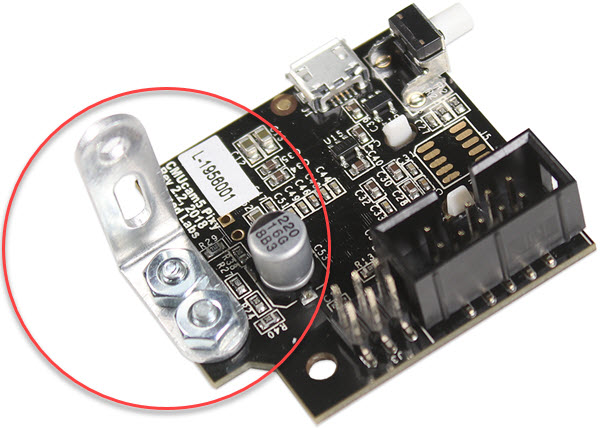
  • Connect an ’L’ bracket to the Pixy2 board, using the two 14″ screws included in the camera box, and two nuts.
 

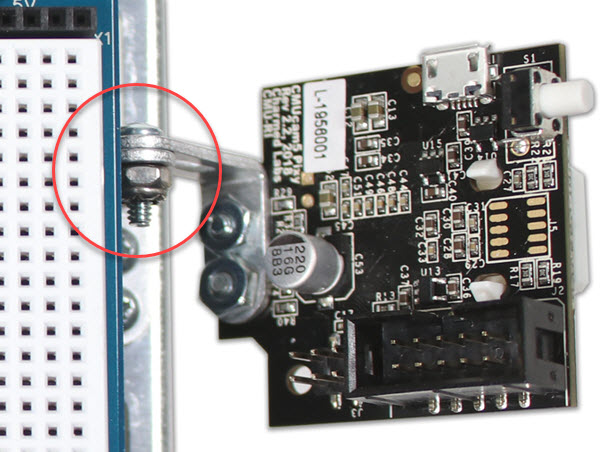
  • Connect the two ’L’ brackets together, using the longer 3/8″ screw and Nylon-core locknut.
 

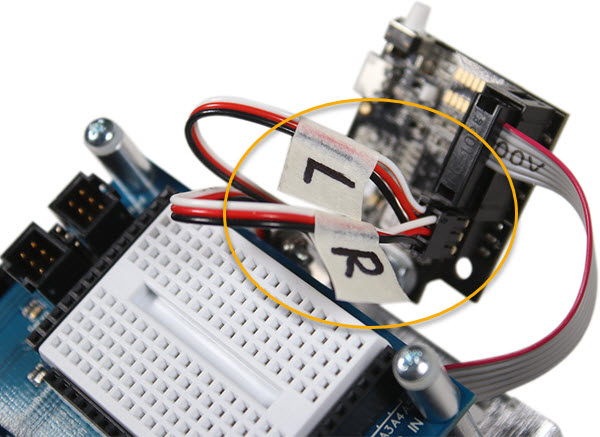
  • Plug in the ribbon cable to the Pixy2 camera, and connect the servo cables, with the left servo cable closest to the center of the Pixy2 camera.
 

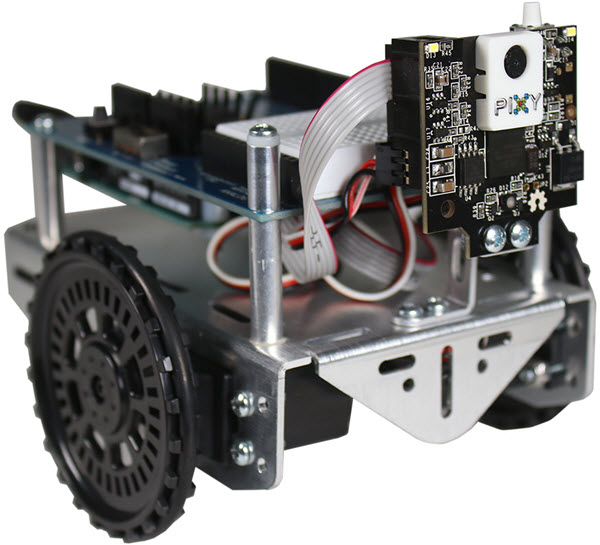
  • Adjust the tilt of the Pixy2 camera up or down, depending on the needs of the application.  If the camera tilts down on its own, tighten the screw and locknut connecting the ’L’ brackets.

Printer-friendly version
Prep the Shield-Bot Chassis
Prev
Pixy2 CMUcam Arduino Resources
Next

DISCUSSION FORUMS | PARALLAX INC. STORE

About | Terms of Use | Feedback: learn@parallax.com | Copyright©Parallax Inc. 2024

© 2026 Parallax Learn • Built with GeneratePress