Skip to content
Parallax Learn

Parallax Learn

  • Welcome
  • Tutorials
        • Tutorial Series head tag

          Tutorial Series
        • Tutorial Series

          The special, classroom-ready series pages are organized collections of tutorials for our most popular hardware and/or languages. The tutorials for each topic are conveniently accessible from a single page, shown in the order it is recommended that they be completed.
        • Robotics Series Head tag

          Robotics Series
        • Robotics Series

          • Artificial Intelligence
          • Cybersecurity: Radio Data tutorialCybersecurity
          • cyber:bot + Python
          • cyber:bot + MakeCode
          • Boe-Bot Tutorial SeriesBoe-Bot
          • Arduino Shield-Bot
          • ActivityBot with C TutorialsActivityBot + C
          • ActivityBot with BlocklyProp Tutorial SeriesActivityBot + BlocklyProp
          • Scribbler 3 Tutorial SeriesScribbler 3
        • Electronics & Programming Series Head tag

          Electronics & Programming Series
          • BS2 Board of Education Tutorial SeriesBS2 Board of Education
          • Propeller C-Language BasicsPropeller C Basics
          • FLiP Try-It Kit C Tutorial SeriesFLiP Try-It Kit + C
          • FLiP Try-It Kit BlocklyProp TutorialsFLiP Try-It Kit + BlocklyProp
          • Badge WX Tutorial SeriesBadge WX
          • Propeller BlocklyProp Basics and ProjectsPropeller BlocklyProp Basics
          • View All Tutorial Series »
        • Browse Tutorials
        • Browse Tutorials

          Individual tutorials sorted by robot or kit, and language.
        • By Robot or Kit
          • ActivityBot
          • SumoBot WX
          • Boe-Bot
          • Shield-Bot
          • cyber:bot
          • Badge WX
          • ELEV-8
          • ARLO
        • By Language
        • By Language

          • Propeller C
          • Arduino
          • BlocklyProp
          • PBASIC
          • Python
          • MakeCode
          • View All Tutorials »
  • Educators
  • Reference
  • Downloads
  • Home
  • All Courses

Arlo with a BASIC Stamp Boe-Bot Brain

Curriculum

  • 1 Section
  • 13 Lessons
  • Lifetime
Expand all sectionsCollapse all sections
  • Arlo with a BASIC Stamp Boe-Bot Brain
    13
    • 1.1
      Connect Your BOE to the DHB-10
    • 1.2
      Test and Correct BoE Electrical Connections
    • 1.3
      Clear the BS2 Program
    • 1.4
      Test BS2 to DHB-10 Communication
    • 1.5
      Test BOE Arlo Motor Connections
    • 1.6
      Test BOE Arlo Encoder Connections
    • 1.7
      Try & Tune Some Boe-Bot Code
    • 1.8
      Increase BOE Arlo’s Top Speed in Pulse Mode
    • 1.9
      Control BOE Arlo with the Debug Terminal
    • 1.10
      More Precise BOE Arlo Maneuvers with Encoders
    • 1.11
      Connect and Test the Arlo + BOE Ping))) Sensors
    • 1.12
      Arlo + BOE Control System Adjustments
    • 1.13
      Troubleshooting Your Arlo + BOE

Connect Your BOE to the DHB-10

Connect Your BOE to the DHB-10

The BOE connections to the Arlo’s DHB-10 motor control board use the same servo ports as the ones you used to connect to your Boe-Bot’s servos.  
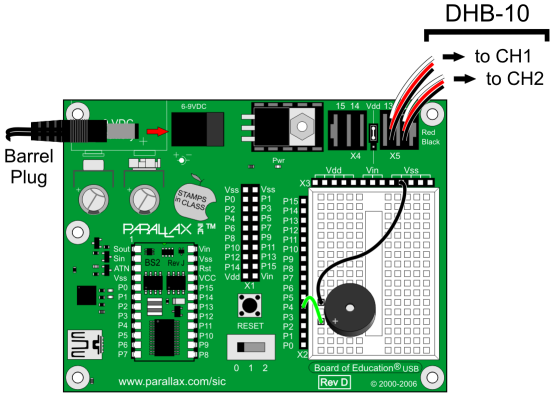
  • Complete the Arlo Robot Assembly Guide first (IMPORTANT).
  • Turn off the Arlo’s MAIN and MOTOR power switches.
  • Set the BOE’s 3-position power switch to 0.
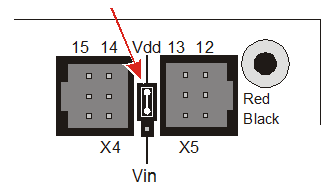
  • IMPORTANT! Make sure the jumper between servo headers P14 and P13 is set to Vdd, NOT Vin. (See image, below.)
  • Use a 4-inch 3-wire cable to connect the P13 servo to the DHB-10’s CH1 port.
  • Use another 4-inch 3-wire cable to connect the P12 servo to the DHB-10’s CH2 port.
  • Double-check that the 3-wire cables are oriented properly, with the black wires connecting to the pins labeled BLACK.
  • Connect the Arlo’s +6.5 V Aux barrel plug to the BOE’s barrel jack.

Printer-friendly version
Test and Correct BoE Electrical Connections
Next

DISCUSSION FORUMS | PARALLAX INC. STORE

About | Terms of Use | Feedback: learn@parallax.com | Copyright©Parallax Inc. 2024

© 2026 Parallax Learn • Built with GeneratePress