
Control BOE Arlo with the Debug Terminal
Control BOE Arlo with the Debug Terminal
You can also communicate with the Arlo through the Debug Terminal, and perform the same serial communication tasks the BASIC Stamp has been programmed to do. For example, here is the sequence of commands and replies from Test Encoder Connections.bs2:
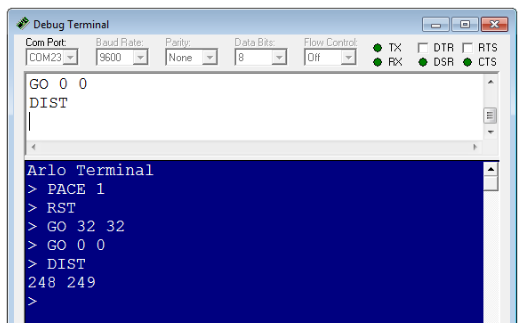
- Make sure your Debug Terminal’s Echo Off box is unchecked.
- Put the Arlo up on blocks so that its wheels can spin freely without touching your work surface.
- Set Main, Motors, and BOE power to on.
- Run Arlo Terminal Communication.bs2.
- Click the text input pane in your debug terminal. It’s just above the pane that displays Debug messages from the BASIC Stamp.
- Type PACE 1, and then press the Enter Key.
- Type RST, and then press the Enter Key.
- Type the following commands, each followed by the Enter key: GO 32 32, Go 0 0, DIST.
The reply values to your DIST command will depend on how long you let the wheels run.
' Arlo - Arlo Terminal Communication

' {$STAMP BS2}                               ' Stamp directive
' {$PBASIC 2.5}                              ' PBASIC directive

info VAR Byte(24)                            ' String buffer
n    VAR Byte                                ' Index

FREQOUT 4, 2000, 3000                        ' Start sound
DEBUG "Arlo Terminal", CR                    ' Terminal title

DO                                           ' Main loop
  DEBUG "> "                                 ' Send to terminal
  DEBUGIN STR info20CR                     ' Get typed values
  SEROUT 13, 32800, [STR info, CR]           ' Send to DHB-10
  SERIN 13, 32800, [STR info24CR]          ' Get DHB-10 reply
  DEBUG STR info                             '
  IF info(0) <> 0 THEN DEBUG CR              ' Add CR to reply
LOOP                                         ' Repeat main loop