
Test BS2 to DHB-10 Communication
Test BASIC Stamp to DHB-10 Communication
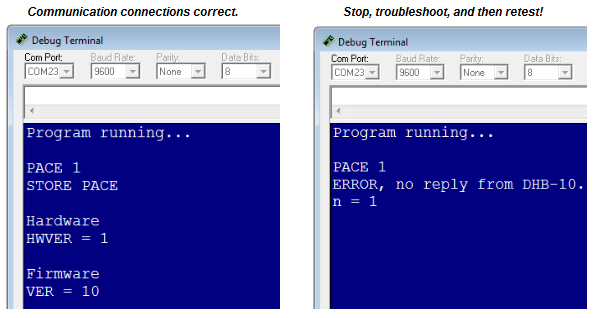
This next program asks the DHB-10 for its hardware and firmware versions, and displays the results in your Debug Terminal. Here is what you’ll see if your BS2 communicates successfully with the DHB-10 (left) alongside one of the messages you might see if communication fails (right).
- Make sure your programming cable is connected, the Arlo’s Main power is on, and the BOE’s power switch is set to 1.
- Turn on the Arlo’s Motors power.
- Verify that the DHB-10’s indicator lights blink on/off orange once every second. If not, go back to the Arlo Assembly Tutorial and start checking wiring connections.
- Open and run Test BOE and DHB-10 Communication.bs2.
- If the Debug Terminal displays an error message, recheck the cables connecting the BOE servo ports to the DHB-10’s Ch1 and Ch2 ports. Also, make sure you set the Arlo’s Motors rocker switch to on.
- If the Debug Terminal displays the hardware and firmware versions, make a note of the firmware version, and then proceed to the Test Motor Connections section.
' Arlo - Test BOE and DHB-10 Communication.bs2
' Run this program to verify that your BOE and DHB-10 are communicating.
' Should display:
'      Hardware
'      HWVER = 1
'      Firmware
'      VER = 10

' If it instead displays:
'     "ERROR, no reply from DHB..."
' It means there is a wiring problem.

' {$STAMP BS2}
' {$PBASIC 2.5}

val VAR Word
n   VAR Byte                                  ' Stores index of serial exchange

FREQOUT 4, 2000, 3000                         ' Beep -> program starting
DEBUG "Program running...", CR, CR            ' Display program running

n = 1                                         ' First exchange
DEBUG "PACE 1", CR                            ' Set serial pace for BS2
SEROUT 13, 32800, ["PACE 1", CR]              ' Set serial pace for BS2
SERIN  13, 32800, 50, ERR, [WAIT(CR)]         ' Get DHB-10's confirmation

n = 2                                         ' Second exchange
DEBUG "STORE PACE", CR, CR                    ' Display storing serial pace
SEROUT 13, 32800, ["STORE PACE", CR]          ' Remember serial pace settings
SERIN  13, 32800, 50, ERR, [WAIT(CR)]         ' Get DHB-10's confirmation

n = 3                                         ' Third exchange
DEBUG "Hardware", CR                          ' Display hardware heading
SEROUT 13, 32800, ["HWVER", CR]               ' Request hardware version
SERIN  13, 32800, 50, ERR, [DEC val]          ' Get DHB-10's reply
DEBUG "HWVER = ", DEC val, CR, CR             ' Display version

n = 4                                         ' Fourth exchange
DEBUG "Firmware", CR                          ' Display firmware heading
SEROUT 13, 32800, ["VER", CR]                 ' Request firmware version
SERIN  13, 32800, 50, ERR, [DEC val]          ' Get DHB-10's reply
DEBUG "VER = ", DEC val, CR                   ' Display version

END                                           ' End program

ERR:                                          ' Error routine
 DEBUG "ERROR, no reply from DHB-10.", CR    ' Error message
 DEBUG "n = ", DEC n                         ' Index of exchange that failed
 END                                         ' End program