
Control BOE Shield Arlo with the Terminal
Control BOE Shield Arlo with the Terminal
You can also communicate with the Arlo through the Terminal. The example shown here uses rst to reset the Arlo’s encoder counts to 0. It’s the equivalent of Arlo.clearCounts(). Next, go 32 32 sets the motor power of both motors to 32/127. It’s the equivalent of Arlo.writeMotorPower(32, 32). After some time went by, go 0 0 was typed in to stop the wheels, then dist, which got a reply of 344, 348. Those are encoder measurements of the number of 144ths of a revolution each wheel turned. These values can also be obtained in a sketch with longVariable = Arlo.readCountsLeft() and longVariable = Arlo.readCountsRight().
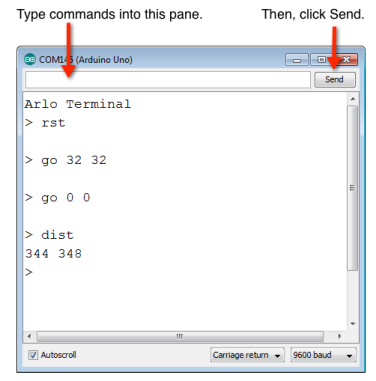
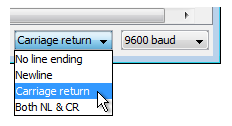
- Make sure your Terminal’s is set to send carriage return values (when you press the Enter Key) and is communicating at the standard 9600 baud rate.
- Put the Arlo up on blocks so that its wheels can spin freely without touching your work surface.
- Set Main, Motors, and BOE Shield power to on.
- Upload Arlo-Terminal-Communication.ino.
- Click the text input pane in your Terminal. It’s just above the pane that displays messages from the Arduino.
- Type rst, and then click Send.
- Type go 32 32, and then click Send.
- Let a few seconds pass.
- Type go 0 0, and then click Send.
- Type Dist, and click Send.
NOTE: The reply values to your DIST command will depend on how long you let the wheels run.
/*
  Arlo-Terminal-Communication

  IMPORTANT: Set Line Ending to Carriage return in the terminal.
*/

#include <ArloRobot.h>                        // Include Arlo library
#include <SoftwareSerial.h>                   // Include SoftwareSerial library

// Arlo and serial objects required
ArloRobot Arlo;                               // Arlo object
SoftwareSerial ArloSerial(12, 13);            // Serial in I/O 12, out I/O 13

char str[64];

void setup()                                  // Setup function
{
  tone(4, 3000, 2000);                        // Piezospeaker beep
  Serial.begin(9600);                         // Start terminal serial port

  ArloSerial.begin(19200);                    // Start DHB-10 serial com
  Arlo.begin(ArloSerial);                     // Pass to Arlo object

  Serial.println("Arlo Terminal");            // Display heading
}

void loop()                                   // Main loop
{
  memset(str, 0, 64);                         // Clear the buffer
  Serial.print("> ");                         // Display prompt
  while(Serial.available() == 0);             // Wait for terminal input
  Serial.readBytesUntil('\r', str, 64);       // Read until carriage return
  Serial.println(str);                        // Display what was typed
  ArloSerial.print(str);                      // Send to Arlo's DHB-10
  ArloSerial.write('\r');                     // Append with a carriage return
  memset(str, 0, 64);                         // Clear the buffer again
  ArloSerial.readBytesUntil('\r', str, 64);   // Get Arlo's reply
  Serial.println(str);                        // Display Arlo's reply
}