
Troubleshooting Your Arlo + BOE Shield
Troubleshooting
Important: Keep Your DHB-10 Firmware Up-to-Date!
The DHB-10 firmware is expected to undergo occasional revision as continual improvements are made by Parallax and by the community. It is important to make sure your firmware is up to date.
To make sure you always have the latest firmware version, bookmark the following pages and check back regularly for updates: Updating Your Firmware, DHB-10 Firmware Download Page
Arlo Failed the Communication Test
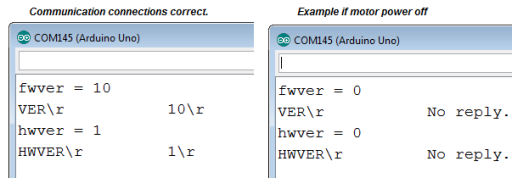
If the Arlo replies with 0 values for fwver and hwver, this sketch will display the entire transaction between Arduino and DHB-10. The lines with the \r shows the actual serial communication from Arduino to DHB-10 (VER\r) and from the DHB-10 to the Arlo (10\r if communication, or messages like No reply in the case where the motor power is not on).
/*
  Arlo-Troubleshoot-Arduino-DHB-10-Communication

  http://learn.parallax.com/tutorials/robot/arlo/arlo-basic-stamp-boe-bot-brain/

  You'll re ready for the next step when the Arduino Terminal displays:

  fwver = 10
  hwver = 1
*/

#include <ArloRobot.h>                        // Include Arlo library
#include <SoftwareSerial.h>                   // Include SoftwareSerial library

ArloRobot Arlo;                               // Declare Arlo object
SoftwareSerial ArloSerial(12, 13);            // Declare SoftwareSerial object
                                              // DHB-10 -> I/O 12, DHB-10 <- I/O 13
void setup()                                  // Setup function
{
  tone(4, 3000, 2000);                        // Piezospeaker beep
  Serial.begin(9600);                         // Start terminal serial port

  ArloSerial.begin(19200);                    // Start DHB-10 serial communication
  Arlo.begin(ArloSerial);                     // Pass to Arlo object

  int fwver = Arlo.readFirmwareVer();         // Check DHB-10 firmware
  Serial.print("fwver = ");                   // Display firmware version
  Serial.println(fwver, DEC);
  Serial.println(Arlo.lastExchange);

  int hwver = Arlo.readHardwareVer();         // Check DHB-10 hardware
  Serial.print("hwver = ");                   // Display hardware version
  Serial.println(hwver, DEC);
  Serial.println(Arlo.lastExchange);
}

void loop() {}                                // Nothing for main loop
Arlo Failed the Motor Connections Test
- If the Arlo instead rotates left (clockwise), it means the Motor 2 inputs are reversed. To fix this, turn all power off and swap the DHB-10’s Motor 2 +/- terminal block connections.
- If it rotates right (counterclockwise) swap the DHB-10’s Motor 1 +/- terminal block connections.
- If it backs up, (travels toward the power switches), both Motor 1 and Motor 2 +/- terminal block connections will need to be swapped. Make sure to test between each adjustment.