Skip to content
Parallax Learn

Parallax Learn

  • Welcome
  • Tutorials
        • Tutorial Series head tag

          Tutorial Series
        • Tutorial Series

          The special, classroom-ready series pages are organized collections of tutorials for our most popular hardware and/or languages. The tutorials for each topic are conveniently accessible from a single page, shown in the order it is recommended that they be completed.
        • Robotics Series Head tag

          Robotics Series
        • Robotics Series

          • Artificial Intelligence
          • Cybersecurity: Radio Data tutorialCybersecurity
          • cyber:bot + Python
          • cyber:bot + MakeCode
          • Boe-Bot Tutorial SeriesBoe-Bot
          • Arduino Shield-Bot
          • ActivityBot with C TutorialsActivityBot + C
          • ActivityBot with BlocklyProp Tutorial SeriesActivityBot + BlocklyProp
          • Scribbler 3 Tutorial SeriesScribbler 3
        • Electronics & Programming Series Head tag

          Electronics & Programming Series
          • BS2 Board of Education Tutorial SeriesBS2 Board of Education
          • Propeller C-Language BasicsPropeller C Basics
          • FLiP Try-It Kit C Tutorial SeriesFLiP Try-It Kit + C
          • FLiP Try-It Kit BlocklyProp TutorialsFLiP Try-It Kit + BlocklyProp
          • Badge WX Tutorial SeriesBadge WX
          • Propeller BlocklyProp Basics and ProjectsPropeller BlocklyProp Basics
          • View All Tutorial Series »
        • Browse Tutorials
        • Browse Tutorials

          Individual tutorials sorted by robot or kit, and language.
        • By Robot or Kit
          • ActivityBot
          • SumoBot WX
          • Boe-Bot
          • Shield-Bot
          • cyber:bot
          • Badge WX
          • ELEV-8
          • ARLO
        • By Language
        • By Language

          • Propeller C
          • Arduino
          • BlocklyProp
          • PBASIC
          • Python
          • MakeCode
          • View All Tutorials »
  • Educators
  • Reference
  • Downloads
  • Home
  • All Courses

BASIC Stamp Tilt Tones Project

Curriculum

  • 1 Section
  • 3 Lessons
  • Lifetime
Expand all sectionsCollapse all sections
  • BASIC Stamp Tilt Tones Project
    3
    • 1.0
      BASIC Stamp Tilt Tones Setup
    • 1.1
      Play Some BASIC Stamp Tones
    • 1.2
      Try your Own Tunes

BASIC Stamp Tilt Tones Setup

Schematics and Building the Circuits

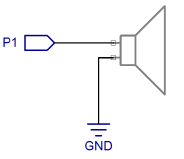
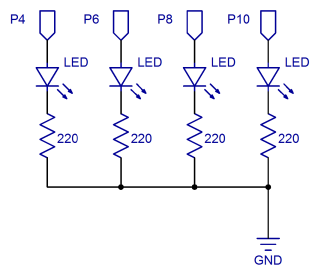
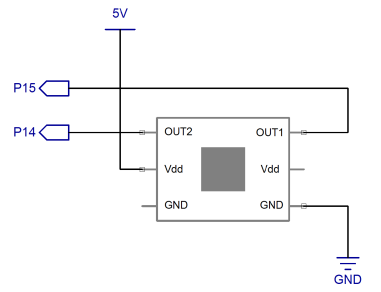
Figure 1 shows the schematics for connecting the 4-Directional Tilt Sensor, piezo speaker and 4 LED lights.

Figure 1 – Tilt Tones Schematics (BASIC Stamp HomeWork Board)
 

220 ohm resistors are built into the HomeWork Board. 
If you are using a HomeWork board, you do not need to add the 220 ohm resistors shown in the schematic above to your breadboard, as shown in Figure 2.  The little tiny chips next to the I/O pin socket labels are surface-mount 220-ohm resistors. However, if you are using the BASIC Stamp Board of Education, you will need to use a 220 ohm resistor on the breadboard for each LED.


Figure 2 – Tilt Tones Wiring Diagram (BASIC Stamp HomeWork Board)
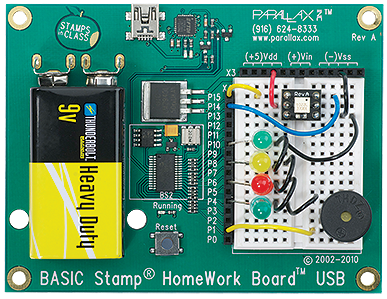
When you have finished setting up your board, it should look something like the wiring diagram in Figure 2.  If your LED leads are too long, they can be cut, but be sure to make note of which side is the cathode and which is the anode. If you look at the top of the LED, the cathode is the side where the edge is either flattened or has a small notch in it.


Printer-friendly version
Play Some BASIC Stamp Tones
Next

DISCUSSION FORUMS | PARALLAX INC. STORE

About | Terms of Use | Feedback: learn@parallax.com | Copyright©Parallax Inc. 2024

© 2026 Parallax Learn • Built with GeneratePress