Skip to content
Parallax Learn

Parallax Learn

  • Welcome
  • Tutorials
        • Tutorial Series head tag

          Tutorial Series
        • Tutorial Series

          The special, classroom-ready series pages are organized collections of tutorials for our most popular hardware and/or languages. The tutorials for each topic are conveniently accessible from a single page, shown in the order it is recommended that they be completed.
        • Robotics Series Head tag

          Robotics Series
        • Robotics Series

          • Artificial Intelligence
          • Cybersecurity: Radio Data tutorialCybersecurity
          • cyber:bot + Python
          • cyber:bot + MakeCode
          • Boe-Bot Tutorial SeriesBoe-Bot
          • Arduino Shield-Bot
          • ActivityBot with C TutorialsActivityBot + C
          • ActivityBot with BlocklyProp Tutorial SeriesActivityBot + BlocklyProp
          • Scribbler 3 Tutorial SeriesScribbler 3
        • Electronics & Programming Series Head tag

          Electronics & Programming Series
          • BS2 Board of Education Tutorial SeriesBS2 Board of Education
          • Propeller C-Language BasicsPropeller C Basics
          • FLiP Try-It Kit C Tutorial SeriesFLiP Try-It Kit + C
          • FLiP Try-It Kit BlocklyProp TutorialsFLiP Try-It Kit + BlocklyProp
          • Badge WX Tutorial SeriesBadge WX
          • Propeller BlocklyProp Basics and ProjectsPropeller BlocklyProp Basics
          • View All Tutorial Series »
        • Browse Tutorials
        • Browse Tutorials

          Individual tutorials sorted by robot or kit, and language.
        • By Robot or Kit
          • ActivityBot
          • SumoBot WX
          • Boe-Bot
          • Shield-Bot
          • cyber:bot
          • Badge WX
          • ELEV-8
          • ARLO
        • By Language
        • By Language

          • Propeller C
          • Arduino
          • BlocklyProp
          • PBASIC
          • Python
          • MakeCode
          • View All Tutorials »
  • Educators
  • Reference
  • Downloads
  • Home
  • All Courses

BASIC Stamp Tilt Tones Project

Curriculum

  • 1 Section
  • 3 Lessons
  • Lifetime
Expand all sectionsCollapse all sections
  • BASIC Stamp Tilt Tones Project
    3
    • 1.0
      BASIC Stamp Tilt Tones Setup
    • 1.1
      Play Some BASIC Stamp Tones
    • 1.2
      Try your Own Tunes

Try your Own Tunes

It’s easy to customize your Tilt Tones musical instrument by modifying the example program.

Turn Up the Beat

In the example program, beat CON 500 initializes the constant beat to 500.  Later, beat is used as the FREQOUT command’s duration argument:

FREQOUT 1, beat, note

This makes the note last for 500 ms, giving you a little time to tilt the board to a new position to select a new note before the code repeats the DO…LOOP.  If you want to slow down the beat, perhaps to practice the movements to play a tune, initialize beat to 750 or 1000.  For peppier tunes — and a coordination challenge — try reducing beat to 250. 

  • Experiment with the beat!


New Notes

It’s easy to modify the program to play different notes to make your own 4-note tunes.  Simply replace the four elements in the LOOKUP, index[…], note list.

To make it easier to see which tilt motion will correspond to which frequency (and which LED will light up) insert this debugging code into your program, just below the LOOKUP statements:

 DEBUG "index (binary) = ", BIN4 index, CR
 DEBUG "index (decimal) = ", DEC index, CR
 DEBUG "led = ", DEC led, CR
 DEBUG "note = ", DEC note, CR

Then, add this line just above LOOP:

 DEBUG CLS

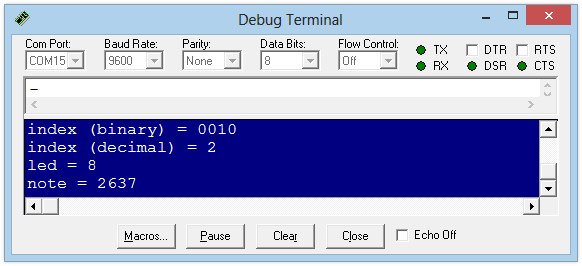
Here’s what the Debug Terminal would look like if you are tilting the board down to the right.
Challenge Yourself

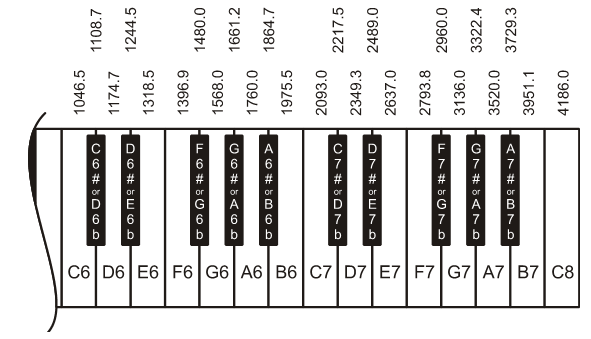
The familiar song Mary Had a Little Lamb uses only four notes: A, B, D, and G.  It also has a simple, steady beat which works well for our Tilt Tones toy. 

B  A   G  A  B   B   B     A   A   A     B   D   D
Ma-ry had a lit-tle lamb, lit-tle lamb, lit-tle lamb,


B  A   G  A  B   B   B     B     A    A    B   A   G
Ma-ry had a lit-tle lamb, its fleece was white as snow.


  • Referring to the keyboard diagram below, try modifying your program to use these four notes, then see if you can play the song.
The Piezo is Quieter on the HomeWork Board compared to the Board of Education because of the built-in resistor.  Frequencies between 3000 and 5000 Hz tend to play louder than those above or below that range.


Printer-friendly version
Play Some BASIC Stamp Tones
Prev

DISCUSSION FORUMS | PARALLAX INC. STORE

About | Terms of Use | Feedback: learn@parallax.com | Copyright©Parallax Inc. 2024

© 2026 Parallax Learn • Built with GeneratePress