Skip to content
Parallax Learn

Parallax Learn

  • Welcome
  • Tutorials
        • Tutorial Series head tag

          Tutorial Series
        • Tutorial Series

          The special, classroom-ready series pages are organized collections of tutorials for our most popular hardware and/or languages. The tutorials for each topic are conveniently accessible from a single page, shown in the order it is recommended that they be completed.
        • Robotics Series Head tag

          Robotics Series
        • Robotics Series

          • Artificial Intelligence
          • Cybersecurity: Radio Data tutorialCybersecurity
          • cyber:bot + Python
          • cyber:bot + MakeCode
          • Boe-Bot Tutorial SeriesBoe-Bot
          • Arduino Shield-Bot
          • ActivityBot with C TutorialsActivityBot + C
          • ActivityBot with BlocklyProp Tutorial SeriesActivityBot + BlocklyProp
          • Scribbler 3 Tutorial SeriesScribbler 3
        • Electronics & Programming Series Head tag

          Electronics & Programming Series
          • BS2 Board of Education Tutorial SeriesBS2 Board of Education
          • Propeller C-Language BasicsPropeller C Basics
          • FLiP Try-It Kit C Tutorial SeriesFLiP Try-It Kit + C
          • FLiP Try-It Kit BlocklyProp TutorialsFLiP Try-It Kit + BlocklyProp
          • Badge WX Tutorial SeriesBadge WX
          • Propeller BlocklyProp Basics and ProjectsPropeller BlocklyProp Basics
          • View All Tutorial Series »
        • Browse Tutorials
        • Browse Tutorials

          Individual tutorials sorted by robot or kit, and language.
        • By Robot or Kit
          • ActivityBot
          • SumoBot WX
          • Boe-Bot
          • Shield-Bot
          • cyber:bot
          • Badge WX
          • ELEV-8
          • ARLO
        • By Language
        • By Language

          • Propeller C
          • Arduino
          • BlocklyProp
          • PBASIC
          • Python
          • MakeCode
          • View All Tutorials »
  • Educators
  • Reference
  • Downloads
  • Home
  • All Courses

BlocklyProp Seismometer

Curriculum

  • 1 Section
  • 2 Lessons
  • Lifetime
Expand all sectionsCollapse all sections
  • BlocklyProp Seismometer
    2
    • 1.0
      Assemble and Wire It
    • 1.1
      Calibrate and Install the Full Program

Assemble and Wire It

  • Make a base any size you want that is big enough to hold the board and battery pack.
  • Using the Propeller Activity Board WX for size reference, drill holes to match holes in board’s corners and insert screws from the underside of the base and secure with a nut.
  • Put the other 4/40 screws in the corners of the Activity Board and secure with a nut also.

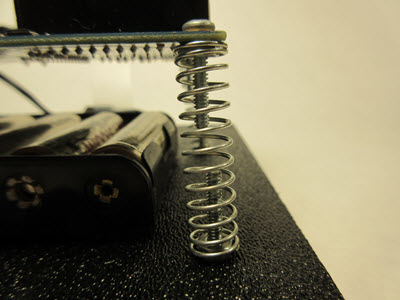
See picture below. The nuts should be positioned on the underside of the Activity Board, and on the top side of the base.
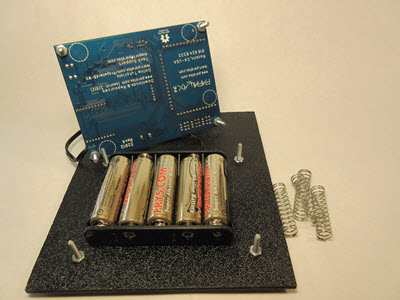
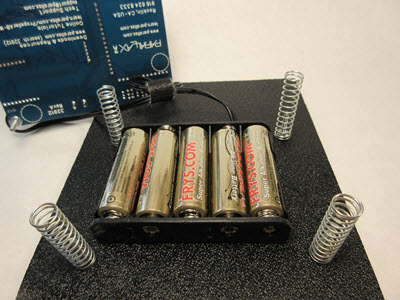
I used 1.5 inch-long by 5/8 inch-wide springs for the seismometer mounting. You want the springs to move freely so they should be long enough to keep screws from touching each other. This gives a very responsive base for the movement of whatever you set your seismometer on. I refer to the springs as “force amplifiers”.  It is sensitive enough to drive you a little crazy if you put it on your desk! The width of the springs is to keep them in place by fitting snugly around the nuts.
 

Wiring it Up

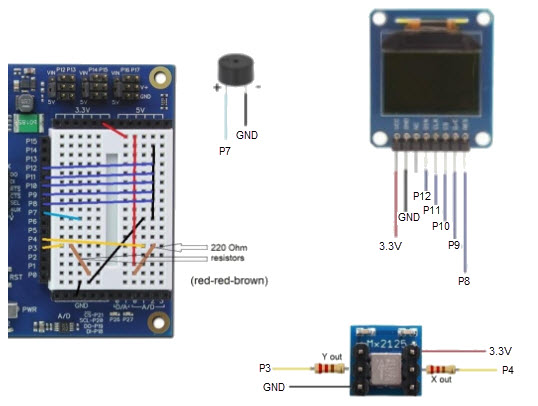
  • Follow the wiring diagrams below closely, along with the sensor placement and schematics.

There are tutorials on these sensors on the Parallax Learn website using several languages to program them with, like Prop C, Spin, and Blocklyprop. We will be using Blocklyprop for this project because of its ease of use. Below on the left is a picture of the breadboard wiring without the sensors, and on the right is the sensor placement. You might want to place the piezospeaker and accelerometer before beginning your wiring, to make it easier. The OLED can be added after the wiring is complete.
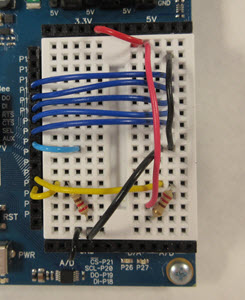
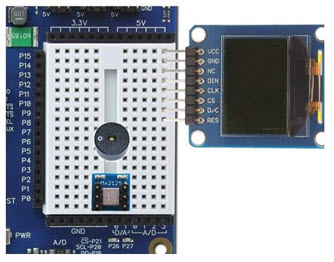
 

Below is a graphic representation of the wiring diagram without sensors installed, plus the schematics for each of the 3 sensors we’re using in this project. The brown lines are the 220-ohm resistors pictured above, and the line colors match the colors on the sensor schematics. Make sure your project agrees with these pinouts.
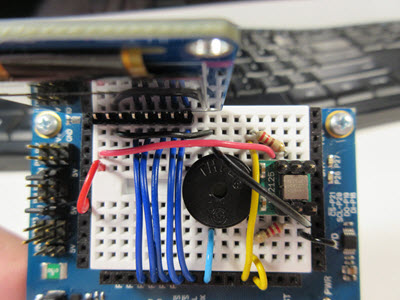
This is an image of the board fully wired, with sensors installed:
  • Once the board is set up, secure the battery pack to the base, in the middle of the springs.
  • Place the Activity Board WX on top of the springs so the screws secure it into the springs, and connect the barrel jack from the battery pack.

Printer-friendly version
Calibrate and Install the Full Program
Next

DISCUSSION FORUMS | PARALLAX INC. STORE

About | Terms of Use | Feedback: learn@parallax.com | Copyright©Parallax Inc. 2024

© 2026 Parallax Learn • Built with GeneratePress