Skip to content
Parallax Learn

Parallax Learn

  • Welcome
  • Tutorials
        • Tutorial Series head tag

          Tutorial Series
        • Tutorial Series

          The special, classroom-ready series pages are organized collections of tutorials for our most popular hardware and/or languages. The tutorials for each topic are conveniently accessible from a single page, shown in the order it is recommended that they be completed.
        • Robotics Series Head tag

          Robotics Series
        • Robotics Series

          • Artificial Intelligence
          • Cybersecurity: Radio Data tutorialCybersecurity
          • cyber:bot + Python
          • cyber:bot + MakeCode
          • Boe-Bot Tutorial SeriesBoe-Bot
          • Arduino Shield-Bot
          • ActivityBot with C TutorialsActivityBot + C
          • ActivityBot with BlocklyProp Tutorial SeriesActivityBot + BlocklyProp
          • Scribbler 3 Tutorial SeriesScribbler 3
        • Electronics & Programming Series Head tag

          Electronics & Programming Series
          • BS2 Board of Education Tutorial SeriesBS2 Board of Education
          • Propeller C-Language BasicsPropeller C Basics
          • FLiP Try-It Kit C Tutorial SeriesFLiP Try-It Kit + C
          • FLiP Try-It Kit BlocklyProp TutorialsFLiP Try-It Kit + BlocklyProp
          • Badge WX Tutorial SeriesBadge WX
          • Propeller BlocklyProp Basics and ProjectsPropeller BlocklyProp Basics
          • View All Tutorial Series »
        • Browse Tutorials
        • Browse Tutorials

          Individual tutorials sorted by robot or kit, and language.
        • By Robot or Kit
          • ActivityBot
          • SumoBot WX
          • Boe-Bot
          • Shield-Bot
          • cyber:bot
          • Badge WX
          • ELEV-8
          • ARLO
        • By Language
        • By Language

          • Propeller C
          • Arduino
          • BlocklyProp
          • PBASIC
          • Python
          • MakeCode
          • View All Tutorials »
  • Educators
  • Reference
  • Downloads
  • Home
  • All Courses

BlocklyProp Seismometer

Curriculum

  • 1 Section
  • 2 Lessons
  • Lifetime
Expand all sectionsCollapse all sections
  • BlocklyProp Seismometer
    2
    • 1.0
      Assemble and Wire It
    • 1.1
      Calibrate and Install the Full Program

Calibrate and Install the Full Program

Once you have your wiring done you will want to know the numerical range of your Memsic sensor in order to give your program the correct numbers to look for when the board is shaken.

  • Using Blocklyprop, make a program to print the numbers your sensor is putting out.
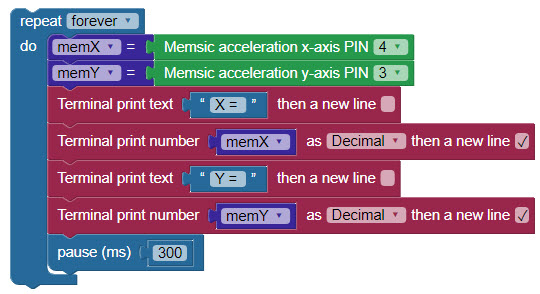
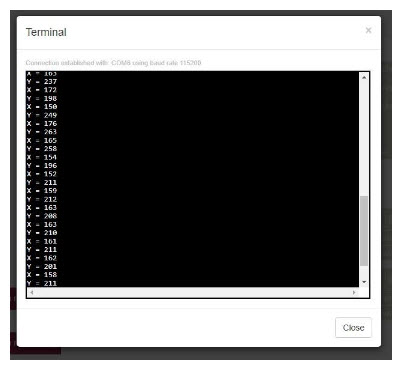
  • After sending the program to the board let it settle down for a while to get the steady state of the sensor. Watch the terminal output for repeated similar numbers.

Anything over that will indicate movement.
Once you have your baseline numbers you can use them to program the logic to let your seismometer know when to sound off. The following Blocklyprop program is what I wrote for my seismometer but you can make your own noises and OLED graphics to suit yourself. It is easy to modify and there are many things you can do with the OLED! Be sure to replace my Memsic baseline numbers with your own.

  • Download the blocks file  and upload it or create the program by hand in a new BlocklyProp Propeller Activity Board WX project.
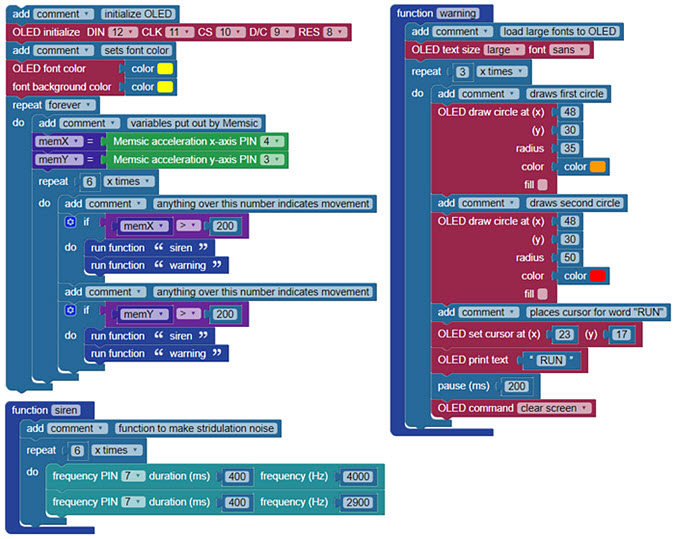
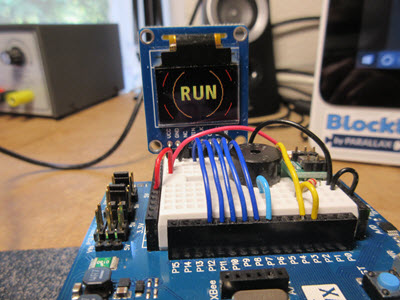
The logic I used for the seismometer is: if the numbers coming from the Memsic sensor are greater than the numbers when it is in its steady state it will sound the alarm. I put the speaker and the OLED in their own functions to make it easy to change them when the whim hits me for something different or better.  Do not forget to right click on a block and use the help function to get the information on a block and how to use it. I hope you enjoy this project!

Printer-friendly version
Assemble and Wire It
Prev

DISCUSSION FORUMS | PARALLAX INC. STORE

About | Terms of Use | Feedback: learn@parallax.com | Copyright©Parallax Inc. 2024

© 2026 Parallax Learn • Built with GeneratePress