Skip to content
Parallax Learn

Parallax Learn

  • Welcome
  • Tutorials
        • Tutorial Series head tag

          Tutorial Series
        • Tutorial Series

          The special, classroom-ready series pages are organized collections of tutorials for our most popular hardware and/or languages. The tutorials for each topic are conveniently accessible from a single page, shown in the order it is recommended that they be completed.
        • Robotics Series Head tag

          Robotics Series
        • Robotics Series

          • Artificial Intelligence
          • Cybersecurity: Radio Data tutorialCybersecurity
          • cyber:bot + Python
          • cyber:bot + MakeCode
          • Boe-Bot Tutorial SeriesBoe-Bot
          • Arduino Shield-Bot
          • ActivityBot with C TutorialsActivityBot + C
          • ActivityBot with BlocklyProp Tutorial SeriesActivityBot + BlocklyProp
          • Scribbler 3 Tutorial SeriesScribbler 3
        • Electronics & Programming Series Head tag

          Electronics & Programming Series
          • BS2 Board of Education Tutorial SeriesBS2 Board of Education
          • Propeller C-Language BasicsPropeller C Basics
          • FLiP Try-It Kit C Tutorial SeriesFLiP Try-It Kit + C
          • FLiP Try-It Kit BlocklyProp TutorialsFLiP Try-It Kit + BlocklyProp
          • Badge WX Tutorial SeriesBadge WX
          • Propeller BlocklyProp Basics and ProjectsPropeller BlocklyProp Basics
          • View All Tutorial Series »
        • Browse Tutorials
        • Browse Tutorials

          Individual tutorials sorted by robot or kit, and language.
        • By Robot or Kit
          • ActivityBot
          • SumoBot WX
          • Boe-Bot
          • Shield-Bot
          • cyber:bot
          • Badge WX
          • ELEV-8
          • ARLO
        • By Language
        • By Language

          • Propeller C
          • Arduino
          • BlocklyProp
          • PBASIC
          • Python
          • MakeCode
          • View All Tutorials »
  • Educators
  • Reference
  • Downloads
  • Home
  • All Courses
  • Calibrating and Performance-Tuning your ELEV-8 v3

Calibrating and Performance-Tuning your ELEV-8 v3

Accelerometer Calibration

Accelerometer Calibration

The Flight Controller firmware comes with a set of default constants for the accelerometer to use. By following this procedure, you will move your ELEV-8 v3 in a series of positions as prompted by the Ground Station software. When completed, the GroundStation software uploads constants to the Flight Controller’s EEPROM.  Then, the firmware will use these constants, specific to your very own ELEV-8 Flight Controller, instead of the defaults while flying. This will improve overall flight performance. 

Reloading the ELEV-8 Flight Controller firmware will not over-write the calibration settings you create with this procedure. To completely erase these (caution – and all!) calibration settings, see the Factory Default option under the System Setup tab.

In the Ground Station software, click on the “Accel Calibration” Tab. You should see this screen:
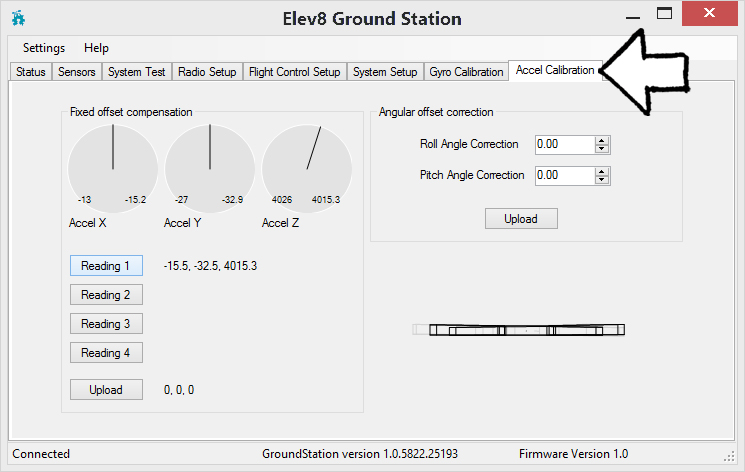
It is important for the ELEV-8 to remain absolutely still during calibration – slamming doors or someone walking around and shaking the floor can create enough vibration to throw off the calibration. 

You will be taking 4 readings, rotating the ELEV-8 v3 one-quarter turn (90º) between each reading:

  • Set the ELEV-8 v3 on a hard, level surface.
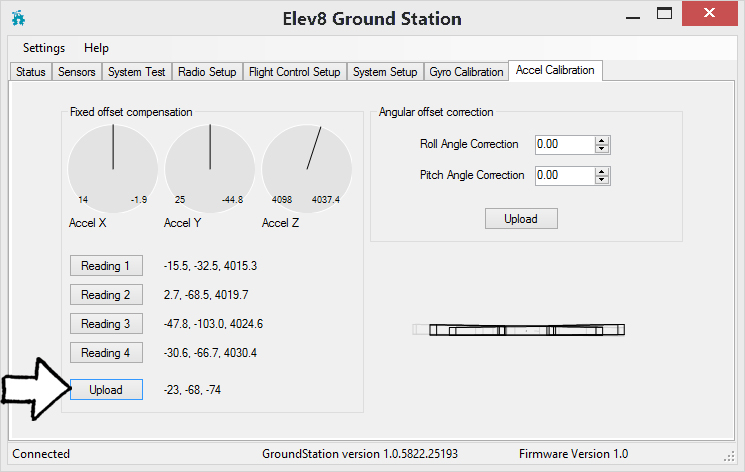
  • Once the ELEV-8 v3 has been still and undisturbed for a 15-30 seconds, click the button labeled “Reading 1”. A set of 3 numbers will appear to the right of the button.
  • Turn the ELEV-8 v3 90º and wait another 15-30 seconds for the accelerometer to settle.
  • Click the button labeled “Reading 2”.
  • Turn the ELEV-8 v3 90º and wait 15-30 seconds for the accelerometer to settle.
  • Click the button labeled “Reading 3”.
  • Turn the ELEV-8 v3 90º and wait 15-30 seconds for the accelerometer to settle.
  • Click the button labeled “Reading 4”.

  • Now that you have taken 4 readings, click the button labeled “Upload”

The ELEV-8 Flight Controller will beep to confirm that the accelerometer has been calibrated.


Printer-friendly version
Gyroscope Calibration
Prev
Correcting Drift
Next

DISCUSSION FORUMS | PARALLAX INC. STORE

About | Terms of Use | Feedback: learn@parallax.com | Copyright©Parallax Inc. 2024

© 2026 Parallax Learn • Built with GeneratePress