Skip to content
Parallax Learn

Parallax Learn

  • Welcome
  • Tutorials
        • Tutorial Series head tag

          Tutorial Series
        • Tutorial Series

          The special, classroom-ready series pages are organized collections of tutorials for our most popular hardware and/or languages. The tutorials for each topic are conveniently accessible from a single page, shown in the order it is recommended that they be completed.
        • Robotics Series Head tag

          Robotics Series
        • Robotics Series

          • Artificial Intelligence
          • Cybersecurity: Radio Data tutorialCybersecurity
          • cyber:bot + Python
          • cyber:bot + MakeCode
          • Boe-Bot Tutorial SeriesBoe-Bot
          • Arduino Shield-Bot
          • ActivityBot with C TutorialsActivityBot + C
          • ActivityBot with BlocklyProp Tutorial SeriesActivityBot + BlocklyProp
          • Scribbler 3 Tutorial SeriesScribbler 3
        • Electronics & Programming Series Head tag

          Electronics & Programming Series
          • BS2 Board of Education Tutorial SeriesBS2 Board of Education
          • Propeller C-Language BasicsPropeller C Basics
          • FLiP Try-It Kit C Tutorial SeriesFLiP Try-It Kit + C
          • FLiP Try-It Kit BlocklyProp TutorialsFLiP Try-It Kit + BlocklyProp
          • Badge WX Tutorial SeriesBadge WX
          • Propeller BlocklyProp Basics and ProjectsPropeller BlocklyProp Basics
          • View All Tutorial Series »
        • Browse Tutorials
        • Browse Tutorials

          Individual tutorials sorted by robot or kit, and language.
        • By Robot or Kit
          • ActivityBot
          • SumoBot WX
          • Boe-Bot
          • Shield-Bot
          • cyber:bot
          • Badge WX
          • ELEV-8
          • ARLO
        • By Language
        • By Language

          • Propeller C
          • Arduino
          • BlocklyProp
          • PBASIC
          • Python
          • MakeCode
          • View All Tutorials »
  • Educators
  • Reference
  • Downloads
  • Home
  • All Courses
  • Calibrating and Performance-Tuning your ELEV-8 v3

Calibrating and Performance-Tuning your ELEV-8 v3

Adjusting Flight Characteristics

Adjusting Flight Characteristics

There are several advanced settings within the Radio Setup tab of the Parallax GroundStation that can be used to tune the flight characteristics of your ELEV-8 v3 quadcopter. These settings are specific to the mode your ELEV-8 v3 is in, so it is important to understand what each setting is and how it works.

  • Connect your ELEV-8 v3 to your computer, open the GroundStation, and make sure that your ELEV-8 v3 is shown as connected.
  • Click on the “Radio Setup” tab in the GroundStation.

On the bottom half of the GroundStation window, you will see six different adjustments that can be made:
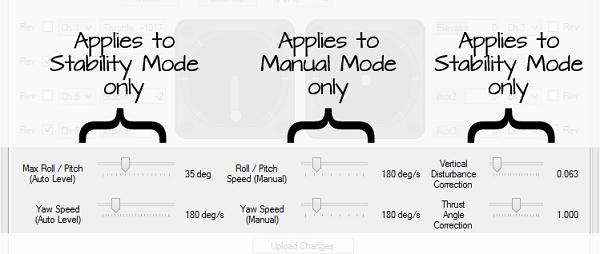
Maximum Roll/Pitch (Stability mode only)

Stability Mode limits how far the ELEV-8 v3 or multirotor will Roll or Pitch in flight. The default limit is 30 in any direction.
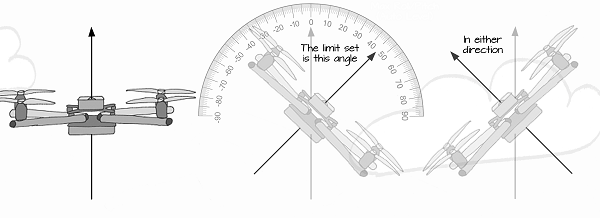
To move to the left, right, forward, or back, the multirotor has to tip in the direction you want it to move. If the multirotor cannot tip as far, it cannot travel there as fast.

If you decrease this value, the multirotor can not travel right, left, forward, or back as fast. If you increase the limit to a high angle, the multirotor can tip further and therefore travel faster. If you allow the multirotor to tip too far, it will not be able to maintain enough lift, and it will begin falling during fast right, left, forward, or backward maneuvers.

To change the Maximum Roll/Pitch:

  • Use your cursor to adjust the Max Roll/Pitch slider (The default Max Roll/Pitch value is 30 degrees).
  • Click the “Upload Changes” button to save your new settings.

Yaw Speed (Separate settings for each mode)
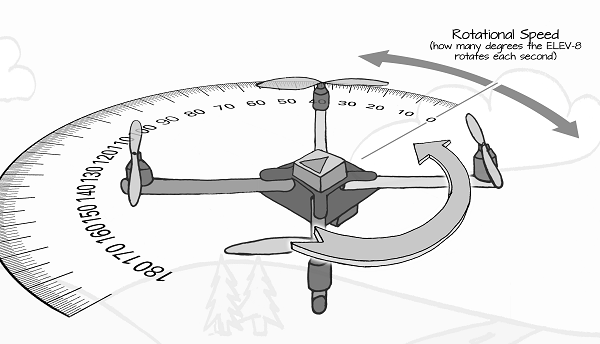
There are separate Yaw Speed settings for Stability and Manual modes. These settings determine how quickly or slowly the ELEV-8 v3 or multirotor can turn in place. If you want it to be able to turn more quickly, you can increase this setting.

The multirotor yaws by slowing down two of the motors that are spinning in one direction and speeding up the two spinning in the opposite direction. If you set this value too high, only two of the four motors are providing a significant amount of lift during the yaw which can cause the multirotor to become unstable.

To change the Yaw Speed settings:

  • Use your cursor to adjust the Yaw Speed (Auto Level) slider (The default Yaw Speed (Auto-Level) value is 180 degrees/second).
  • Use your cursor to adjust the Yaw Speed (Maunal) slider (The default Yaw Speed (Maunal) value is 180 degrees/second).
  • Click the “Upload Changes” button to save your new settings.

Roll/Pitch Speed (Manual mode only)

In Manual mode, there is no limit to how far the ELEV-8 v3 or multirotor can be tipped. This means that you (in theory) can do flips* or barrel rolls* in Manual Mode. 

*When flying in Manual Mode, there is no lift available during the upside down part of a roll or flip – if the throttle is up, it is actually accelerating toward the ground!  Only attempt these types of maneuvers if you are an experienced operator.

This setting determines how quickly or slowly the ELEV-8 v3 or multirotor rolls or pitches – a setting of 180 deg/s (degrees per second) means that it will take one second to invert and another second to come all the way around.

To change the Roll/Pitch Speed:

  • Use your cursor to adjust the Roll/Pitch Speed slider (The default value is 180 degrees/second).
  • Click the “Upload Changes” button to save your new settings.

Vertical Disturbance Correction (Stability Mode only)

In Stability Mode, the ELEV-8 v3 or multirotor is using its accelerometer to stabilize its altitude. For example, if the multirotor gets a small bump of wind underneath it, the accelerometer will detect that and adjust the throttle a small amount to compensate for it.

The Vertical Disturbance Correction value is actually the filter amount used to reduce noise in the readings: lower values provide stronger filtering which will make the multirotor less responsive. Higher values can be good because the multirotor will react more quickly and hold its altitude better, but it will be subject to more noise from the accelerometer. If your motors and propellers are well balanced you can safely set this number slightly higher.

If you set this value too high, the multirotor will start pulsing the motors, which will make the motors run hotter and use more battery. You will be able to tell if this value is set too high because you will be able to hear the motors pulsing while the multirotor is flying.

To change the Vertical Disturbance Correction:

  • Use your cursor to adjust the Vertical Disturbance Correction slider (the default value is 0.063).
  • Click the “Upload Changes” button to save your new settings.

Thrust Angle Correction (Stability Mode only)
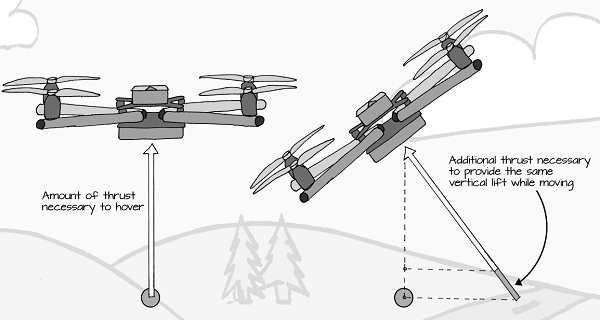
In Stability mode, the ELEV-8 v3 or multirotor calculates it angle relative to the ground and provides additional thrust to prevent the multirotor from falling when it is moving forward, backward, left or right.
The amount of additional thrust added during these maneuvers can be adjusted. Setting this adjustment to zero will provide no additional thrust during these maneuvers, and setting it to 2.000 will double the strength of the correction.

To change the Thrust Angle Correction:

  • Use your cursor to adjust the Thrust Angle Correction slider (the default value is 1.000).
  • Click the “Upload Changes” button to save your new settings.

Printer-friendly version
Flight Control Gain Adjustment
Prev
Balancing the Frame
Next

DISCUSSION FORUMS | PARALLAX INC. STORE

About | Terms of Use | Feedback: learn@parallax.com | Copyright©Parallax Inc. 2024

© 2026 Parallax Learn • Built with GeneratePress