Skip to content
Parallax Learn

Parallax Learn

  • Welcome
  • Tutorials
        • Tutorial Series head tag

          Tutorial Series
        • Tutorial Series

          The special, classroom-ready series pages are organized collections of tutorials for our most popular hardware and/or languages. The tutorials for each topic are conveniently accessible from a single page, shown in the order it is recommended that they be completed.
        • Robotics Series Head tag

          Robotics Series
        • Robotics Series

          • Artificial Intelligence
          • Cybersecurity: Radio Data tutorialCybersecurity
          • cyber:bot + Python
          • cyber:bot + MakeCode
          • Boe-Bot Tutorial SeriesBoe-Bot
          • Arduino Shield-Bot
          • ActivityBot with C TutorialsActivityBot + C
          • ActivityBot with BlocklyProp Tutorial SeriesActivityBot + BlocklyProp
          • Scribbler 3 Tutorial SeriesScribbler 3
        • Electronics & Programming Series Head tag

          Electronics & Programming Series
          • BS2 Board of Education Tutorial SeriesBS2 Board of Education
          • Propeller C-Language BasicsPropeller C Basics
          • FLiP Try-It Kit C Tutorial SeriesFLiP Try-It Kit + C
          • FLiP Try-It Kit BlocklyProp TutorialsFLiP Try-It Kit + BlocklyProp
          • Badge WX Tutorial SeriesBadge WX
          • Propeller BlocklyProp Basics and ProjectsPropeller BlocklyProp Basics
          • View All Tutorial Series »
        • Browse Tutorials
        • Browse Tutorials

          Individual tutorials sorted by robot or kit, and language.
        • By Robot or Kit
          • ActivityBot
          • SumoBot WX
          • Boe-Bot
          • Shield-Bot
          • cyber:bot
          • Badge WX
          • ELEV-8
          • ARLO
        • By Language
        • By Language

          • Propeller C
          • Arduino
          • BlocklyProp
          • PBASIC
          • Python
          • MakeCode
          • View All Tutorials »
  • Educators
  • Reference
  • Downloads
  • Home
  • All Courses
  • Calibrating and Performance-Tuning your ELEV-8 v3

Calibrating and Performance-Tuning your ELEV-8 v3

Balancing the Frame

Balancing the Frame

A basic way to optimize the performance of a multirotor, including an ELEV-8 Quadcopter, is to balance the frame, ensuring that its center of mass of the multirotor is in the exact geometric center. This will balance the workload of the motors, allowing you to get maximum power and performance out of your multirotor. 

PRO TIP: Do this activity before doing any roll and pitch correction.
First, balance the frame without any batteries. Then, place the battery in a position that you think will maintain the balance, and repeat the procedure to check it again.

  • First, find two identical narrow but stable objects that have a flat bottom and top, and are about 4 to 10 inches (10 to 25 cm) tall. 
  • Set the two objects on a flat surface about 12 to 14 inches (30 to 36 cm) apart, on center.
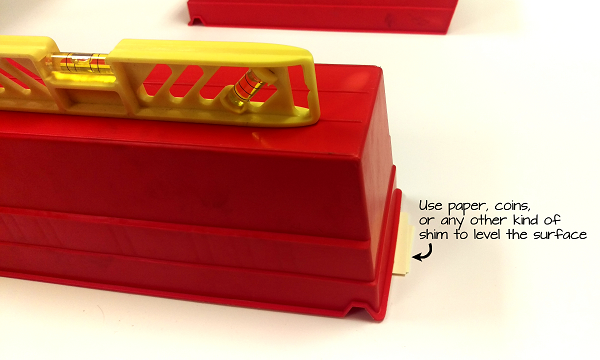
  • Use a level to make sure the surfaces are not tilted or angled.  You may need to use paper or coins to make the object level:
 

  • Flip the quadcopter upside-down and balance two booms on the objects, as shown in the picture below.

You will likely see it tilt until one of the other booms rests on the table surface.  The goal is to get it to balance, so no booms are touching the table surface.
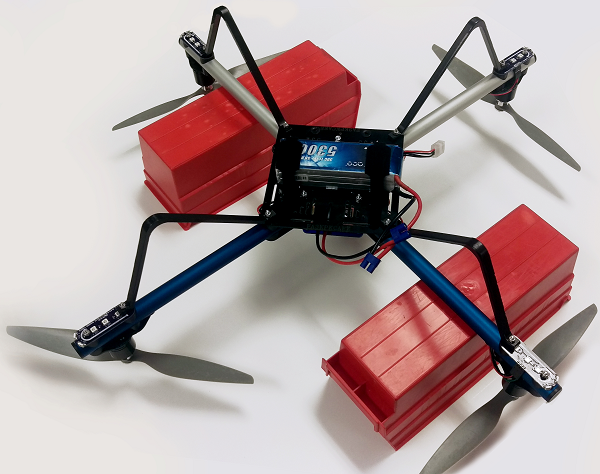
  • Shift around the components on the quadcopter, such as the receiver, ESCs, cable slack, and anything else you may have attached, until no booms touch the table when you let it tilt freely. You may need to remove the bottom chassis plate to have complete access to all components.
  • Rotate the quadcopter to balance it on the other two booms, and repeat the process.  If your quadcopter again tilts, move around components again, keeping in mind to make side-to-side adjustments since you have already balanced the other axis.  
  • Rotate the quadcopter once more, to make sure you did not undo your balancing on the first axis while making adjustments on the second.
  • Once the quadcopter is balanced on both axes, secure all of the components, including the receiver, Power Distribution Cable, and ESCs.

The same procedure applies to hexcopters and octo-copters; repeat the process across each opposing set of booms.


Printer-friendly version
Adjusting Flight Characteristics
Prev
Balancing the Propellers
Next

DISCUSSION FORUMS | PARALLAX INC. STORE

About | Terms of Use | Feedback: learn@parallax.com | Copyright©Parallax Inc. 2024

© 2026 Parallax Learn • Built with GeneratePress