
Correcting Drift
Correcting Drift – Roll and Pitch Correction
Once you have flown your ELEV-8 v3, you may have observed a drift. If you fly your ELEV-8 in very still air (no wind) and it consistently drifts to one side or forward/back (or combination of the two), you can correct the drift using the Parallax GroundStation software and achieve a very stable hover. This process does require trial-and-error and must only be done in very still air (no wind).
Do not follow this procedure unless you have:
– Properly calibrated both the accelerometer and gyroscope,
– Flown in very still air (no wind),
– The trims on your transmitter are all set to zero, AND
– Observed a consistant amount of drift in a consistant direction.
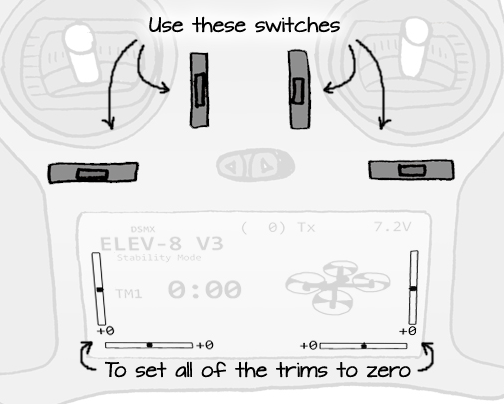
If your trims are not set to zero, be sure to set them to zero before proceeding:
It is important to determine how much drift, and in what direction, ELEV-8 v3 is drifting.
- Set up a circular reference about 20 feet (6 meters) in diameter by laying out rope or using cones.
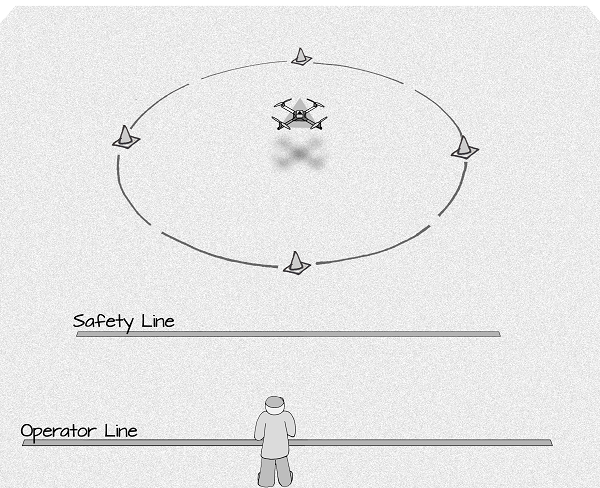
- Fly the ELEV-8 v3 about 5 ft (1.5 m) off the the ground.
- Find the “neutral throttle” and keep a level, nose-out hover.
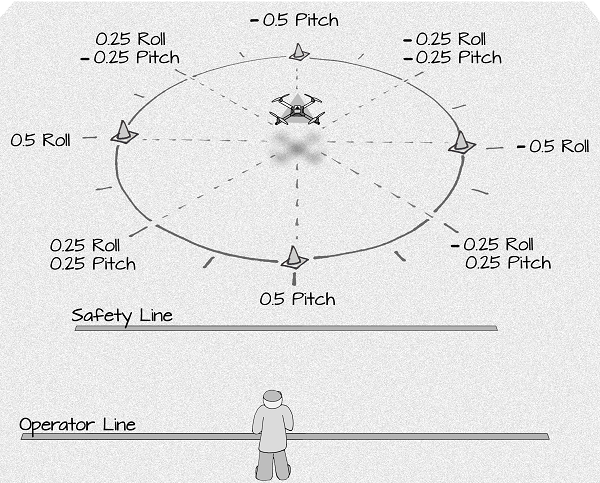
- Carefully observe where the ELEV-8 v3 exits the circle you’ve set up; this will help determine the ratio of Roll and Pitch Correction necessary to prevent drift.
If it is drifting to the left or right, it can be corrected with a Roll Angle Correction. If it is drifting forward or backward, it can be corrected with Pitch Angle Correction. If it is drifting at an angle, it will require both Roll and Pitch Correction. The corrections can be positive or negative:
- To begin the Roll and Pitch Correction, connect your ELEV-8 v3 to your computer and open the GroundStation software.
- Verifty that the ELEV-8 v3 is conected, and click on the “Accel Calibration” Tab.
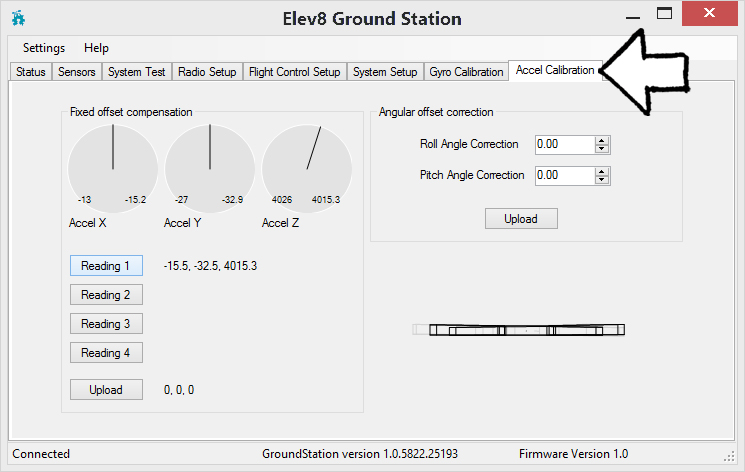
- Based on the direction of the drift, make a small initial change (no more than 0.50 degrees) to the Roll and/or Pitch Corrections, and click “Upload”.
- Repeat the test flight from earlier to determine if your ELEV-8 v3 needs additional correction, if drift has been corrected, or of the initial change you made was too large. It shouldn’t be necessary to correct more than a degree or two.
- If your ELEV-8 v3 requires more than 2 degrees of correction, it may need to be machanically balanced – try shifting the battery to better center the weight of the ELEV-8 v3.
- Repeating the process several times will help you dial in the exact amount of Roll and Pitch correction necessary to stabilze your ELEV-8 v3.