Skip to content
Parallax Learn

Parallax Learn

  • Welcome
  • Tutorials
        • Tutorial Series head tag

          Tutorial Series
        • Tutorial Series

          The special, classroom-ready series pages are organized collections of tutorials for our most popular hardware and/or languages. The tutorials for each topic are conveniently accessible from a single page, shown in the order it is recommended that they be completed.
        • Robotics Series Head tag

          Robotics Series
        • Robotics Series

          • Artificial Intelligence
          • Cybersecurity: Radio Data tutorialCybersecurity
          • cyber:bot + Python
          • cyber:bot + MakeCode
          • Boe-Bot Tutorial SeriesBoe-Bot
          • Arduino Shield-Bot
          • ActivityBot with C TutorialsActivityBot + C
          • ActivityBot with BlocklyProp Tutorial SeriesActivityBot + BlocklyProp
          • Scribbler 3 Tutorial SeriesScribbler 3
        • Electronics & Programming Series Head tag

          Electronics & Programming Series
          • BS2 Board of Education Tutorial SeriesBS2 Board of Education
          • Propeller C-Language BasicsPropeller C Basics
          • FLiP Try-It Kit C Tutorial SeriesFLiP Try-It Kit + C
          • FLiP Try-It Kit BlocklyProp TutorialsFLiP Try-It Kit + BlocklyProp
          • Badge WX Tutorial SeriesBadge WX
          • Propeller BlocklyProp Basics and ProjectsPropeller BlocklyProp Basics
          • View All Tutorial Series »
        • Browse Tutorials
        • Browse Tutorials

          Individual tutorials sorted by robot or kit, and language.
        • By Robot or Kit
          • ActivityBot
          • SumoBot WX
          • Boe-Bot
          • Shield-Bot
          • cyber:bot
          • Badge WX
          • ELEV-8
          • ARLO
        • By Language
        • By Language

          • Propeller C
          • Arduino
          • BlocklyProp
          • PBASIC
          • Python
          • MakeCode
          • View All Tutorials »
  • Educators
  • Reference
  • Downloads
  • Home
  • All Courses
  • Calibrating and Performance-Tuning your ELEV-8 v3

Calibrating and Performance-Tuning your ELEV-8 v3

Gyroscope Calibration

Gyroscope Calibration

The Flight Controller firmware comes with a set of default constants for the gyroscope sensor to use. By following this procedure, you will gently warm your ELEV-8 Flight Controller (or simply let it sit for a while). When completed, the GroundStation software uploads constants to the Flight Controller’s EEPROM.  Then, the firmware will use these constants, specific to your very own ELEV-8 Flight Controller, instead of the defaults while flying. This will improve overall flight performance. 

Reloading the ELEV-8 Flight Controller firmware will not over-write the calibration settings you create with this procedure. To completely erase these (caution – and all!) calibration settings, see the Factory Default option under the System Setup tab.

  • Connect your ELEV-8 v3 to your computer, open the GroundStation, and make sure that your ELEV-8 v3 is shown as connected.
  • In the Ground Station software, click on the “Gyro Calibration” Tab. You will see this screen: 
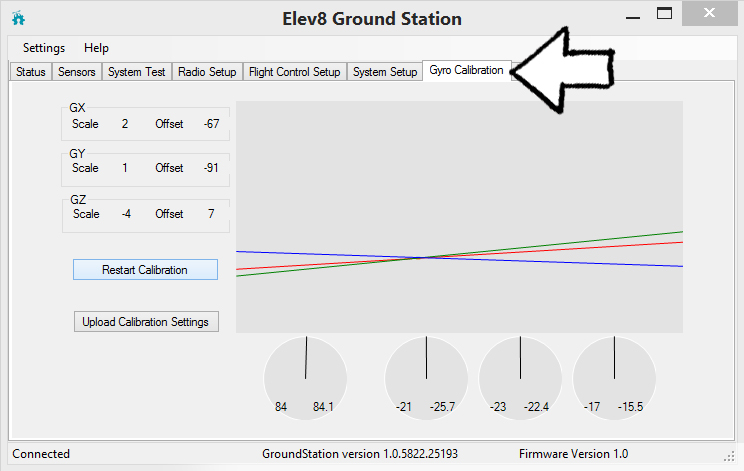
To properly calibrate the ELEV-8 Flight Controller gyroscope, you will need a hair dryer or other source of gentle warm air. If you do not have access to a hair dryer, you can simply leave the ELEV-8 v3 still for a long period of time (5-15 minutes).

It is important for the ELEV-8 to remain absolutely still during calibration – slamming doors or someone walking around and shaking the floor can create enough vibration to throw off the calibration.

  • With the ELEV-8 v3 stationary, click the “Restart Calibration” button.
  • Hold the hairdryer at least 18 inches (50 cm) away from the flight controller.
  • Use the hairdryer to blow warm air at the flight controller for a few seconds to warm it up. You don’t need to heat it a lot, so 5-10 seconds of warm air is enough.

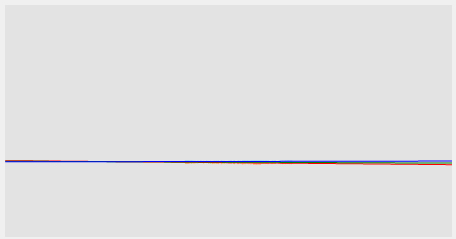
The gyro readings should plot a line and the offset and scale values will mostly stabilize. If you do not have a hair dryer or heat gun, leave the ELEV-8 v3 still for a long period of time to stabilize the gyro readings. When they are stable, the graph will look similar to this:
  • Once the readings are stable, click the “Upload Calibration Settings” button to set the gyro calibration data.

The ELEV-8 Flight Controller will beep to let you know the settings have been saved.


Printer-friendly version
Accelerometer Calibration
Next

DISCUSSION FORUMS | PARALLAX INC. STORE

About | Terms of Use | Feedback: learn@parallax.com | Copyright©Parallax Inc. 2024

© 2026 Parallax Learn • Built with GeneratePress