Skip to content
Parallax Learn

Parallax Learn

  • Welcome
  • Tutorials
        • Tutorial Series head tag

          Tutorial Series
        • Tutorial Series

          The special, classroom-ready series pages are organized collections of tutorials for our most popular hardware and/or languages. The tutorials for each topic are conveniently accessible from a single page, shown in the order it is recommended that they be completed.
        • Robotics Series Head tag

          Robotics Series
        • Robotics Series

          • Artificial Intelligence
          • Cybersecurity: Radio Data tutorialCybersecurity
          • cyber:bot + Python
          • cyber:bot + MakeCode
          • Boe-Bot Tutorial SeriesBoe-Bot
          • Arduino Shield-Bot
          • ActivityBot with C TutorialsActivityBot + C
          • ActivityBot with BlocklyProp Tutorial SeriesActivityBot + BlocklyProp
          • Scribbler 3 Tutorial SeriesScribbler 3
        • Electronics & Programming Series Head tag

          Electronics & Programming Series
          • BS2 Board of Education Tutorial SeriesBS2 Board of Education
          • Propeller C-Language BasicsPropeller C Basics
          • FLiP Try-It Kit C Tutorial SeriesFLiP Try-It Kit + C
          • FLiP Try-It Kit BlocklyProp TutorialsFLiP Try-It Kit + BlocklyProp
          • Badge WX Tutorial SeriesBadge WX
          • Propeller BlocklyProp Basics and ProjectsPropeller BlocklyProp Basics
          • View All Tutorial Series »
        • Browse Tutorials
        • Browse Tutorials

          Individual tutorials sorted by robot or kit, and language.
        • By Robot or Kit
          • ActivityBot
          • SumoBot WX
          • Boe-Bot
          • Shield-Bot
          • cyber:bot
          • Badge WX
          • ELEV-8
          • ARLO
        • By Language
        • By Language

          • Propeller C
          • Arduino
          • BlocklyProp
          • PBASIC
          • Python
          • MakeCode
          • View All Tutorials »
  • Educators
  • Reference
  • Downloads
  • Home
  • All Courses
  • Candy Sorter BlocklyProp Project

Candy Sorter BlocklyProp Project

Build the Candy Sorter

Candy Sorter Parts List

  • (1) Propeller Activity Board WX*
  • (1) ColorPAL Color Sensor*
  • (1) 3-pin F-F extension cable*
  • (2) Parallax Standard Servos**
  • (1) 5-cell AA Battery Pack*
  • (5) AA batteries
  • Heavy-duty corrugated cardboard
  • Box knife
  • Hot glue gun & glue, or very strong tape
  • Small bright candies such as Skittles or M&M’s
  • Paper cups

*Items are in the BlocklyProp Starter Kit. ** The BlocklyProp Starter Kit has just one servo, get another servo here.

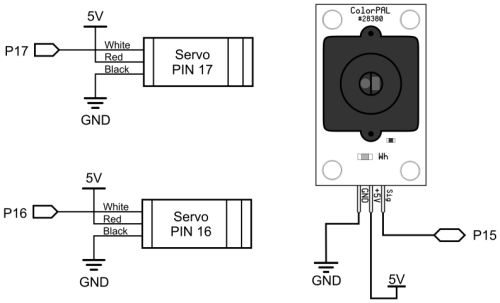
Propeller I/O Pin Connections

  • P15 ColorPal Sensor
  • P16 – Parallax Standard Servo controlling bottom chute
  • P17 – Parallax Standard Servo lifting sensor in top chute
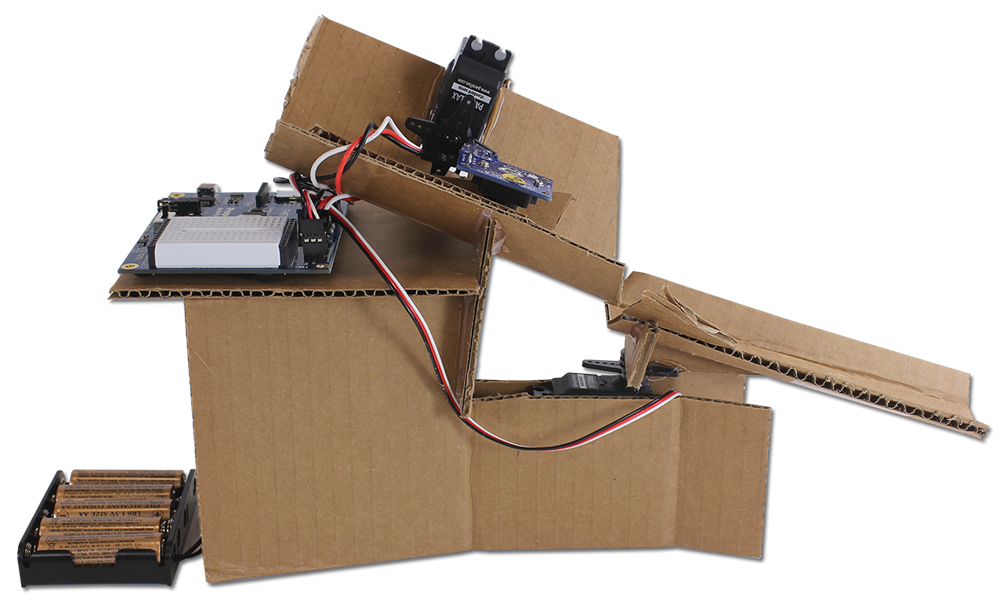
  • With cardboard, hot glue, and your own ingenuity, build the base structure, with angled top and bottom chutes angled to let the candies slide freely.  The image below is a guide, but there are many possible solutions.
  • Remove the servo horn from the top servo, glue the ColorPAL sensor to it, and then re-attach the horn.  
  • Make sure the jumpers are set to 5V between the servo port pins on the Propeller Activity Board WX.
  • Connect the servos, ColorPAL sensor, and battery pack to the Propeller Activity Board. Then plug the Activity Board into your computer’s USB port.

CAUTION! Don’t try to run this project off of your computer’s USB power alone – use the battery pack too.  The servos can take quite a bit of current when they move, and may exceed the amount of current that your USB port can supply.


Printer-friendly version
Program and Tune the Candy Sorter
Next

DISCUSSION FORUMS | PARALLAX INC. STORE

About | Terms of Use | Feedback: learn@parallax.com | Copyright©Parallax Inc. 2024

© 2026 Parallax Learn • Built with GeneratePress