Skip to content
Parallax Learn

Parallax Learn

  • Welcome
  • Tutorials
        • Tutorial Series head tag

          Tutorial Series
        • Tutorial Series

          The special, classroom-ready series pages are organized collections of tutorials for our most popular hardware and/or languages. The tutorials for each topic are conveniently accessible from a single page, shown in the order it is recommended that they be completed.
        • Robotics Series Head tag

          Robotics Series
        • Robotics Series

          • Artificial Intelligence
          • Cybersecurity: Radio Data tutorialCybersecurity
          • cyber:bot + Python
          • cyber:bot + MakeCode
          • Boe-Bot Tutorial SeriesBoe-Bot
          • Arduino Shield-Bot
          • ActivityBot with C TutorialsActivityBot + C
          • ActivityBot with BlocklyProp Tutorial SeriesActivityBot + BlocklyProp
          • Scribbler 3 Tutorial SeriesScribbler 3
        • Electronics & Programming Series Head tag

          Electronics & Programming Series
          • BS2 Board of Education Tutorial SeriesBS2 Board of Education
          • Propeller C-Language BasicsPropeller C Basics
          • FLiP Try-It Kit C Tutorial SeriesFLiP Try-It Kit + C
          • FLiP Try-It Kit BlocklyProp TutorialsFLiP Try-It Kit + BlocklyProp
          • Badge WX Tutorial SeriesBadge WX
          • Propeller BlocklyProp Basics and ProjectsPropeller BlocklyProp Basics
          • View All Tutorial Series »
        • Browse Tutorials
        • Browse Tutorials

          Individual tutorials sorted by robot or kit, and language.
        • By Robot or Kit
          • ActivityBot
          • SumoBot WX
          • Boe-Bot
          • Shield-Bot
          • cyber:bot
          • Badge WX
          • ELEV-8
          • ARLO
        • By Language
        • By Language

          • Propeller C
          • Arduino
          • BlocklyProp
          • PBASIC
          • Python
          • MakeCode
          • View All Tutorials »
  • Educators
  • Reference
  • Downloads
  • Home
  • All Courses

Capacitive Touch Pong Game

Curriculum

  • 1 Section
  • 2 Lessons
  • Lifetime
Expand all sectionsCollapse all sections
  • Capacitive Touch Pong Game
    2
    • 1.0
      Calibration and Programming
    • 1.1
      Modify the Game

Modify the Game

How it Works

Capacitive touch sensing allows detection of human interaction with the circuit without requiring physical touch. The circuit provides some level of detection up to almost a foot away. This detection is accomplished using a modified resistor/capacitor circuit with a single 10 MOhm resistor between two Propeller I/O pins.

The aluminum foil and your body make up the two plates of the capacitor. (Your body also provides some additional resistance and a pseudo ground connection.) The amount of time it takes for the circuit to discharge from a high to a low logic level varies with your proximity to the aluminum foil. But this circuit and code have a twist – we’re using PWM to set a logic level halfway between the Propeller’s high and low values.


Did You Know?

The Pong game is one of the earliest arcade-style video games, originally released in 1972 by Atari. It’s a simple, two-dimensional game in which a player uses a paddle to knock a ball off adjacent walls. Pong has a long history with many adaptations for a variety of hardware consoles and platforms. It is among the simplest games to code.

Wikipedia hosts a complete summary of Pong if you’re interested in the full history.


Try This

Change the difficulty of the game and add sound effects with a piezo speaker. Test the following:

  • There are variables for paddleWidth along with ballSpeedX and ballSpeedY. Increase or decrease these values to change how difficult the game is. For example, a shorter paddle width combined with quicker ball speed will provide more of a challenge.


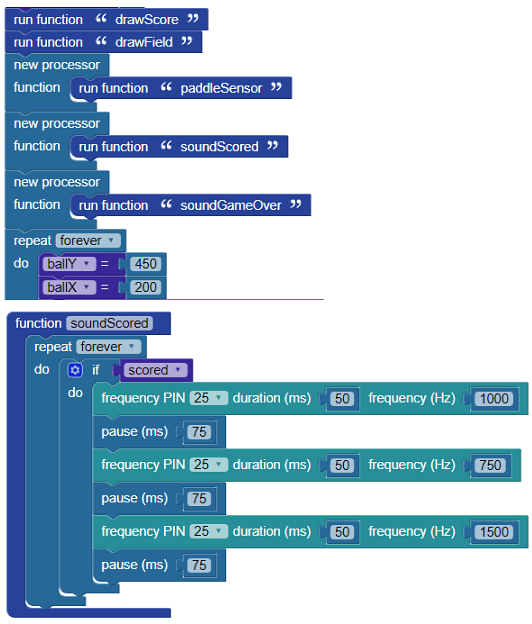
  • Add a small sound or series of sounds that play when the score increments, or when the ball count goes down and when the player scores a point.
    • For example, add two new processor blocks with the sound functions inside, then add them to the beginning of the main program. Below are examples of a set of sounds that play from each function “soundGameOver” and “soundScored.”


Your Turn

Try modifying your program to change the colors of the game.  Do the colors of the paddle, ball, and walls have an effect on gameplay? Is it easier to see the ball, and therefore more likely to hit it, if it is colored differently from the paddle? What if all game components are the same hue?


Printer-friendly version
Calibration and Programming
Prev

DISCUSSION FORUMS | PARALLAX INC. STORE

About | Terms of Use | Feedback: learn@parallax.com | Copyright©Parallax Inc. 2024

© 2026 Parallax Learn • Built with GeneratePress