Skip to content
Parallax Learn

Parallax Learn

  • Welcome
  • Tutorials
        • Tutorial Series head tag

          Tutorial Series
        • Tutorial Series

          The special, classroom-ready series pages are organized collections of tutorials for our most popular hardware and/or languages. The tutorials for each topic are conveniently accessible from a single page, shown in the order it is recommended that they be completed.
        • Robotics Series Head tag

          Robotics Series
        • Robotics Series

          • Artificial Intelligence
          • Cybersecurity: Radio Data tutorialCybersecurity
          • cyber:bot + Python
          • cyber:bot + MakeCode
          • Boe-Bot Tutorial SeriesBoe-Bot
          • Arduino Shield-Bot
          • ActivityBot with C TutorialsActivityBot + C
          • ActivityBot with BlocklyProp Tutorial SeriesActivityBot + BlocklyProp
          • Scribbler 3 Tutorial SeriesScribbler 3
        • Electronics & Programming Series Head tag

          Electronics & Programming Series
          • BS2 Board of Education Tutorial SeriesBS2 Board of Education
          • Propeller C-Language BasicsPropeller C Basics
          • FLiP Try-It Kit C Tutorial SeriesFLiP Try-It Kit + C
          • FLiP Try-It Kit BlocklyProp TutorialsFLiP Try-It Kit + BlocklyProp
          • Badge WX Tutorial SeriesBadge WX
          • Propeller BlocklyProp Basics and ProjectsPropeller BlocklyProp Basics
          • View All Tutorial Series »
        • Browse Tutorials
        • Browse Tutorials

          Individual tutorials sorted by robot or kit, and language.
        • By Robot or Kit
          • ActivityBot
          • SumoBot WX
          • Boe-Bot
          • Shield-Bot
          • cyber:bot
          • Badge WX
          • ELEV-8
          • ARLO
        • By Language
        • By Language

          • Propeller C
          • Arduino
          • BlocklyProp
          • PBASIC
          • Python
          • MakeCode
          • View All Tutorials »
  • Educators
  • Reference
  • Downloads
  • Home
  • All Courses

Connect a Coin Acceptor to Your Propeller Project

Curriculum

  • 1 Section
  • 2 Lessons
  • Lifetime
Expand all sectionsCollapse all sections
  • Connect a Coin Acceptor to Your Propeller Project
    2
    • 1.0
      Circuit Design
    • 1.1
      Setup, Sampling, and Programming

Circuit Design

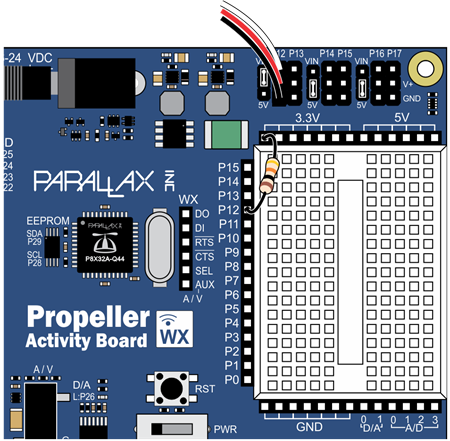
Connections differ depending on the Propeller board you choose to work with. The first set of instructions are for the Activity Board or Activity Board WX. The second set of instructions are for the Propeller FLiP on a breadboard.

Building the Circuit (Propeller Activity Board/Activity Board WX)

  • Modify one end of the 3 pin cable:
    • Use a tool with a fine point to carefully lift each of the tabs on the connector:
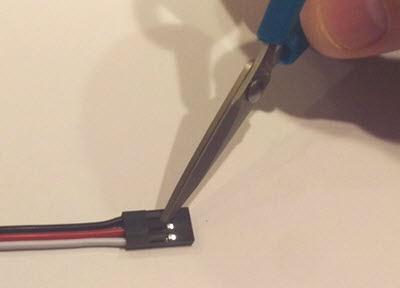
    • Pull out the wires
    • Arrange the wires so they are ordered RED-WHITE-BLACK and re-insert them into the connector end:
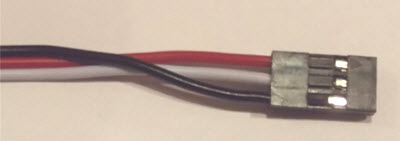
    • Make sure the wires make the following connections when plugged into the coin acceptor:
      • RED -> DC12V
      • WHITE -> COIN
      • BLACK -> GND
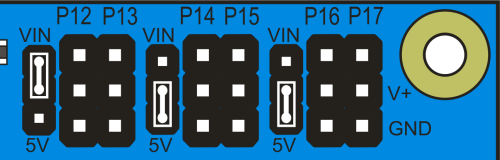
  • Make sure the P12-13 shunt jumper is moved from the 5V to the VIN position:
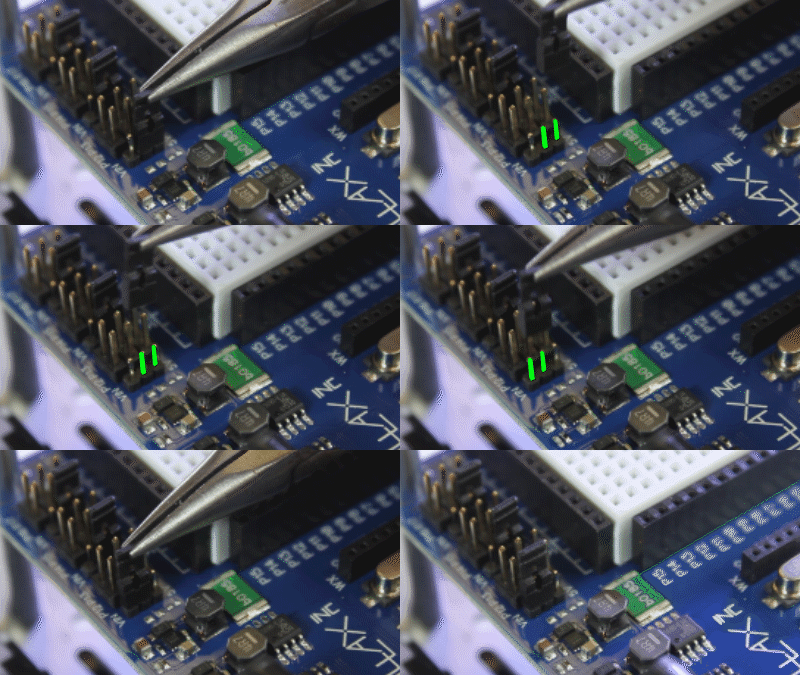
  • Connect the other (unmodified) end of the 3-pin cable to the P12 header.
  • Connect a 10 kOhm resistor between P12 and 3.3V.
 

Building the Circuit (Propeller FLiP)

  • Modify one end of the 3 pin cable :
    • Use a tool with a fine point to carefully lift each of the tabs on the connector:
    • Pull out the wires.
    • Arrange the wires so they are ordered RED-WHITE-BLACK.
    • Make sure the wires make the following connections when plugged into the coin acceptor:
      • RED -> DC12V
      • WHITE -> COIN
      • BLACK -> GND
  • Follow the diagram below to make the connections on the breadboard:
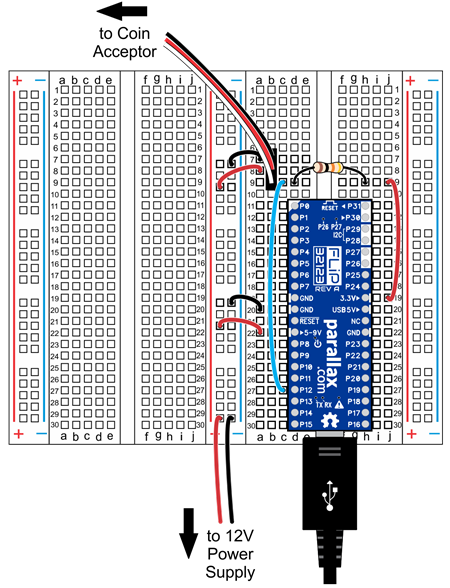
REMEMBER: The 12V supply can be connected to the (→5-9VIN pin) on the FLiP – however be aware that because the input voltage is above 9 volts, if the FLiP module’s power connections are shorted, the FLiP will get VERY HOT.


Printer-friendly version
Setup, Sampling, and Programming
Next

DISCUSSION FORUMS | PARALLAX INC. STORE

About | Terms of Use | Feedback: learn@parallax.com | Copyright©Parallax Inc. 2024

© 2026 Parallax Learn • Built with GeneratePress