
Drive your cyber:bot with the Remote
With the next program, use buttons 1-9 to drive the robot in different directions. Once you press a button, your robot will drive in that direction until you choose another direction. Press 5 to make it stop.
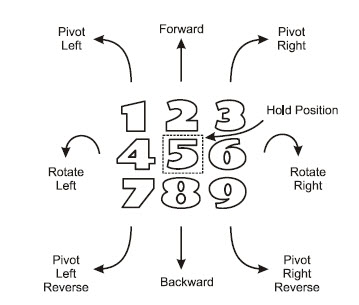
- Change the project’s name from ir_remote_test to ir_remote_control.
- Enter the script below, and then click Save.
- Click Send to micro:bit.
- Unplug the USB cable from the cyber:bot.
- Set the cyber:bot on the floor, and set the cyber:bot board’s PWR switch to 2.
- Point the remote at the IR receiver on the board, and press numbers on the remote to make it drive. Press 5 to make it stop.
# ir_remote_control

from cyberbot import *
from tv_remote import *

wL = 0
wR = 0
img = Image.HAPPY

bot(22).tone(2000, 300)

while True:
    num = ir(10).remote()

    if num == 1:
        wL = 0
        wR = -75
        img = Image.ARROW_SE
    elif num == 2:
        wL = 75
        wR = -75
        img = Image.ARROW_S
    elif num == 3:
        wL=75
        wR=0
        img=Image.ARROW_SW
    elif num == 4:
        wL=-75
        wR=-75
        img=Image.ARROW_E
    elif num == 5:
        wL=0
        wR=0
        img=Image.HAPPY
    elif num == 6:
        wL=75
        wR=75
        img=Image.ARROW_W
    elif num == 7:
        wL=0
        wR=75
        img=Image.ARROW_NE
    elif num == 8:
        wL=-75
        wR=75
        img=Image.ARROW_N
    elif num == 9:
        wL=-75
        wR=0
        img=Image.ARROW_NW

    display.show(img)
    bot(18).servo_speed(wL)
    bot(19).servo_speed(wR)