Strengthen Your Cipher with Substitution
At the end of the Cybersecurity: Encryption Intro tutorial, there’s a Your Turn in the Substitution Ciphers page where you created a scrambled_alphabet_cipher script. This kind of function is a much better defense against brute force attacks. Instead of testing 93 possible shifts, a brute force attack would have to try decrypting with 26! permutations of the alphabet. The term 26! is pronounced 26 factorial.
3! = 3 * 2 * 1 = 6
4! = 4 * 3 * 2 * 1 = 24
5! = 5 * 4 * 3 * 2 * 1 = 120
…
26! = 403,291,461,126,605,635,584,000,000
Wow! That would be a lot of rearrangements of the alphabet for a brute force algorithm to crack. Also, who would try to look at all those combinations to find the intelligible text?
Example script: scrambled_alphabet_cipher
- Enter, name, save, and flash scrambled_alphabet_cipher into a micro:bit.
# scrambled_alphabet_cipher

from microbit import *

# Scrambled alphabet cipher.
def scramble(text, encrypt):
    alpha  = "ABCDEFGHIJKLMNOPQRSTUVWXYZ"
    crypta = "PTQGMKCRSVEXADZBJFOWYNIHLU"
    result = "

    if encrypt is False:
        temp = alpha
        alpha = crypta
        crypta = temp

    for letter in text:
        letter = letter.upper()
        index = alpha.find(letter)
        result = result + crypta[index]

    return result

# The script starts executing statements from here.

sleep(1000)

print("Set your keyboard to CAPS LOCK.")
print()

while True:
    text = input("Enter a CAPS LOCK string: ")

    result = scramble(text, True)

    print("scrambled result =", result)

    result =  scramble(result, False)

    print("unscrambled result =", result)
- If the serial monitor isn’t already open, click the Show serial.
- Either press CAPS LOCK, or hold the SHIFT key as you type.
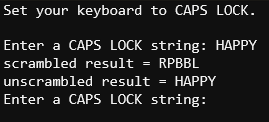
- Type HAPPY into the terminal.
- Verify that the scrambled result is RPBBL. That’s the encrypted result.
- Verify that the unscrambled, decrypted result is HAPPY.