Skip to content
Parallax Learn

Parallax Learn

  • Welcome
  • Tutorials
        • Tutorial Series head tag

          Tutorial Series
        • Tutorial Series

          The special, classroom-ready series pages are organized collections of tutorials for our most popular hardware and/or languages. The tutorials for each topic are conveniently accessible from a single page, shown in the order it is recommended that they be completed.
        • Robotics Series Head tag

          Robotics Series
        • Robotics Series

          • Artificial Intelligence
          • Cybersecurity: Radio Data tutorialCybersecurity
          • cyber:bot + Python
          • cyber:bot + MakeCode
          • Boe-Bot Tutorial SeriesBoe-Bot
          • Arduino Shield-Bot
          • ActivityBot with C TutorialsActivityBot + C
          • ActivityBot with BlocklyProp Tutorial SeriesActivityBot + BlocklyProp
          • Scribbler 3 Tutorial SeriesScribbler 3
        • Electronics & Programming Series Head tag

          Electronics & Programming Series
          • BS2 Board of Education Tutorial SeriesBS2 Board of Education
          • Propeller C-Language BasicsPropeller C Basics
          • FLiP Try-It Kit C Tutorial SeriesFLiP Try-It Kit + C
          • FLiP Try-It Kit BlocklyProp TutorialsFLiP Try-It Kit + BlocklyProp
          • Badge WX Tutorial SeriesBadge WX
          • Propeller BlocklyProp Basics and ProjectsPropeller BlocklyProp Basics
          • View All Tutorial Series »
        • Browse Tutorials
        • Browse Tutorials

          Individual tutorials sorted by robot or kit, and language.
        • By Robot or Kit
          • ActivityBot
          • SumoBot WX
          • Boe-Bot
          • Shield-Bot
          • cyber:bot
          • Badge WX
          • ELEV-8
          • ARLO
        • By Language
        • By Language

          • Propeller C
          • Arduino
          • BlocklyProp
          • PBASIC
          • Python
          • MakeCode
          • View All Tutorials »
  • Educators
  • Reference
  • Downloads
  • Home
  • All Courses

Cybersecurity: Malformed Packet Attacks & Defenses

Curriculum

  • 1 Section
  • 12 Lessons
  • Lifetime
Expand all sectionsCollapse all sections
  • Cybersecurity: Malformed Packet Attacks & Defenses
    12
    • 1.0
      Malformed Packets and the Countdown Timer
    • 1.1
      Sender & Receiver Tests
    • 1.2
      Try This: Add Exception Handling
    • 1.3
      Your Turn: Add a Vulnerability
    • 1.4
      Malformed Packets and Sharing Something
    • 1.5
      Test the Script
    • 1.6
      Try This: Prevent Freezing
    • 1.7
      Your Turn: Exception Handling plus Encryption
    • 1.8
      Malformed Packets and Keyboard cyber:bot Control
    • 1.9
      Test the Radio Connection to the cyber:bot
    • 1.10
      Try This: Add Exception Handling
    • 1.11
      Your Turn: Add Encryption

Your Turn: Add Encryption

Did You Know: Again, Stronger Together

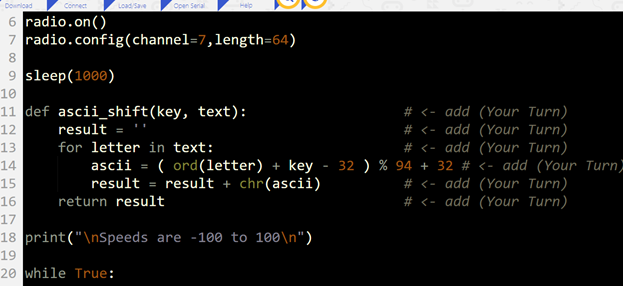
As mentioned earlier, devices on a network need both encryption AND protection from malformed packets.  This does not normally take many lines of code.  Like the earlier example, both Sender and Receiver scripts need the encrypt/decrypt function (ascii_shift in our example).  

def ascii_shift(key, text):
    result = ''
    for letter in text:
        ascii = ( ord(letter) + key - 32 ) % 94 + 32
        result = result + chr(ascii)
    return result

The Sender script also needs to encrypt the packet before sending:

        packet = ascii_shift(17, packet)

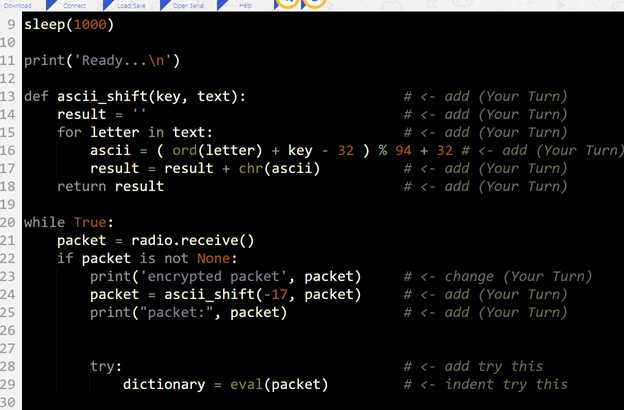
…and the Receiver needs to decrypt the packet after receiving:

        packet = ascii_shift(-17, packet)


In Python for computers (as opposed to MicroPython for the micro:bit), an encryption/decryption module would be imported.  Instead of adding a comparatively weak encryption function, you’d import a module like PyCryptodome, Cryptography, or PyNaCl and use its stronger cryptography methods to encrypt and decrypt.

Your Turn: Add Encryption

The last task in hardening the keyboard-controlled cyber:bot is to implement both encryption and exception handling.

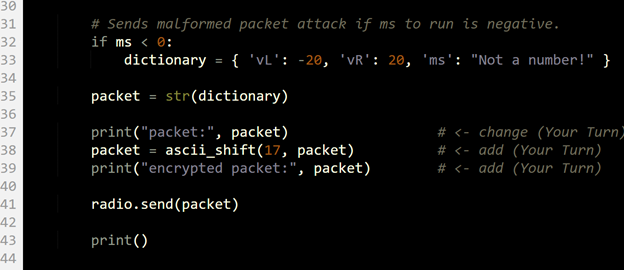
  • Modify the sender and receiver scripts using the comments tagged (Your Turn) in the images below as a guide.
  • Name and save your modified sender and receiver scripts.
  • Repeat the tests yet again, this time to verify that the application still works and is still immune to malformed packets.
  • Examine the transmitter and receiver micro:bit serial monitors, and verify that the encryption and decryption are happening as planned.


Sender Script Modifications
 

Receiver Script Modifications


Printer-friendly version
Try This: Add Exception Handling
Prev

DISCUSSION FORUMS | PARALLAX INC. STORE

About | Terms of Use | Feedback: learn@parallax.com | Copyright©Parallax Inc. 2024

© 2026 Parallax Learn • Built with GeneratePress