Skip to content
Parallax Learn

Parallax Learn

  • Welcome
  • Tutorials
        • Tutorial Series head tag

          Tutorial Series
        • Tutorial Series

          The special, classroom-ready series pages are organized collections of tutorials for our most popular hardware and/or languages. The tutorials for each topic are conveniently accessible from a single page, shown in the order it is recommended that they be completed.
        • Robotics Series Head tag

          Robotics Series
        • Robotics Series

          • Artificial Intelligence
          • Cybersecurity: Radio Data tutorialCybersecurity
          • cyber:bot + Python
          • cyber:bot + MakeCode
          • Boe-Bot Tutorial SeriesBoe-Bot
          • Arduino Shield-Bot
          • ActivityBot with C TutorialsActivityBot + C
          • ActivityBot with BlocklyProp Tutorial SeriesActivityBot + BlocklyProp
          • Scribbler 3 Tutorial SeriesScribbler 3
        • Electronics & Programming Series Head tag

          Electronics & Programming Series
          • BS2 Board of Education Tutorial SeriesBS2 Board of Education
          • Propeller C-Language BasicsPropeller C Basics
          • FLiP Try-It Kit C Tutorial SeriesFLiP Try-It Kit + C
          • FLiP Try-It Kit BlocklyProp TutorialsFLiP Try-It Kit + BlocklyProp
          • Badge WX Tutorial SeriesBadge WX
          • Propeller BlocklyProp Basics and ProjectsPropeller BlocklyProp Basics
          • View All Tutorial Series »
        • Browse Tutorials
        • Browse Tutorials

          Individual tutorials sorted by robot or kit, and language.
        • By Robot or Kit
          • ActivityBot
          • SumoBot WX
          • Boe-Bot
          • Shield-Bot
          • cyber:bot
          • Badge WX
          • ELEV-8
          • ARLO
        • By Language
        • By Language

          • Propeller C
          • Arduino
          • BlocklyProp
          • PBASIC
          • Python
          • MakeCode
          • View All Tutorials »
  • Educators
  • Reference
  • Downloads
  • Home
  • All Courses

Cybersecurity: Radio Tilt Control

Curriculum

  • 1 Section
  • 33 Lessons
  • Lifetime
Expand all sectionsCollapse all sections
  • Cybersecurity: Radio Tilt Control
    33
    • 1.0
      Measure Accelerometer Tilt
    • 1.1
      Test Tilts
    • 1.2
      A Bit About Acceleration
    • 1.3
      Inside the micro:bit Accelerometer
    • 1.4
      How the Project Works
    • 1.5
      Try This: Take X and Y Rotation Samples
    • 1.6
      Your Turn: Combine Tilt and Rotation
    • 1.7
      Measure Rotation Angles
    • 1.8
      Measuring Rotation Angles
    • 1.9
      How Measuring Rotation Angles Works
    • 1.10
      Did You Know? Trigonometry and Rotation Angles
    • 1.11
      Measure How Far from Vertical or Level
    • 1.12
      How It Works
    • 1.13
      Z-Axis: Which Way Is Up?
    • 1.14
      How it Works: Z-axis
    • 1.15
      Did You Know? This Way Up
    • 1.16
      Try This: Get Familiar Z-Axis Angle Measurements
    • 1.17
      Your Turn: All Together Now
    • 1.18
      Display Tilt Direction
    • 1.19
      Your Turn: Display Tilt Direction
    • 1.20
      Tilt Radio Tests
    • 1.21
      Radio-Transmit Tilt
    • 1.22
      Radio-Receive Tilt
    • 1.23
      How the Tilt Radio Tests Work
    • 1.24
      Tilt Control Forward & Backward
    • 1.25
      Rapid Radio-Transmit Tilt Data
    • 1.26
      Rapid Radio-Receive Tilt Plus Forward/Backward Control
    • 1.27
      Adding a Stop Range
    • 1.28
      Transmitter Displays Stop Range
    • 1.29
      Receiver Full Tilt Control & Stop Range
    • 1.30
      Add Left/Right Tilt Control
    • 1.31
      Update the Receiver cyber:bot project
    • 1.32
      How the Receiver Works

Measure Accelerometer Tilt

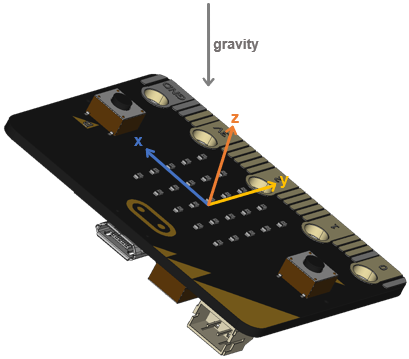
The micro:bit module’s accelerometer has three sensing axes: x, y, and z. You can picture the x-axis running side-to-side, the y-axis running front-to-back, and the z-axis pointing upwards.

When the micro:bit is held still, the accelerometer can sense how much each of these axes aligns with the downward pull of gravity. This can, in turn, be used to sense how you have tilted the micro:bit. In this activity, you will explore how the various numbers the micro:bit reports for its x and y accelerometer axes relate to its tilt direction and level.

Printer-friendly version
Test Tilts
Next

DISCUSSION FORUMS | PARALLAX INC. STORE

About | Terms of Use | Feedback: learn@parallax.com | Copyright©Parallax Inc. 2024

© 2026 Parallax Learn • Built with GeneratePress