Skip to content
Parallax Learn

Parallax Learn

  • Welcome
  • Tutorials
        • Tutorial Series head tag

          Tutorial Series
        • Tutorial Series

          The special, classroom-ready series pages are organized collections of tutorials for our most popular hardware and/or languages. The tutorials for each topic are conveniently accessible from a single page, shown in the order it is recommended that they be completed.
        • Robotics Series Head tag

          Robotics Series
        • Robotics Series

          • Artificial Intelligence
          • Cybersecurity: Radio Data tutorialCybersecurity
          • cyber:bot + Python
          • cyber:bot + MakeCode
          • Boe-Bot Tutorial SeriesBoe-Bot
          • Arduino Shield-Bot
          • ActivityBot with C TutorialsActivityBot + C
          • ActivityBot with BlocklyProp Tutorial SeriesActivityBot + BlocklyProp
          • Scribbler 3 Tutorial SeriesScribbler 3
        • Electronics & Programming Series Head tag

          Electronics & Programming Series
          • BS2 Board of Education Tutorial SeriesBS2 Board of Education
          • Propeller C-Language BasicsPropeller C Basics
          • FLiP Try-It Kit C Tutorial SeriesFLiP Try-It Kit + C
          • FLiP Try-It Kit BlocklyProp TutorialsFLiP Try-It Kit + BlocklyProp
          • Badge WX Tutorial SeriesBadge WX
          • Propeller BlocklyProp Basics and ProjectsPropeller BlocklyProp Basics
          • View All Tutorial Series »
        • Browse Tutorials
        • Browse Tutorials

          Individual tutorials sorted by robot or kit, and language.
        • By Robot or Kit
          • ActivityBot
          • SumoBot WX
          • Boe-Bot
          • Shield-Bot
          • cyber:bot
          • Badge WX
          • ELEV-8
          • ARLO
        • By Language
        • By Language

          • Propeller C
          • Arduino
          • BlocklyProp
          • PBASIC
          • Python
          • MakeCode
          • View All Tutorials »
  • Educators
  • Reference
  • Downloads
  • Home
  • All Courses

Dictionary Primer

Curriculum

  • 1 Section
  • 4 Lessons
  • Lifetime
Expand all sectionsCollapse all sections
  • Dictionary Primer
    4
    • 1.0
      About Dictionaries
    • 1.1
      Create a Dictionary
    • 1.2
      Try This: Use Keys to Change Values
    • 1.3
      Your Turn: Expand and Use the Dictionary

Try This: Use Keys to Change Values

Earlier, you used statements to add key-value pairs that were not already in the dictionary.  If a dictionary already has a given key, those statments can be used to change the value that’s paired with the key.  

  • Change project’s name from  interactive_dictionary to interactive_dictionary_try_this.
  • Add the statements below to the end of the script.
  • Save the modified script.
  • Click the Send to micro:bit button.
print("Enter game high score instead: ")
text = input("Enter high score: ")
value = int(text)

info['score'] = value

print("Updated dictionary: ")
print("info = ", info)
  • In the serial monitor, click the the right of the Enter your name: prompt.
  • To make it match the example shown here, enter the same values that you did before, and then enter 1234 when prompted to enter high score.
  • Verify that the updated dictionary that gets displayed is info = {’name’: ’Sir Lancelot’, ’score’ : 1234}.
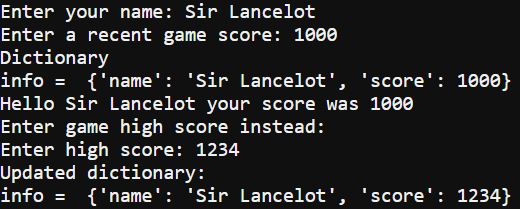
Pay close attention to the difference between the first and second time the script executes this statement:

info[’score’] = value

The first one in the script added the key-value pair ’score’ : 1000 to the info dictionary.  The second one changed that key value pair to ’score’ : 1234.


Did You Know?

This kind of dictionary isn’t alphabetical! The order that the key-value pairs are in doesn’t matter.  You will always use a key to get the value paired with it.

For example, it doesn’t matter which one of these dictionaries you use, info[’score’] still returns 1234.

info = {’name’: ’Sir Lancelot’, ’score’ : 1234}
info = {’score’ : 1234, ’name’: ’Sir Lancelot’}


Printer-friendly version
Create a Dictionary
Prev
Your Turn: Expand and Use the Dictionary
Next

DISCUSSION FORUMS | PARALLAX INC. STORE

About | Terms of Use | Feedback: learn@parallax.com | Copyright©Parallax Inc. 2024

© 2026 Parallax Learn • Built with GeneratePress