
Try This: Use Keys to Change Values
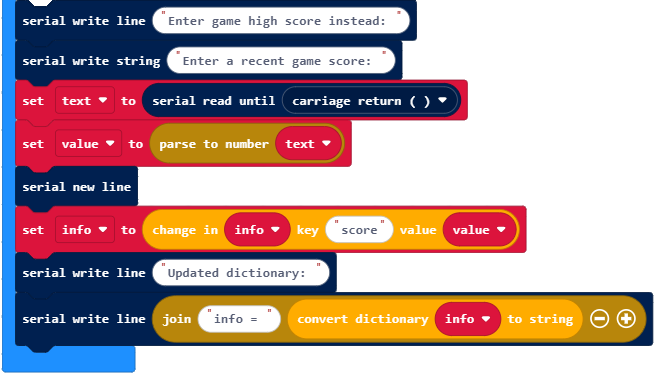
Earlier, you used blocks to add key-value pairs that were not already in the dictionary. If a dictionary already has a given key, there’s a block that can be used to change the value that’s paired with the key.
- Change the project’s name from interactive_dictionary to interactive_dictionary_try_this.
- Add the blocks below to the end of the project.
- Click the Download button.
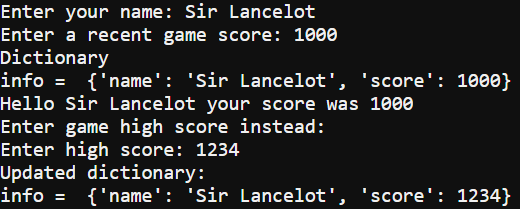
- In the serial monitor, click the the right of the Enter your name: prompt.
- To make it match the example shown here, enter the same values that you did before, and then enter 1234 when prompted to enter high score.
- Verify that the updated dictionary that gets displayed is info = {‘name’: ‘Sir Lancelot’, ‘score’: 1234}.
Did You Know?
This kind of dictionary isn’t alphabetical! The order that the key-value pairs are in doesn’t matter. You will always use a key to get the value paired with it.
For example, it doesn’t matter which one of these dictionaries you use, info[‘score’] still returns 1234.
info = {'name': 'Sir Lancelot', 'score': 1234}
info = {'score': 1234, 'name': 'Sir Lancelot'}