Skip to content
Parallax Learn

Parallax Learn

  • Welcome
  • Tutorials
        • Tutorial Series head tag

          Tutorial Series
        • Tutorial Series

          The special, classroom-ready series pages are organized collections of tutorials for our most popular hardware and/or languages. The tutorials for each topic are conveniently accessible from a single page, shown in the order it is recommended that they be completed.
        • Robotics Series Head tag

          Robotics Series
        • Robotics Series

          • Artificial Intelligence
          • Cybersecurity: Radio Data tutorialCybersecurity
          • cyber:bot + Python
          • cyber:bot + MakeCode
          • Boe-Bot Tutorial SeriesBoe-Bot
          • Arduino Shield-Bot
          • ActivityBot with C TutorialsActivityBot + C
          • ActivityBot with BlocklyProp Tutorial SeriesActivityBot + BlocklyProp
          • Scribbler 3 Tutorial SeriesScribbler 3
        • Electronics & Programming Series Head tag

          Electronics & Programming Series
          • BS2 Board of Education Tutorial SeriesBS2 Board of Education
          • Propeller C-Language BasicsPropeller C Basics
          • FLiP Try-It Kit C Tutorial SeriesFLiP Try-It Kit + C
          • FLiP Try-It Kit BlocklyProp TutorialsFLiP Try-It Kit + BlocklyProp
          • Badge WX Tutorial SeriesBadge WX
          • Propeller BlocklyProp Basics and ProjectsPropeller BlocklyProp Basics
          • View All Tutorial Series »
        • Browse Tutorials
        • Browse Tutorials

          Individual tutorials sorted by robot or kit, and language.
        • By Robot or Kit
          • ActivityBot
          • SumoBot WX
          • Boe-Bot
          • Shield-Bot
          • cyber:bot
          • Badge WX
          • ELEV-8
          • ARLO
        • By Language
        • By Language

          • Propeller C
          • Arduino
          • BlocklyProp
          • PBASIC
          • Python
          • MakeCode
          • View All Tutorials »
  • Educators
  • Reference
  • Downloads
  • Home
  • All Courses

Get Started with the HUSKYLENS on your cyber:bot (Python)

Curriculum

  • 1 Section
  • 5 Lessons
  • Lifetime
Expand all sectionsCollapse all sections
  • HUSKYLENS Setup & Testing
    5
    • 1.0
      Build it: Attach the HUSKYLENS (Python)
    • 1.1
      Wire it: Connect with I²C (Python)
    • 1.2
      Set it up: Add husklens Python Module
    • 1.3
      Code it: Create a Test Script (Python)
    • 1.4
      Test it: Can it Recognize a Color? (Python)

Wire it: Connect with I²C (Python)

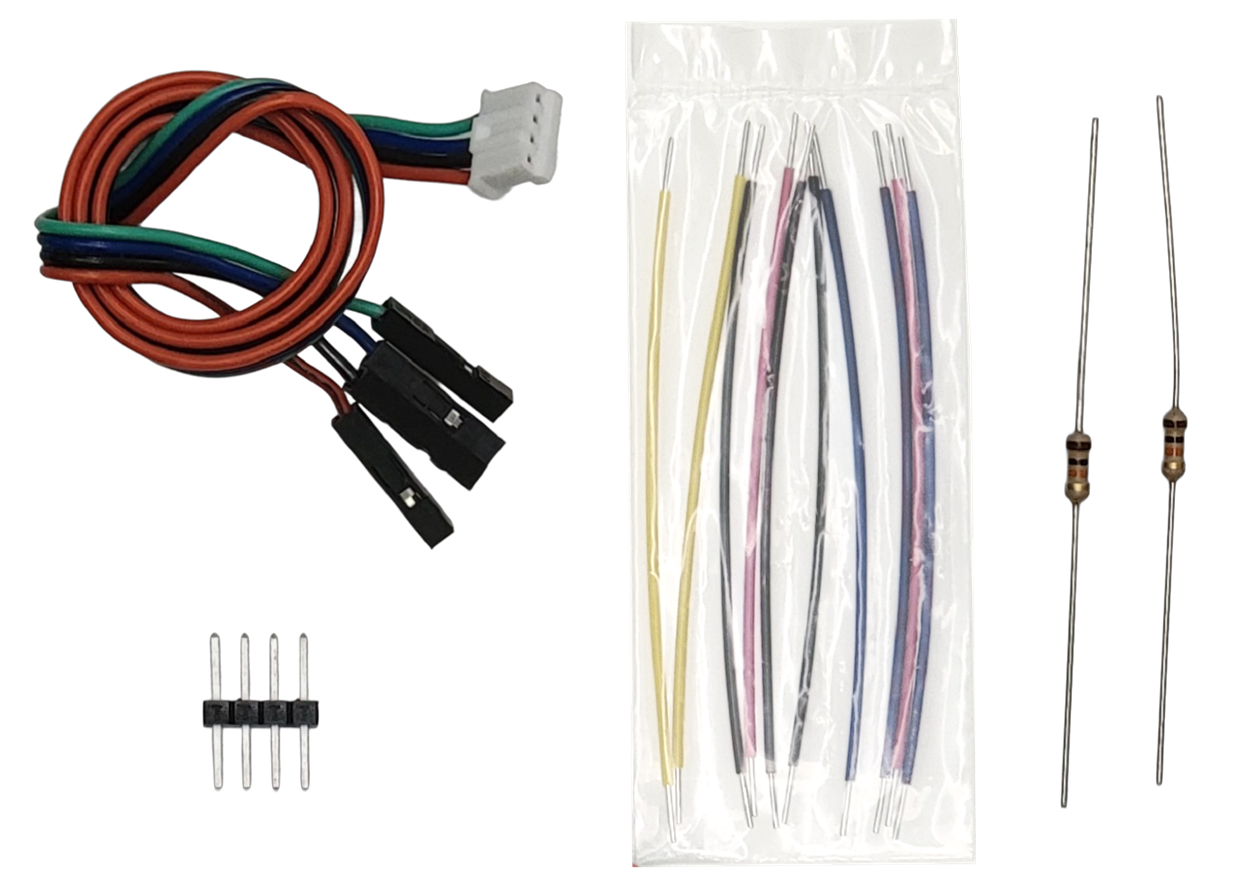
Parts

(1) JST plug to 4-socket cable
(1) Header: 4-pin
(2) Resistors: 10 kΩ (brown-black-orange-gold)
(4) Jumper wires
Recommended: 1 red, 1 black, 2 blue
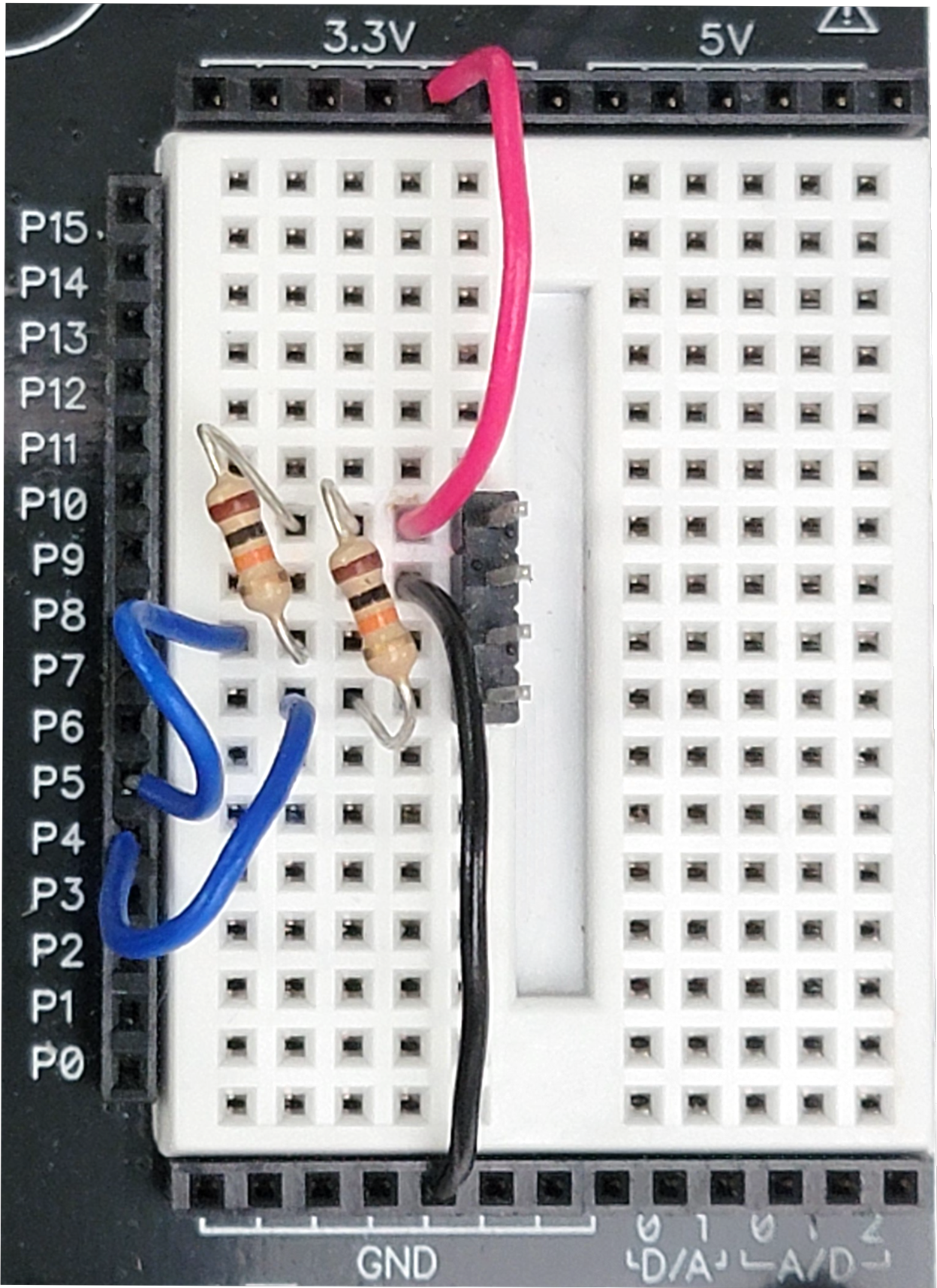
Circuit

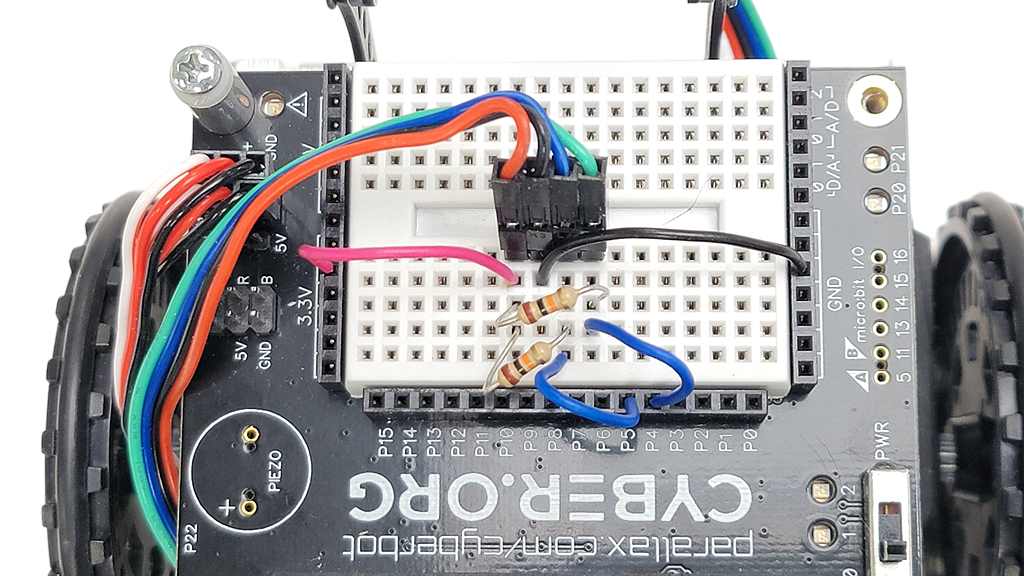
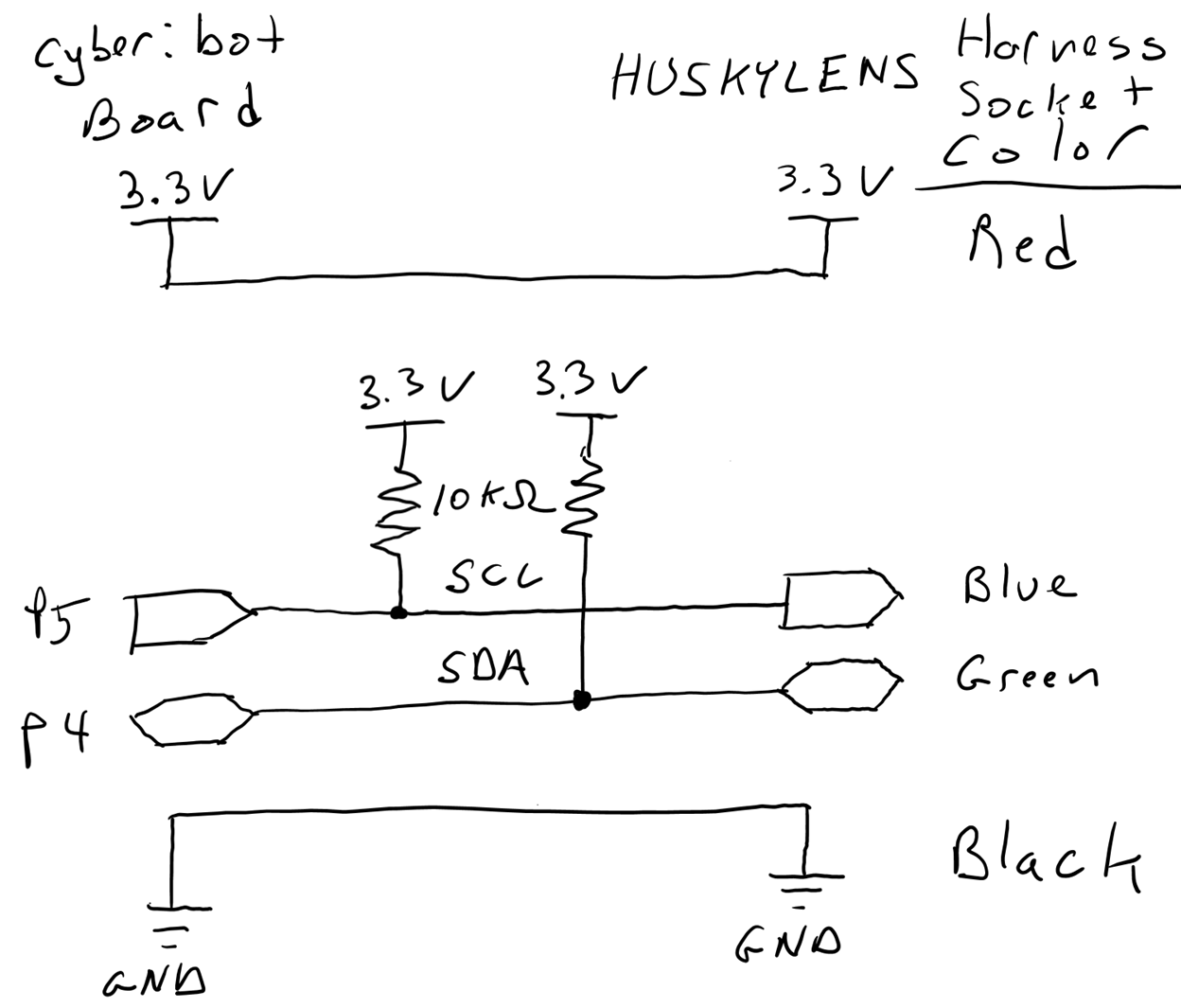
Build the circuit exactly as shown using the two 10 kΩ resistors, four jumper wires, and the four-post header.
Connect the 4-wire harness’ sockets to the 4-pin header as shown: Red, black, blue, green
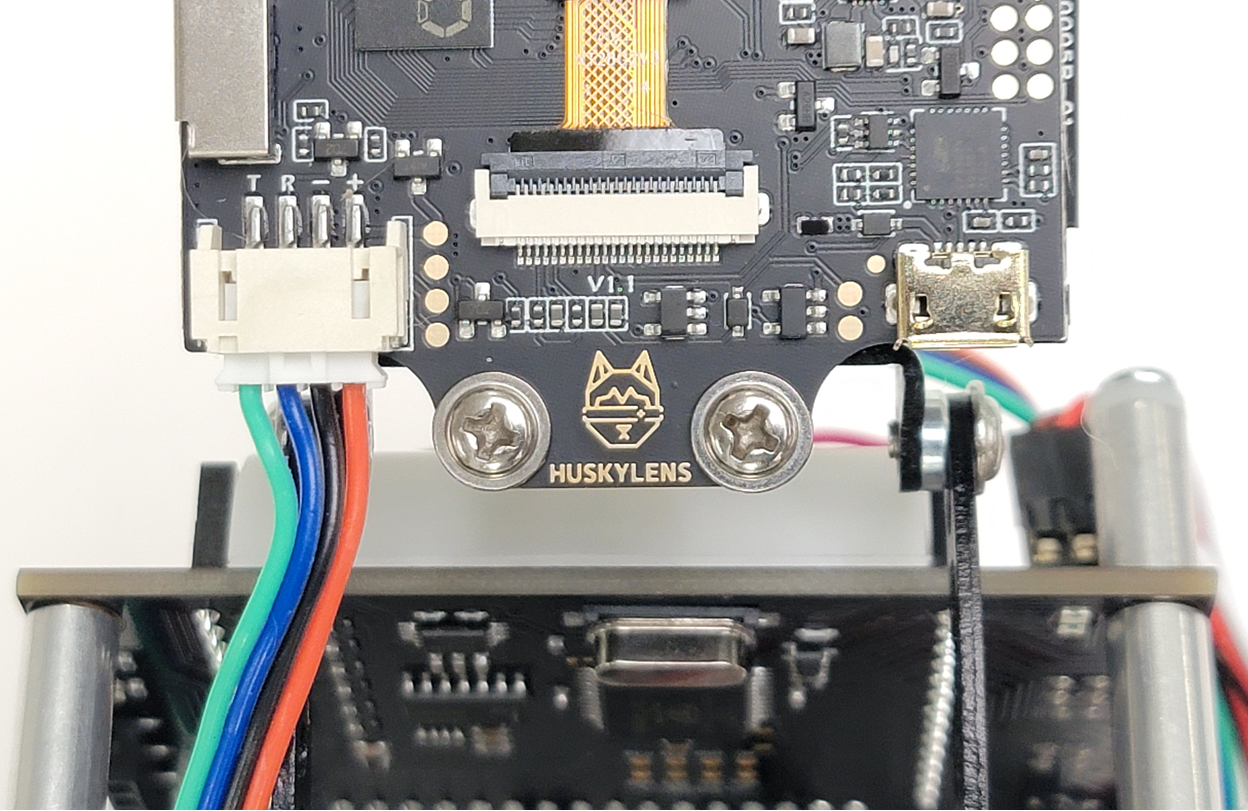
Connect the JST plug end of the cable to the HUSKYLENS JST socket.
About the Circuit

The four colored wires that connect the cyber:bot to the HUSKYLENS are:

  • Red: 3.3 V power
  • Blue: I²C serial clock (SCL) signal
  • Green: I²C serial data (SDA) signal
  • Black: Common ground

The micro:bit exchanges data with the HUSKYLENS with a communication protocol called I²C (pronounced eye-squared-see).  P5 is connected to the I²C SCL line and P4 to SDA.  
Did You Know

I²C (Inter-Integrated Circuit) is one of the most common communication protocols for connecting sensors and devices to microcontrollers. It uses just two wires—SDA (data) and SCL (clock)—to send information back and forth between devices like the micro#bit and the HUSKYLENS camera.


Printer-friendly version
Build it: Attach the HUSKYLENS (Python)
Prev
Set it up: Add husklens Python Module
Next

DISCUSSION FORUMS | PARALLAX INC. STORE

About | Terms of Use | Feedback: learn@parallax.com | Copyright©Parallax Inc. 2024

© 2026 Parallax Learn • Built with GeneratePress