
Faster IR Navigation
The style of pre-programmed maneuvers from the last activity were fine for whiskers, but are unnecessarily slow when using the IR detectors. With whiskers, the cyber:bot had to make contact and then back up to navigate around obstacles. With infrared, your cyber:bot will detect most obstacles before it runs into them, and can just find a clear path around the obstacle.
Increase the Sampling Rate to Avoid Collisions
As your cyber:bot navigates, it will execute a series of small turns to avoid an obstacle before it ever runs into it. With that approach, the cyber:bot never turns further than it has to, and it can neatly find its way around obstacles and successfully navigate more complex courses. After experimenting with this next project, you’ll likely agree that it’s a much better way for your cyber:bot to roam.
- Enter and flash the project fast_IR_roaming, then test it with the same obstacles you used with the project roaming_with_IR. Is your cyber:bot roaming more efficiently?
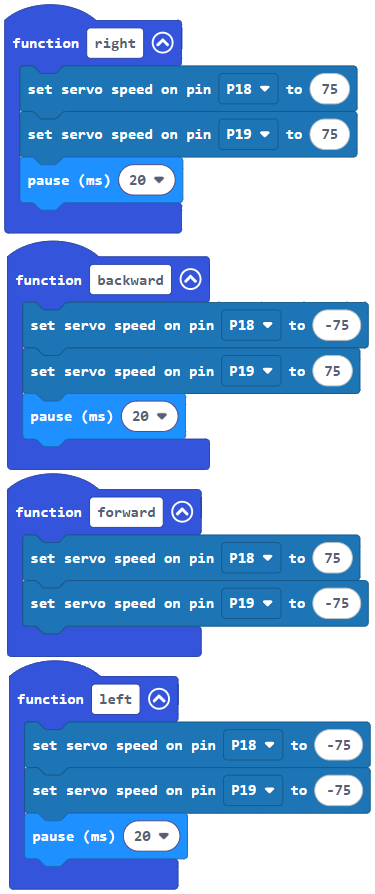
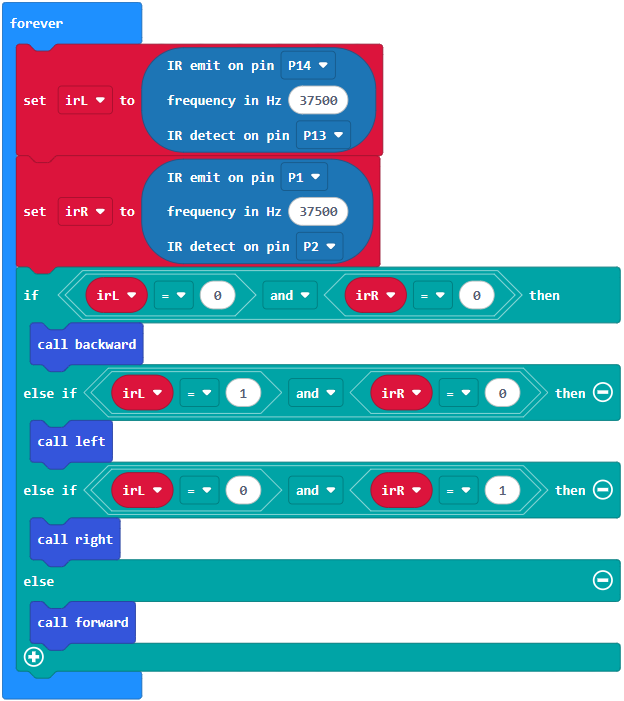
How fast_IR_roaming works better
Though this project has a similar structure to roaming_with_IR, there are three key changes that improved performance:
- The pause block arguments have been drastically reduced from 250 ms to just 20 ms. This lets the cyber:bot roam much faster.
- The project removes the backwards function when only one IR LED detects something. Since the cyber:bot is no longer physically touching objects to detect them, it does not need to back up before turning.
- The project also performs a one-servo-forward pivot turn instead of rotating left and right using both servos.