
Understanding and Tuning your Code
Now that your tests are complete, you can fine tune the code to maximize your SumoBot’s chances in the competition ring. But to be able to tune the code, you need to understand how it works before you start experimenting with different tuning strategies.
How It Works
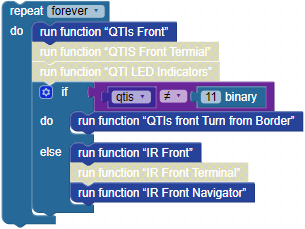
The main loop checks the “QTIs Front” function first. After that, if QTIs store anything other than binary 11, it means that the SumoBot needs to forget about anything in front of it and instead avoid the border and go in a new direction. So, the if qtis ≠ 11 binary, do input has a block that calls run function “QTIs front turn from Border”. On the other hand, if QTIs front loads 11 binary into the qtis variable, it means the SumoBot is safely cruising over the black sumo ring surface, so it should look for an opponent. Inside the else input, there are two enabled function calls. The first is to “IR Front”, which checks for objects and stores their relative distance values in the irLF (IR Left Front) and irRF (IR Right Front) variables. Then, “IR Front Navigator” sets the wheel speeds based on the distances.
- Right-click the function IR Front Navigator… block and select Expand Block.

The IR Front Navigator function has a chain of if…else if…else if…else conditions. The first is if irL and irRF are both less than 7. It means they both see an opponent, so charge straight ahead at full speed. If only one of the values was less than 7, it means the other sensor is 8, and the opponent was only sighted by one of the two IR sensors.
The first else if detects the opponent on the left, but not on the right, so its do input has CR servo PIN…speed… blocks that make it pivot to the left. The second else if is an inverse of the first, with the opponent detected on the right, and servo blocks for pivoting right. The else condition is a catch all, and currently, it’s just moving forward.

Tuning Strategies
There are several areas where code adjustments can improve your SumoBot’s chances of winning in the ring. Since each robot and competition environment is slightly different, exact code is not given here. But these are three strategies you might consider for custom code adjustments.
How Close is Too Close
Probably the most important ingredient to a winning SumoBot strategy is tuning and customizing how motors respond to opponent detection (and not detection). The example you just tried is the most basic version. In terms of simple adjustments, those 7 values can be reduced if you need to make the SumoBot only respond when the opponent is at a closer range. This is not necessarily a good thing, unless your SumoBot is having problems detecting infrared that reflects off the surface of the sumo ring or objects at a distance around the ring.
Side Eye
What happens if the opponent tips your SumoBot upwards? The opponent disappears! The function in this code example should still deal with it properly since it plows straight forward when an opponent is not visible as well as when it is visible. It’s only when the opponent is detected on one side (with one eye) that the SumoBot responds by turning.
One clever adjustment could be turning in place faster if the opponent is detected further away on a given side. On the other hand, you might want the SumoBot to turn slower if it’s detected on a side but closer. The trick to this kind of modification would be to multiply the irLF or irRF distance by some value to get a range from 100 to -100 on the wheel that currently pivots.
Look Both Ways
Another way to improve your chances of winning is to scan left and right for an opponent if none is detected for a certain amount of time. It’s a challenging piece of code that can be added to the else condition. If you can get it to work well, your SumoBot will be a much stronger competitor.