
More Sounds for the S3
As we learned in the last tutorial, creating simple sounds for the S3 robot is easy with the BlocklyProp programming tool. This is a short collection of additional sounds and short tunes you can quickly program on their own, or add to other S3 BlocklyProp projects.
Ta Da!
This sound is a favorite at any age, and is fun to play when your robot completes its assigned task.
In BlocklyProp, use the play tone block and the wait block for the rest, or silent pause, between the tones.
- Study, build, save, and run the project code below to see how it works.
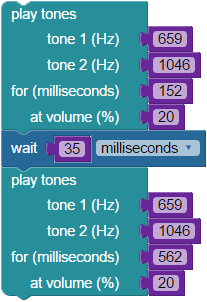
In this program, the volume variable is built into the play tone block itself. However, this is not always the case. Other programs will sometimes require the use of the set variable and use variable blocks to control variables like volume level. For more information on inserting a variable in place of a number value block, see the previous tutorial: Let’s Make Some Noise.
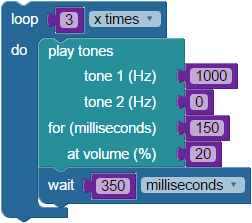
Playing Beeps
In BlocklyProp, use the play tone block to play a single tone. Note that there are settings for two tones in this block; make sure you set the second tone to 0. As in the previous tutorial, the wait block is the rest, or silent pause. Here, it is used to create a pause between beeps. The loop (x times) block is used to repeat the tone the desired number of times.
- Study, build, save, and run the project code below to see how it works.
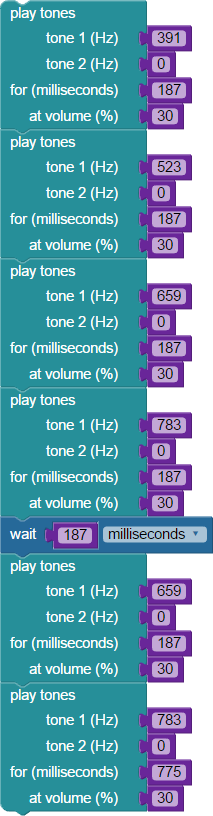
Charge!
This next sound is one you may recognize from arena sports games like baseball or hockey. Most appropriately played when your robot begins a task, Charge! is a fun sound to add to your programs. In BlocklyProp, you will use the play tone block which lets you play two tones at the same time as well as the wait block for a musical rest.
- Study, build, save, and run the project code below to see how it works.
Shave and a Haircut – Two Bits! (and a few bytes too)
Sometimes, tunes can take you back to a memory or remind you of childhood. Here is one from when you, or maybe when your parents, were little. This tune will be our version of a childhood classic, but for your S3.
In BlocklyProp, follow the ACTIONS > SOUND catgeory and select the play note block. Remember that in this block we can choose an octave, a note, a note count, and a volume. Pay special attention to all the settings. If you’d like, you can find the original sheet music online through Wikipedia or any search engine.
- Study, build, save, and run the project code below to see how it works.
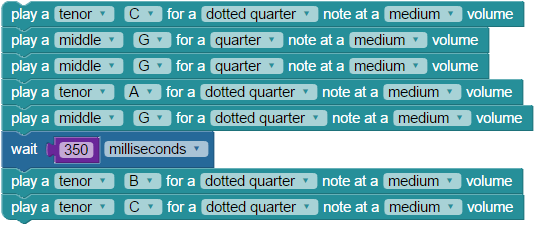
What is a dotted note? It is a note which is tied to half its duration or value. To help make things simpler for our purposes, think of it as a note whose duration is halfway between it and the next note. In music’s written form, a dotted note is literally shown as a note with a dot immediately behind it.
Beethoven’s 5th Symphony
These eight notes are some of the most well known for their ominous sound. Instantly recognizable, you might play this tune on your S3 when peril lies ahead. For example, to warn you of an upcoming obstacle.
To compile this tune in BlocklyProp, use the ACTIONS > SOUND category’s play note block. Search for the sheet music of the tune you want to create on Google or through Wikipedia (in this case, Beethoven’s 5th Symphony) and enter the octave, note, count and volume.
- Study, build, save, and run the project code below to see how it works.
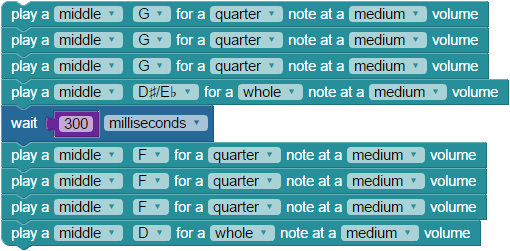
Alternate Version – In this alternate version of the Beethoven’s 5th BlocklyProp code, we use the ACTIONS > SOUND category’s play tone block, and variables to set the note duration count and volume. We play the same notes as above, along with the same length and octave above.

What did you notice about how the alternate version sounded compared to the first version? Unlike the play note block, the play tone block allows us to add a second tone to each sound – essentially, a second note. This second tone can be used, as it is here, to create a sort of chord (a group of harmonious notes played together at the same time). Though true chords are usually 3 or more notes played together, your S3 can still make harmonious sounds with two.
Special thanks to Parallax friend Whit Stodghill for his assistance in writing, editing, and testing material for these S3 tutorials.