
Create the Color Training Script
Entering the Script
Now it’s your turn to program the micro:bit. Open the MakeCode editor. It’s usually best to start by opening an earlier project where the HUSKYLENS and cyber:bot extensions have already been added.
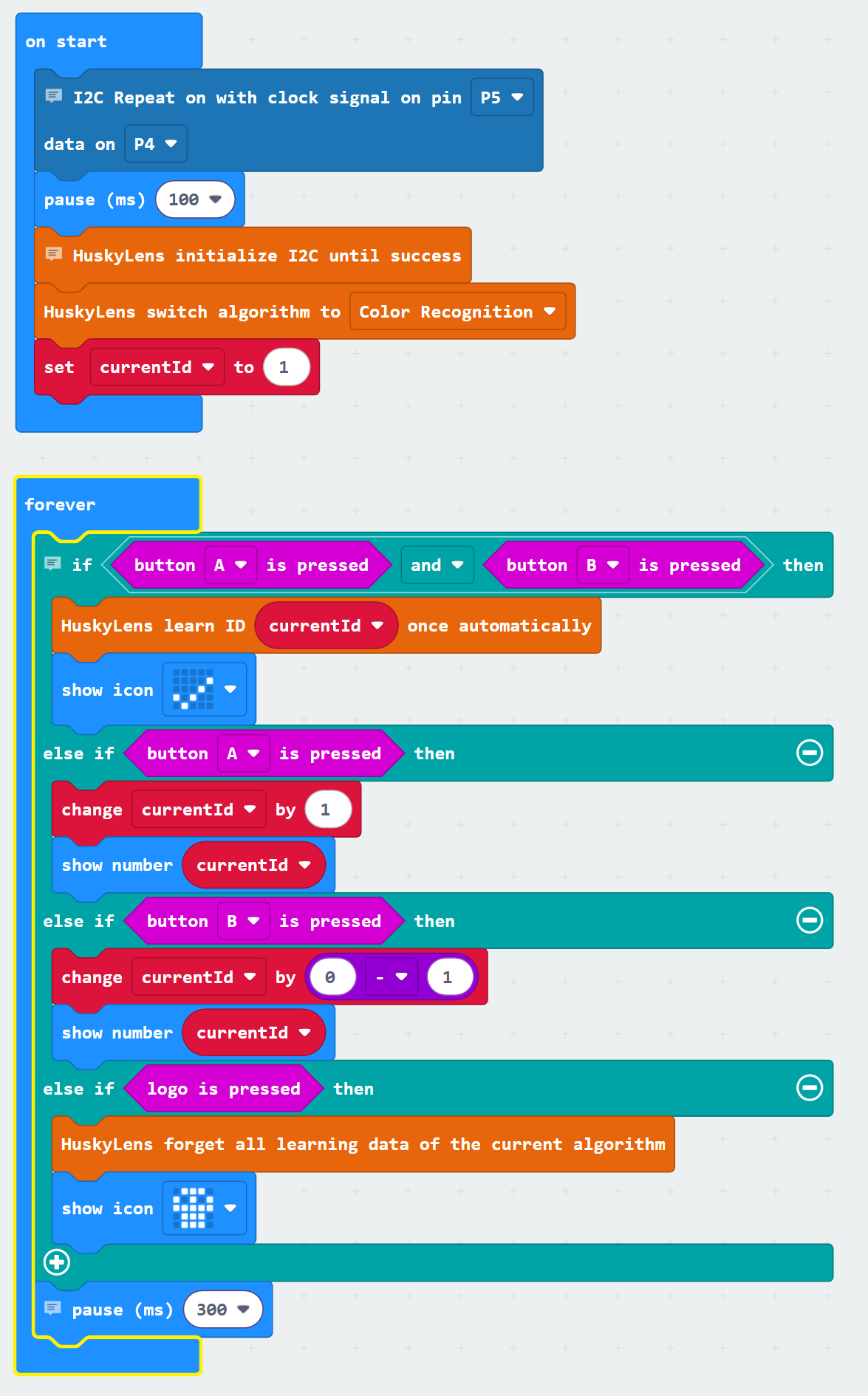
This program will let you change IDs, teach the HUSKYLENS to recognize colors, and erase learned data using the micro:bit buttons and logo touch.
- In the MakeCode editor, build the blocks program with the picture below as your guide.
- Use the name field to the right of the Download button to name the project Learn Colors.
- Click the floppy disk Save icon to the right of the name filed to save your work.
- Use the Download button to load the program into the micro:bit.
How it Works
-
Share I²C between micro:bit and cyber:bot
The blockI2C Repeat on with clock signal on pin P5 data on P4)has the cyber:bot board’s Propeller microcontroller share the micro:bit I²C bus with the HUSKYLENS connection. Thepause (ms) (100)block gives everything time to get ready. -
Start the HUSKYLENS
The blockHuskyLens initialize I2C until successstarts communication between the micro:bit and HUSKYLENS camera. ThenHuskyLens switch algorithm to (color recognition)sets it to look for colors. -
Keep track of the current ID
A variableset (currentId) to (1)starts the currentId variable at 1. This number tells HUSKYLENS which memory slot it’s working with. -
Forever loop
Inside theforeverblock, the program responds to button presses by configuring the HUSKYLENS with if…else if…else if… decisions:-
if <button (A) is pressed> and <button (B) is pressed> then
This means both buttons have to be pressed at about the same time.
→ The blockHuskyLens learn ID (currentId) once automaticallytells HUSKYLENS to remember the current item in this ID slot. The blockshow icon (Yes)confirms learning worked. -
else if <button (A) is pressed> then
→ The blockchange (currentId) by (1)increases the ID number. The blockshow number (currentId)shows the new ID on the micro:bit module’s LED matrix screen. -
else if <button (A) is pressed> then
→ The blockchange currentId by (0–1)decreases the ID number by 1. The blockshow number (currentId)shows the updated ID. -
else if <logo is pressed> then
→ The blockhuskylens forget all learning data of the current algorithmclears all the learned items. The blockshow icon (Skull)shows that memory has been erased. -
One pause for everything
The blockpause (300 ms)slows down the loop just enough to act like a button “debounce,” so one press only counts once.
-