Skip to content
Parallax Learn

Parallax Learn

  • Welcome
  • Tutorials
        • Tutorial Series head tag

          Tutorial Series
        • Tutorial Series

          The special, classroom-ready series pages are organized collections of tutorials for our most popular hardware and/or languages. The tutorials for each topic are conveniently accessible from a single page, shown in the order it is recommended that they be completed.
        • Robotics Series Head tag

          Robotics Series
        • Robotics Series

          • Artificial Intelligence
          • Cybersecurity: Radio Data tutorialCybersecurity
          • cyber:bot + Python
          • cyber:bot + MakeCode
          • Boe-Bot Tutorial SeriesBoe-Bot
          • Arduino Shield-Bot
          • ActivityBot with C TutorialsActivityBot + C
          • ActivityBot with BlocklyProp Tutorial SeriesActivityBot + BlocklyProp
          • Scribbler 3 Tutorial SeriesScribbler 3
        • Electronics & Programming Series Head tag

          Electronics & Programming Series
          • BS2 Board of Education Tutorial SeriesBS2 Board of Education
          • Propeller C-Language BasicsPropeller C Basics
          • FLiP Try-It Kit C Tutorial SeriesFLiP Try-It Kit + C
          • FLiP Try-It Kit BlocklyProp TutorialsFLiP Try-It Kit + BlocklyProp
          • Badge WX Tutorial SeriesBadge WX
          • Propeller BlocklyProp Basics and ProjectsPropeller BlocklyProp Basics
          • View All Tutorial Series »
        • Browse Tutorials
        • Browse Tutorials

          Individual tutorials sorted by robot or kit, and language.
        • By Robot or Kit
          • ActivityBot
          • SumoBot WX
          • Boe-Bot
          • Shield-Bot
          • cyber:bot
          • Badge WX
          • ELEV-8
          • ARLO
        • By Language
        • By Language

          • Propeller C
          • Arduino
          • BlocklyProp
          • PBASIC
          • Python
          • MakeCode
          • View All Tutorials »
  • Educators
  • Reference
  • Downloads
  • Home
  • All Courses

Navigation with the cyber:bot

Curriculum

  • 1 Section
  • 4 Lessons
  • Lifetime
Expand all sectionsCollapse all sections
  • Navigation with the cyber:bot
    4
    • 1.1
      Are the Servos Centered?
    • 1.2
      cyber:bot Wheel Speed Control
    • 1.3
      Forward, Backward, and Straightening Curves
    • 1.5
      Left and Right Turns

Forward and Backward

Have you ever thought about what direction a car’s wheels have to turn to propel it forward?  The wheels turn opposite directions on opposite sides of the car.  Likewise, to make the cyber:bot go forward, its left wheel has to turn counterclockwise, while its right wheel turns clockwise.
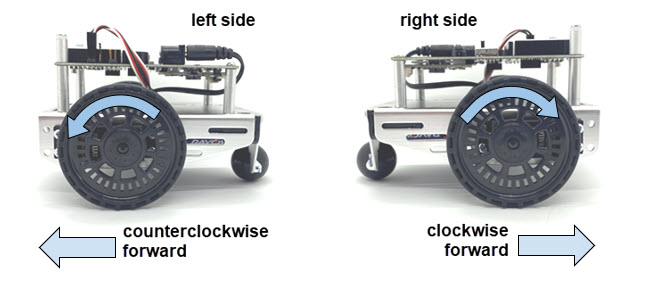
Remember that a script can use the servo_speed function to control the speed and direction of each servo.  Then, it can use the sleep function to keep the servos running for certain amounts of time before choosing new speeds and directions.  Here’s an example that will make the cyber:bot roll forward for about three seconds, and then stop.

Hardware Setup

  • Set the cyber:bot board’s power (PWR) switch to Position 0.
  • Make sure the battery holder is loaded with 5 AA batteries.
  • Make sure the battery holder’s barrel plug is firmly plugged into the cyber:bot board’s barrel jack. 
  • Connect your micro:bit module to your computer with a USB cable.

Example Script: forward_three_seconds

  • In a Google Chrome or Microsoft Edge browser, go to python.microbit.org to open the micro:bit Python Editor.
  • Make sure the cyberbot.py module is added to the Project Files.
    (See Add modules to your micro:bit).
  • Set the project’s name to forward_three_seconds, enter the script below, and then click Save.
    (See Save & Edit Scripts and Flash Scripts with Python Editor.)
  • Click Send to micro:bit.  
    (See Flash Scripts with Python Editor.)
# forward_three_seconds

from cyberbot import *

bot(18).servo_speed(75)             # Full speed forward
bot(19).servo_speed(-75)
sleep(3000)                         # Wait three seconds
 
bot(18).servo_speed(None)           #Stop
bot(19).servo_speed(None)
  • Set the power (PWR) switch to position 2.
  • Verify that the cyber:bot rolls forward for three seconds.
  • Set the PWR switch to 0.

Your Turn – Traveling Backwards

Now, let’s try making  the cyber:bot travel backwards for three seconds.

  • Change the project name from forward_three_seconds to backward_three_seconds.
  • Change the servo_speed arguments so the cyber:bot will travel backwards for three seconds.
  • Save the modified script and flash it with the Send to micro:bit button.
# backward_three_seconds
 
from cyberbot import *
 
bot(18).servo_speed(-75)            # Full speed backwards
bot(19).servo_speed(75)
 
sleep(3000)
 
bot(18).servo_speed(None)           # Stop
bot(19).servo_speed(None)
  • Set the PWR switch to 2.
  • Verify that the cyber:bot rolls backwards for 3 seconds.
  • Set the PWR switch to 0.

Printer-friendly version

DISCUSSION FORUMS | PARALLAX INC. STORE

About | Terms of Use | Feedback: learn@parallax.com | Copyright©Parallax Inc. 2024

© 2026 Parallax Learn • Built with GeneratePress