Skip to content
Parallax Learn

Parallax Learn

  • Welcome
  • Tutorials
        • Tutorial Series head tag

          Tutorial Series
        • Tutorial Series

          The special, classroom-ready series pages are organized collections of tutorials for our most popular hardware and/or languages. The tutorials for each topic are conveniently accessible from a single page, shown in the order it is recommended that they be completed.
        • Robotics Series Head tag

          Robotics Series
        • Robotics Series

          • Artificial Intelligence
          • Cybersecurity: Radio Data tutorialCybersecurity
          • cyber:bot + Python
          • cyber:bot + MakeCode
          • Boe-Bot Tutorial SeriesBoe-Bot
          • Arduino Shield-Bot
          • ActivityBot with C TutorialsActivityBot + C
          • ActivityBot with BlocklyProp Tutorial SeriesActivityBot + BlocklyProp
          • Scribbler 3 Tutorial SeriesScribbler 3
        • Electronics & Programming Series Head tag

          Electronics & Programming Series
          • BS2 Board of Education Tutorial SeriesBS2 Board of Education
          • Propeller C-Language BasicsPropeller C Basics
          • FLiP Try-It Kit C Tutorial SeriesFLiP Try-It Kit + C
          • FLiP Try-It Kit BlocklyProp TutorialsFLiP Try-It Kit + BlocklyProp
          • Badge WX Tutorial SeriesBadge WX
          • Propeller BlocklyProp Basics and ProjectsPropeller BlocklyProp Basics
          • View All Tutorial Series »
        • Browse Tutorials
        • Browse Tutorials

          Individual tutorials sorted by robot or kit, and language.
        • By Robot or Kit
          • ActivityBot
          • SumoBot WX
          • Boe-Bot
          • Shield-Bot
          • cyber:bot
          • Badge WX
          • ELEV-8
          • ARLO
        • By Language
        • By Language

          • Propeller C
          • Arduino
          • BlocklyProp
          • PBASIC
          • Python
          • MakeCode
          • View All Tutorials »
  • Educators
  • Reference
  • Downloads
  • Home
  • All Courses
  • Parallax WX Wi-Fi Module for the BS2

Parallax WX Wi-Fi Module for the BS2

Test the BS2 to Webpage Connection

First let’s load the test program into your BS2.

  • Navigate to the PBASIC folder.  
    • If you are using the BASIC Stamp Editor, open Val from Micro Host.bs2.
    • If you are using Parallax IDE, open Val from Micro Host.bs2 with a text editor, then copy and paste into the Parallax IDE.
  • Connect power to your board and a programming cable from your board to the computer.
  • Set the board PWR switch to either 1 or 2.
  • Load the program into the BASIC Stamp 2 (BASIC Stamp Editor Run button, or Parallax IDE Download button).

Now we’ll check the connection between your BS2 and the webpage we had you open in the previous page. Make sure you have the page open and visible.

The BASIC Stamp counts upwards at about 4x per second.  Every time you click the web page’s Enter button, the BASIC Stamp should send an updated (and higher) value.
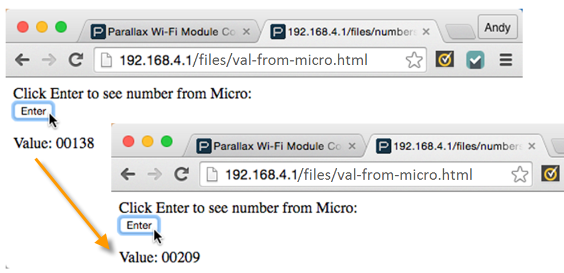
  • Try clicking the web page’s Enter button, wait a few seconds, then click it again.  

In addition to an updated number in the web page, your BASIC Stamp programming software’s Debug Terminal should display that it sent a number each time you click the button:


Printer-friendly version
Load and View a Test Page
Prev
Join Another Wi-Fi Network
Next

DISCUSSION FORUMS | PARALLAX INC. STORE

About | Terms of Use | Feedback: learn@parallax.com | Copyright©Parallax Inc. 2024

© 2025 Parallax Learn • Built with GeneratePress