Skip to content
Parallax Learn

Parallax Learn

  • Welcome
  • Tutorials
        • Tutorial Series head tag

          Tutorial Series
        • Tutorial Series

          The special, classroom-ready series pages are organized collections of tutorials for our most popular hardware and/or languages. The tutorials for each topic are conveniently accessible from a single page, shown in the order it is recommended that they be completed.
        • Robotics Series Head tag

          Robotics Series
        • Robotics Series

          • Artificial Intelligence
          • Cybersecurity: Radio Data tutorialCybersecurity
          • cyber:bot + Python
          • cyber:bot + MakeCode
          • Boe-Bot Tutorial SeriesBoe-Bot
          • Arduino Shield-Bot
          • ActivityBot with C TutorialsActivityBot + C
          • ActivityBot with BlocklyProp Tutorial SeriesActivityBot + BlocklyProp
          • Scribbler 3 Tutorial SeriesScribbler 3
        • Electronics & Programming Series Head tag

          Electronics & Programming Series
          • BS2 Board of Education Tutorial SeriesBS2 Board of Education
          • Propeller C-Language BasicsPropeller C Basics
          • FLiP Try-It Kit C Tutorial SeriesFLiP Try-It Kit + C
          • FLiP Try-It Kit BlocklyProp TutorialsFLiP Try-It Kit + BlocklyProp
          • Badge WX Tutorial SeriesBadge WX
          • Propeller BlocklyProp Basics and ProjectsPropeller BlocklyProp Basics
          • View All Tutorial Series »
        • Browse Tutorials
        • Browse Tutorials

          Individual tutorials sorted by robot or kit, and language.
        • By Robot or Kit
          • ActivityBot
          • SumoBot WX
          • Boe-Bot
          • Shield-Bot
          • cyber:bot
          • Badge WX
          • ELEV-8
          • ARLO
        • By Language
        • By Language

          • Propeller C
          • Arduino
          • BlocklyProp
          • PBASIC
          • Python
          • MakeCode
          • View All Tutorials »
  • Educators
  • Reference
  • Downloads
  • Home
  • All Courses

Peeking Doll Project

Curriculum

  • 1 Section
  • 3 Lessons
  • Lifetime
Expand all sectionsCollapse all sections
  • Peeking Doll Project
    3
    • 1.0
      Build the Body Movement Mechanism
    • 1.1
      Build the Head Movement Mechanism
    • 1.2
      Wire and Program

Wire and Program

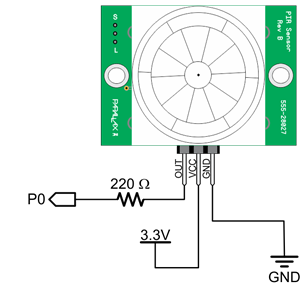
With any good Halloween prop, it’s ideal to have it be somehow motion activated. I added a PIR motion sensor (included in the Animation Kit) to add motion-sensing capability. This way when someone walks anywhere near the front of your prop, the sensor will detect movement and prompt your servo to move the doll out from behind the wall.

I mounted my PIR motion sensor about 2ft ahead of the doll along a walking path so when someone passes by it triggers the doll to move. This ensures it has time to fully peep out when that person arrives at the doll’s location.

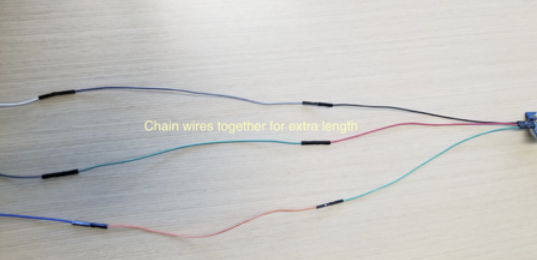
  • To do this I used the left-over wires in the Animation kit and chained them together to make my PIR wires longer.


Wiring

PIR

  • PIR motion sensor – Connects to P0

Servos

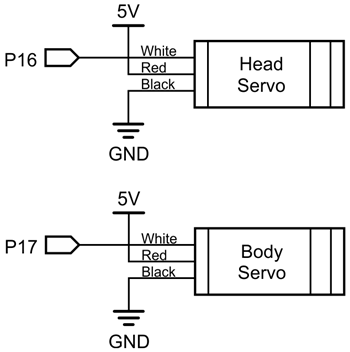
  • Body Movement servo – connected to servo header P17
  • Head Movement servo – connected to servo header P16
NeoPixel Ring (Optional – soldering required)

To add a lighting effect, I used a NeoPixel Ring included with the Animation Kit. I used a soldering iron to solder posts into all the Neopixel ring’s available solder pads (Power, Ground, OUT, IN) and inserted it into the breadboard. Based on where you want your lighting effect to be, you may need to solder the ring to jumper wires instead of posts and mount the ring somewhere on the box or doll. This is completely up to you. Where I chose to place the ring gave the doll a spooky back-glow effect once the Activity Board was mounted to the box.
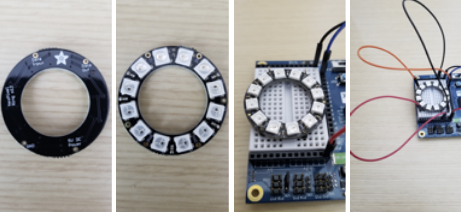
  • Red wire connects the ring’s PWR pin to 3.3V
  • Black wire connects the ring’s ground pin to boards ground pin.
  • Orange wire connects the ring’s IN pin to the board’s pin number 2 (P2).
  • OUT is no connection.


BlocklyProp Code

I don’t expect you to recreate this project yourself, so the image below is just for visual reference. Download the blocks file and upload it into your own project.

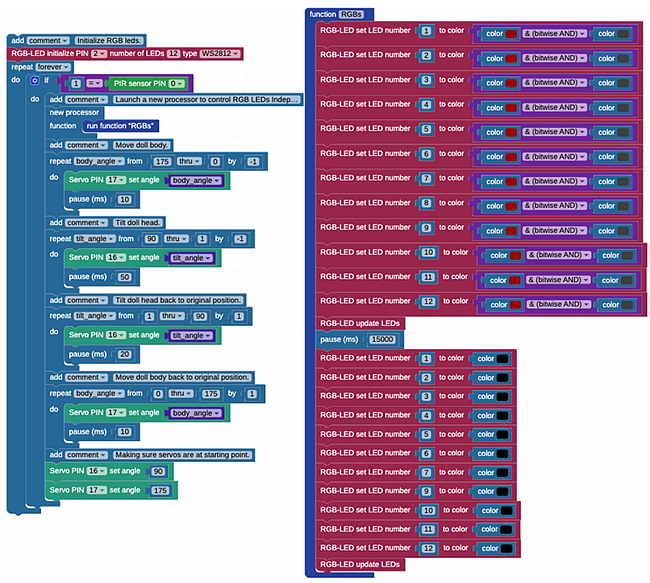
  • BlocklyProp Peeking Doll Project Blocks


Printer-friendly version
Build the Head Movement Mechanism
Prev

DISCUSSION FORUMS | PARALLAX INC. STORE

About | Terms of Use | Feedback: learn@parallax.com | Copyright©Parallax Inc. 2024

© 2026 Parallax Learn • Built with GeneratePress