Skip to content
Parallax Learn

Parallax Learn

  • Welcome
  • Tutorials
        • Tutorial Series head tag

          Tutorial Series
        • Tutorial Series

          The special, classroom-ready series pages are organized collections of tutorials for our most popular hardware and/or languages. The tutorials for each topic are conveniently accessible from a single page, shown in the order it is recommended that they be completed.
        • Robotics Series Head tag

          Robotics Series
        • Robotics Series

          • Artificial Intelligence
          • Cybersecurity: Radio Data tutorialCybersecurity
          • cyber:bot + Python
          • cyber:bot + MakeCode
          • Boe-Bot Tutorial SeriesBoe-Bot
          • Arduino Shield-Bot
          • ActivityBot with C TutorialsActivityBot + C
          • ActivityBot with BlocklyProp Tutorial SeriesActivityBot + BlocklyProp
          • Scribbler 3 Tutorial SeriesScribbler 3
        • Electronics & Programming Series Head tag

          Electronics & Programming Series
          • BS2 Board of Education Tutorial SeriesBS2 Board of Education
          • Propeller C-Language BasicsPropeller C Basics
          • FLiP Try-It Kit C Tutorial SeriesFLiP Try-It Kit + C
          • FLiP Try-It Kit BlocklyProp TutorialsFLiP Try-It Kit + BlocklyProp
          • Badge WX Tutorial SeriesBadge WX
          • Propeller BlocklyProp Basics and ProjectsPropeller BlocklyProp Basics
          • View All Tutorial Series »
        • Browse Tutorials
        • Browse Tutorials

          Individual tutorials sorted by robot or kit, and language.
        • By Robot or Kit
          • ActivityBot
          • SumoBot WX
          • Boe-Bot
          • Shield-Bot
          • cyber:bot
          • Badge WX
          • ELEV-8
          • ARLO
        • By Language
        • By Language

          • Propeller C
          • Arduino
          • BlocklyProp
          • PBASIC
          • Python
          • MakeCode
          • View All Tutorials »
  • Educators
  • Reference
  • Downloads
  • Home
  • All Courses

Regular Polygons and Circles

Curriculum

  • 1 Section
  • 4 Lessons
  • Lifetime
Expand all sectionsCollapse all sections
  • Regular Polygons and Circles
    4
    • 1.0
      Calculating Angles of Rotation
    • 1.1
      Making Polygonal Paths
    • 1.2
      Circles as Regular Polygons
    • 1.3
      Making Circles With a Set Radius

Calculating Angles of Rotation

This tutorial series will explain how we can make polygonal and circular orbits using a differential wheeled robot. You’ll go through some examples of regular polygons and circles, first done by using mathematics, and then by running some SimpleIDE code examples.  These tutorials are meant to be done on Parallax’s ActivityBot, but the concepts can be extended to various other robots (like the S2), with some modification.

First, we’ll need to study and analyze the problem of how to program rotation. We should be able to program the robot to rotate to the correct direction (clockwise or counterclockwise) corresponding to the various angles 0 ° < ω < 360 ° that we want to turn.


Rotation of ActivityBot ω degrees

In Go Certain Distances, you can see that the drive_goto(26, -25) command makes the ActivityBot execute a 90-degree right turn. Let’s see this example in closer detail and try to create a mathematical formula to calculate the appropriate number of “ticks” that correspond to some angle ω.
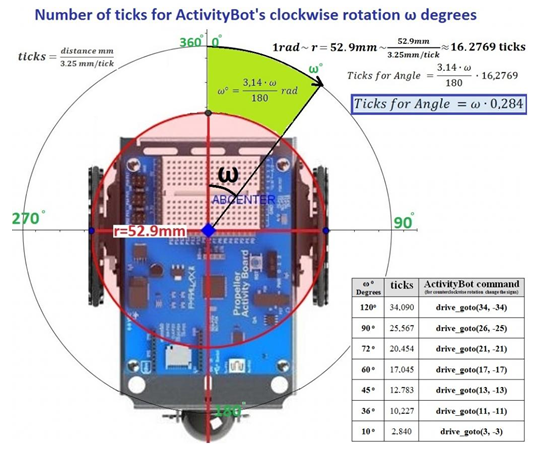
As the ActivityBot makes a rotation, it moves its wheels on the red circle (radius: 52.9 mm). If the robot makes a turn equal to 1 radian (rad), each wheel will move a distance equal to the radius r of the red circle. Thus 1 rad rotation of the ActivityBot is equivalent to movement of the wheels of distance:

r =52.9 mm = 52.91/3.25 ticks = 16.2769 ticks

Changing rad to degrees, we take the formula:

Ticks for Angle = ω * 0.284

So if we want to program the ActivityBot to rotate ω degrees we can multiply by 0.284 in order to find the appropriate number of wheel ticks.

To verify the above formula, we can see that a rotation of 90 degrees = 90 * 0.284 ticks = 25.56 ticks = 26 ticks (rounded up).

In the image above, there is a table that has useful information for the coming activities.  Below we have provided an enlarged view of it:
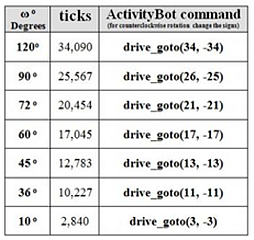
In the chart, the text under “ActivityBot command” reads: for counterclockwise rotation, change the signs.  This means that to reverse the direction of motion, change positive values to negative, and negative values to positive.  For example, drive_goto(34, -34) would become drive_goto(-34, 34), etc.


Printer-friendly version
Making Polygonal Paths
Next

DISCUSSION FORUMS | PARALLAX INC. STORE

About | Terms of Use | Feedback: learn@parallax.com | Copyright©Parallax Inc. 2024

© 2026 Parallax Learn • Built with GeneratePress