Skip to content
Parallax Learn

Parallax Learn

  • Welcome
  • Tutorials
        • Tutorial Series head tag

          Tutorial Series
        • Tutorial Series

          The special, classroom-ready series pages are organized collections of tutorials for our most popular hardware and/or languages. The tutorials for each topic are conveniently accessible from a single page, shown in the order it is recommended that they be completed.
        • Robotics Series Head tag

          Robotics Series
        • Robotics Series

          • Artificial Intelligence
          • Cybersecurity: Radio Data tutorialCybersecurity
          • cyber:bot + Python
          • cyber:bot + MakeCode
          • Boe-Bot Tutorial SeriesBoe-Bot
          • Arduino Shield-Bot
          • ActivityBot with C TutorialsActivityBot + C
          • ActivityBot with BlocklyProp Tutorial SeriesActivityBot + BlocklyProp
          • Scribbler 3 Tutorial SeriesScribbler 3
        • Electronics & Programming Series Head tag

          Electronics & Programming Series
          • BS2 Board of Education Tutorial SeriesBS2 Board of Education
          • Propeller C-Language BasicsPropeller C Basics
          • FLiP Try-It Kit C Tutorial SeriesFLiP Try-It Kit + C
          • FLiP Try-It Kit BlocklyProp TutorialsFLiP Try-It Kit + BlocklyProp
          • Badge WX Tutorial SeriesBadge WX
          • Propeller BlocklyProp Basics and ProjectsPropeller BlocklyProp Basics
          • View All Tutorial Series »
        • Browse Tutorials
        • Browse Tutorials

          Individual tutorials sorted by robot or kit, and language.
        • By Robot or Kit
          • ActivityBot
          • SumoBot WX
          • Boe-Bot
          • Shield-Bot
          • cyber:bot
          • Badge WX
          • ELEV-8
          • ARLO
        • By Language
        • By Language

          • Propeller C
          • Arduino
          • BlocklyProp
          • PBASIC
          • Python
          • MakeCode
          • View All Tutorials »
  • Educators
  • Reference
  • Downloads
  • Home
  • All Courses

Regular Polygons and Circles

Curriculum

  • 1 Section
  • 4 Lessons
  • Lifetime
Expand all sectionsCollapse all sections
  • Regular Polygons and Circles
    4
    • 1.0
      Calculating Angles of Rotation
    • 1.1
      Making Polygonal Paths
    • 1.2
      Circles as Regular Polygons
    • 1.3
      Making Circles With a Set Radius

Circles as Regular Polygons

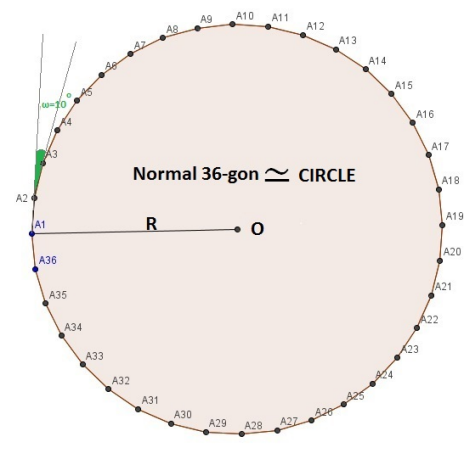
As we said before, the circle is special because we can approach it as a regular polygon with 36 (or more) vertices.  We will use exactly 36 vertices for this example.
So, if we want the robot to do a circle (clockwise) we need to give the following commands (note: the exterior angle values may be difficult to see in the image but each is 10 degrees):
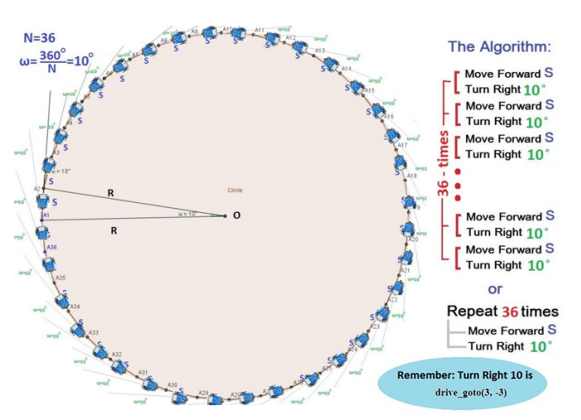
Keep in mind that the S mustn’t be a big number because otherwise your circle will be very large! Choose small numbers for the S values. For example, in the next example S = 8 ticks.

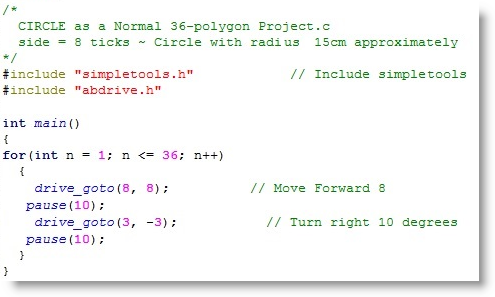
The following SimpleIDE code programs the ActivityBot to make a circle with radius of approximately 15 cm:

  • Start a new SimpleIDE Project
  • Enter in the code below and make sure load it to your robot with the “Load EEPROM & Run” button
The question that might arises from this example is: what length should the S be in order to make a circle with a specific radius (R)? In other words, can I calculate the S as a function of R? Math theory shows us that “Cosines Law” is the answer to this. Looking at the triangle OA1A2 (below) we can see that:
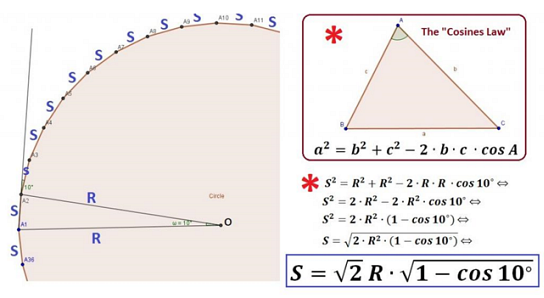
So now we are almost ready for the final algorithm that will be able to create any circle with a given radius R, or create a polygon within a circle of radius R.


Printer-friendly version
Making Polygonal Paths
Prev
Making Circles With a Set Radius
Next

DISCUSSION FORUMS | PARALLAX INC. STORE

About | Terms of Use | Feedback: learn@parallax.com | Copyright©Parallax Inc. 2024

© 2026 Parallax Learn • Built with GeneratePress