
Making Circles With a Set Radius
The following flowchart describes the final algorithm for creating a circle with a given R:
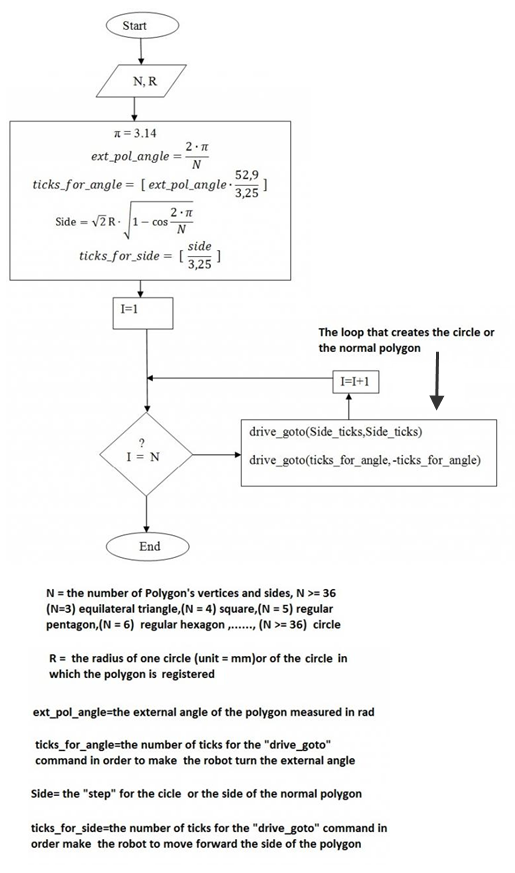
This algorithm also works well for all other regular polygons.
Keep track of variables! The code below uses lowercase variables n and r for the same variables we have been calling N and R so far. The code comments can help you if you get confused.
/*
Final Circle Polygon Algorithm.c
Makes the ActivityBot do a circle or regular polygon
(By Nikos Giannakopoulos)

N = 3 equilateral triangle, N = 4 square, N = 5 regular
pentagon, N = 6 regular hexagon....N = number of polygon's
vertices and sides, N >= 36 circle

R = the radius of one circle (unit in mm) or of the circle
in which the polygon is registered.
*/
#include "simpletools.h"             // Include simpletools
#include "abdrive.h"

int main()                           // Main function
{
float pi, ext_pol_angle,side;

int n = 36;                          // N = number of polygon's vertices

int r = 150;                         // R = the radius of the circle in
                                     // which the polygon is registered
                                     // (unit = mm)  e.g. r = 150mm

pi = 4 * atan(1);                    // the number ᴨ = 3.14 tan(ᴨ/4) = 1

ext_pol_angle = 2 * pi / n;          // external angle of the polygon in rad

int ticks_for_angle = round(ext_pol_angle * (52.9/2.35)); // number of ticks
                                                          // for drive_goto to
                                                          // make robot turn the
                                                          // external angle

side = sqrt(2) * r * sqrt(1-cos(2*pi/n));   // side length of the regular polygon

int Side_ticks = round(side/3.25);   // number of ticks for drive_goto to drive
                                     // the side length of the polygon

for (int i = 1; i <= n; i++)         // repeats forward and right turn commands
                                     // N times to complete the polygon shape

  {
   drive_goto(Side_ticks,Side_ticks);   // Move forward
   pause(10);
   drive_goto(ticks_for_angle, -ticks_for_angle);   // Turn right or left
   pause(10);
  }
}
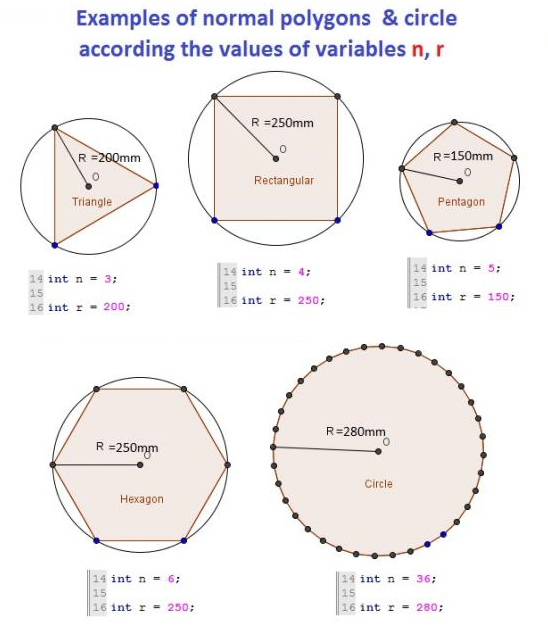
As you can see, the program could also make your ActivityBot form any regular polygon within a circle of radius r. Below are some polygons and circles that you can make with your AcrivityBot by changing the values of variables n and r in the above code.
Try This
- Try altering the code slightly so that the robot moves counterclockwise instead of clockwise. Remember that to go counterclockwise, you need to change make changes to the drive_goto command parameters. Check the bottom of the page on Calcuating Angles of Rotation if you need a refresher on how to do that.