Skip to content
Parallax Learn

Parallax Learn

  • Welcome
  • Tutorials
        • Tutorial Series head tag

          Tutorial Series
        • Tutorial Series

          The special, classroom-ready series pages are organized collections of tutorials for our most popular hardware and/or languages. The tutorials for each topic are conveniently accessible from a single page, shown in the order it is recommended that they be completed.
        • Robotics Series Head tag

          Robotics Series
        • Robotics Series

          • Artificial Intelligence
          • Cybersecurity: Radio Data tutorialCybersecurity
          • cyber:bot + Python
          • cyber:bot + MakeCode
          • Boe-Bot Tutorial SeriesBoe-Bot
          • Arduino Shield-Bot
          • ActivityBot with C TutorialsActivityBot + C
          • ActivityBot with BlocklyProp Tutorial SeriesActivityBot + BlocklyProp
          • Scribbler 3 Tutorial SeriesScribbler 3
        • Electronics & Programming Series Head tag

          Electronics & Programming Series
          • BS2 Board of Education Tutorial SeriesBS2 Board of Education
          • Propeller C-Language BasicsPropeller C Basics
          • FLiP Try-It Kit C Tutorial SeriesFLiP Try-It Kit + C
          • FLiP Try-It Kit BlocklyProp TutorialsFLiP Try-It Kit + BlocklyProp
          • Badge WX Tutorial SeriesBadge WX
          • Propeller BlocklyProp Basics and ProjectsPropeller BlocklyProp Basics
          • View All Tutorial Series »
        • Browse Tutorials
        • Browse Tutorials

          Individual tutorials sorted by robot or kit, and language.
        • By Robot or Kit
          • ActivityBot
          • SumoBot WX
          • Boe-Bot
          • Shield-Bot
          • cyber:bot
          • Badge WX
          • ELEV-8
          • ARLO
        • By Language
        • By Language

          • Propeller C
          • Arduino
          • BlocklyProp
          • PBASIC
          • Python
          • MakeCode
          • View All Tutorials »
  • Educators
  • Reference
  • Downloads
  • Home
  • All Courses

Regular Polygons and Circles

Curriculum

  • 1 Section
  • 4 Lessons
  • Lifetime
Expand all sectionsCollapse all sections
  • Regular Polygons and Circles
    4
    • 1.0
      Calculating Angles of Rotation
    • 1.1
      Making Polygonal Paths
    • 1.2
      Circles as Regular Polygons
    • 1.3
      Making Circles With a Set Radius

Making Polygonal Paths

A polygon is a closed shape that has N-number of vertices and N-number of sides (N ≥ 3). Specifically, something that is called a regular polygon is one in which all sides are of equal length.  We will only be dealing with regular polygons for these tutorials.

Some examples of regular polygon types are below:

  • the equilateral triangle (N = 3)
  • the square (N = 4)
  • the regular pentagon (N = 5)
  • the regular hexagon (N = 6), and etc.

Regular polygons with (N ≥ 36) are of special interest, because in terms of shape they are very close to the circle. Although they are not real circles (real circles lack any vertices), in practice these polygons have so many vertices that are close enough together that they can represent a circle with high precision.

We will try now to do orbits of regular polygons with the ActivityBot.


Making Polygonal Paths Using Robots

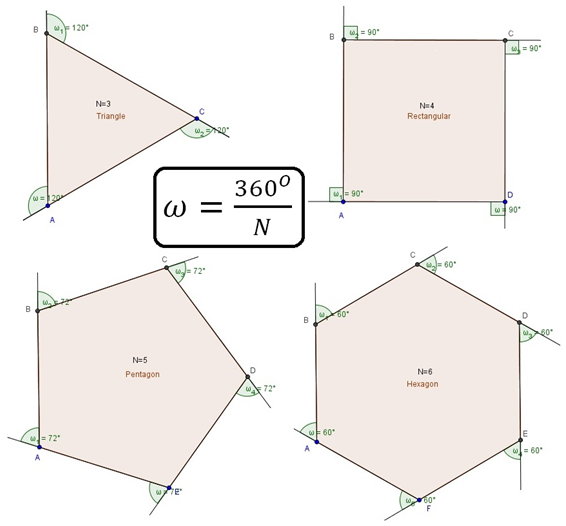
It is essential to know the external angle of the regular polygon in order to give the robot the appropriate command to turn properly.  An external angle (or exterior angle) is the angle that is formed outside of the polygon between one side and a line extended from another side adjacent to it. It can be difficult to visualize from just reading, so take a look at the image below for visual examples.

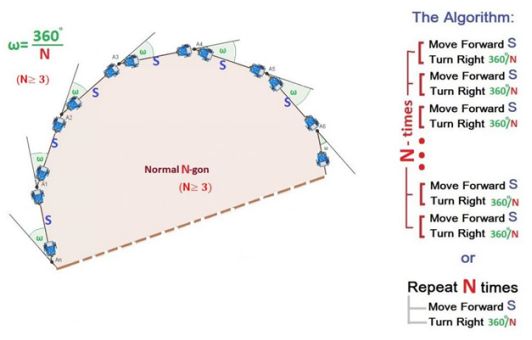
The external angle ω , of a regular polygon (N ≥ 3) is given by the formula: ω=360/N.
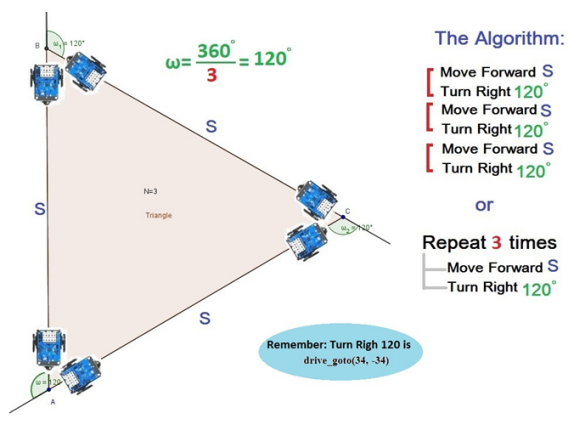
So, in order to make (clockwise) an equilateral triangle with side S, using the ActivityBot we must give the following commands:
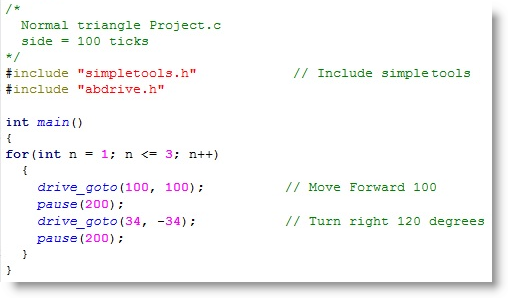
  • Start a new SimpleIDE Project
  • Enter in the code below and make sure load it to your robot with the “Load EEPROM & Run” button
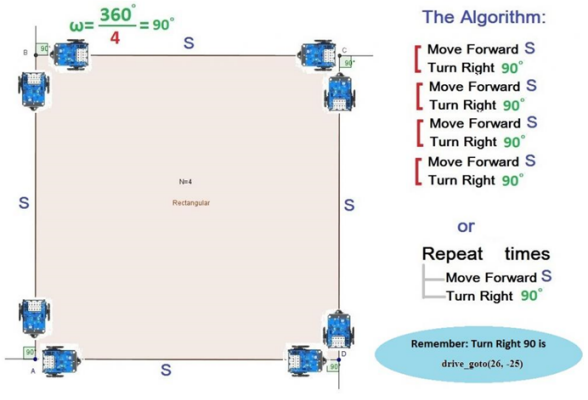
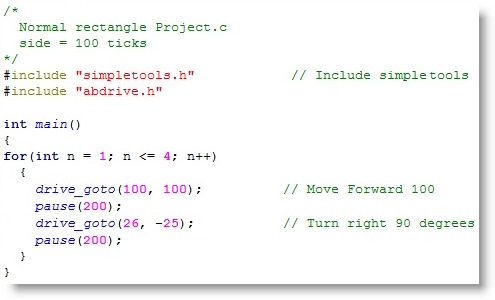
If we want the robot to do a square path of side S (clockwise), we need to give the following commands:
  • Again, start a new SimpleIDE Project
  • Enter in the code below and make sure load it to your robot with the “Load EEPROM & Run” button
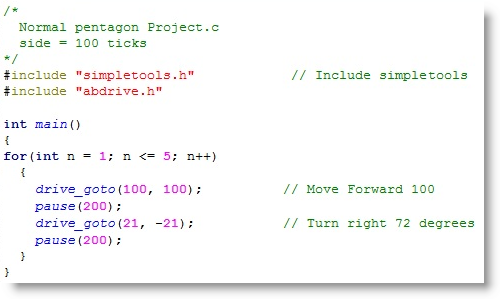
If we want the robot to do a regular pentagon path of side S (clockwise) we need to give the following commands:
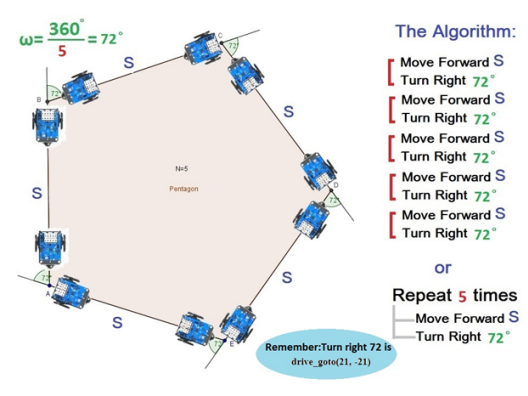
  • Start another new SimpleIDE Project
  • Enter in the code below and make sure load it to your robot with the “Load EEPROM & Run” button
Based on the exercises above, we can give a general equation for every regular polygon with N vertices (Ν≥3) and side S (clockwise):

Printer-friendly version
Calculating Angles of Rotation
Prev
Circles as Regular Polygons
Next

DISCUSSION FORUMS | PARALLAX INC. STORE

About | Terms of Use | Feedback: learn@parallax.com | Copyright©Parallax Inc. 2024

© 2026 Parallax Learn • Built with GeneratePress