Skip to content
Parallax Learn

Parallax Learn

  • Welcome
  • Tutorials
        • Tutorial Series head tag

          Tutorial Series
        • Tutorial Series

          The special, classroom-ready series pages are organized collections of tutorials for our most popular hardware and/or languages. The tutorials for each topic are conveniently accessible from a single page, shown in the order it is recommended that they be completed.
        • Robotics Series Head tag

          Robotics Series
        • Robotics Series

          • Artificial Intelligence
          • Cybersecurity: Radio Data tutorialCybersecurity
          • cyber:bot + Python
          • cyber:bot + MakeCode
          • Boe-Bot Tutorial SeriesBoe-Bot
          • Arduino Shield-Bot
          • ActivityBot with C TutorialsActivityBot + C
          • ActivityBot with BlocklyProp Tutorial SeriesActivityBot + BlocklyProp
          • Scribbler 3 Tutorial SeriesScribbler 3
        • Electronics & Programming Series Head tag

          Electronics & Programming Series
          • BS2 Board of Education Tutorial SeriesBS2 Board of Education
          • Propeller C-Language BasicsPropeller C Basics
          • FLiP Try-It Kit C Tutorial SeriesFLiP Try-It Kit + C
          • FLiP Try-It Kit BlocklyProp TutorialsFLiP Try-It Kit + BlocklyProp
          • Badge WX Tutorial SeriesBadge WX
          • Propeller BlocklyProp Basics and ProjectsPropeller BlocklyProp Basics
          • View All Tutorial Series »
        • Browse Tutorials
        • Browse Tutorials

          Individual tutorials sorted by robot or kit, and language.
        • By Robot or Kit
          • ActivityBot
          • SumoBot WX
          • Boe-Bot
          • Shield-Bot
          • cyber:bot
          • Badge WX
          • ELEV-8
          • ARLO
        • By Language
        • By Language

          • Propeller C
          • Arduino
          • BlocklyProp
          • PBASIC
          • Python
          • MakeCode
          • View All Tutorials »
  • Educators
  • Reference
  • Downloads
  • Home
  • All Courses

Remote Control Rock, Talk, and Roll ActivityBot

Curriculum

  • 1 Section
  • 4 Lessons
  • Lifetime
Expand all sectionsCollapse all sections
  • Remote Control Rock, Talk, and Roll ActivityBot
    4
    • 1.0
      Putting the Pieces Together
    • 1.1
      Taking a Test Drive
    • 1.2
      How Does it All Work Together?
    • 1.3
      Do More With This Project

Putting the Pieces Together

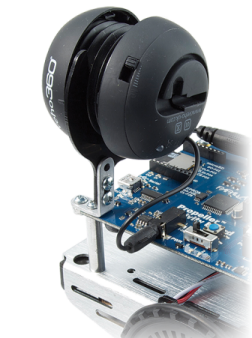
You will need to add the veho360 speaker and its mounting bracket, the whisker circuits, and one IR receiver circuit to your ActivityBot.  You will also need to configure your IR remote for Sony protocol.

First Things First

  • Charge your veho360 or Portable Mini Hamburger Speaker (if it is not charged yet) while you complete the rest of the building steps.  It comes with a USB charging cable. (Note: the speaker’s cable doesn’t work for programming the ActivityBot; for that you must use the cable that came with the robot kit).
  • Make sure you are using the latest SimpleIDE software, and the latest Learn Libraries and ActivityBot Libraries.
  • Make sure your robot has been calibrated recently. If it hasn’t, follow these directions to calibrate your ActivityBot.

Prepare the Gadgets

  • Make sure your IR remote has fresh batteries!
  • Configure your IR remote for Sony protocol (if it is not already configured) following its manufacturer instructions. (For the Brightstar brand remote available from Parallax, press and hold the Setup button until the light near it turns on. Then, press 6-0-5.)

]

  • Follow the directions in the ActivityBot Speaker Mount product guide to attach the bracket to the robot chassis, and mount the charged veho360 or Portable Mini Hamburger speaker. 
 

Build and Test the Sensor Circuits

You will need to build and test three sensor circuits on your ActivityBot breadboard: two for whiskers, and one for the Infrared Receiver.  When you are done, your board will look something like the one below.
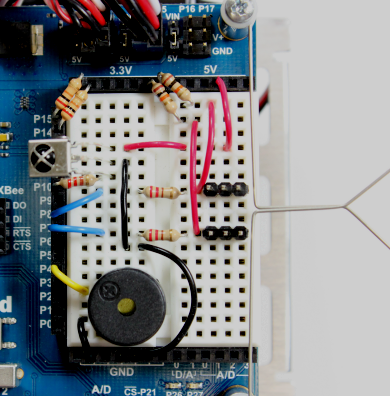
  • Follow the directions on the Build the Whiskers page from the ActivityBot tutorial .  You can use the component placement shown in the photo below, or follow the wiring diagram in the Build the Whiskers page. Either is fine!
  • Test the whisker circuits to make sure they are working.
  • Build and test the IR Receiver circuit, following the Infrared Receiver and Remote tutorial.
  • Gently bend the IR receiver legs so the dome on the sensor is facing upwards. This will help it to receive IR signals from the remote, no matter which way it is traveling.
  • If you like, add a piezo speaker circuit to I/O pin 4. The application code will use it as a low-battery reset indicator at the start of the main routine.

Printer-friendly version
Taking a Test Drive
Next

DISCUSSION FORUMS | PARALLAX INC. STORE

About | Terms of Use | Feedback: learn@parallax.com | Copyright©Parallax Inc. 2024

© 2026 Parallax Learn • Built with GeneratePress