Skip to content
Parallax Learn

Parallax Learn

  • Welcome
  • Tutorials
        • Tutorial Series head tag

          Tutorial Series
        • Tutorial Series

          The special, classroom-ready series pages are organized collections of tutorials for our most popular hardware and/or languages. The tutorials for each topic are conveniently accessible from a single page, shown in the order it is recommended that they be completed.
        • Robotics Series Head tag

          Robotics Series
        • Robotics Series

          • Artificial Intelligence
          • Cybersecurity: Radio Data tutorialCybersecurity
          • cyber:bot + Python
          • cyber:bot + MakeCode
          • Boe-Bot Tutorial SeriesBoe-Bot
          • Arduino Shield-Bot
          • ActivityBot with C TutorialsActivityBot + C
          • ActivityBot with BlocklyProp Tutorial SeriesActivityBot + BlocklyProp
          • Scribbler 3 Tutorial SeriesScribbler 3
        • Electronics & Programming Series Head tag

          Electronics & Programming Series
          • BS2 Board of Education Tutorial SeriesBS2 Board of Education
          • Propeller C-Language BasicsPropeller C Basics
          • FLiP Try-It Kit C Tutorial SeriesFLiP Try-It Kit + C
          • FLiP Try-It Kit BlocklyProp TutorialsFLiP Try-It Kit + BlocklyProp
          • Badge WX Tutorial SeriesBadge WX
          • Propeller BlocklyProp Basics and ProjectsPropeller BlocklyProp Basics
          • View All Tutorial Series »
        • Browse Tutorials
        • Browse Tutorials

          Individual tutorials sorted by robot or kit, and language.
        • By Robot or Kit
          • ActivityBot
          • SumoBot WX
          • Boe-Bot
          • Shield-Bot
          • cyber:bot
          • Badge WX
          • ELEV-8
          • ARLO
        • By Language
        • By Language

          • Propeller C
          • Arduino
          • BlocklyProp
          • PBASIC
          • Python
          • MakeCode
          • View All Tutorials »
  • Educators
  • Reference
  • Downloads
  • Home
  • All Courses

Robotic Drawing Arm Project

Curriculum

  • 1 Section
  • 2 Lessons
  • Lifetime
Expand all sectionsCollapse all sections
  • Robotic Drawing Arm Project
    2
    • 1.0
      Putting It All Together
    • 1.1
      How the Robotic Arm Works

How the Robotic Arm Works
Run The Program

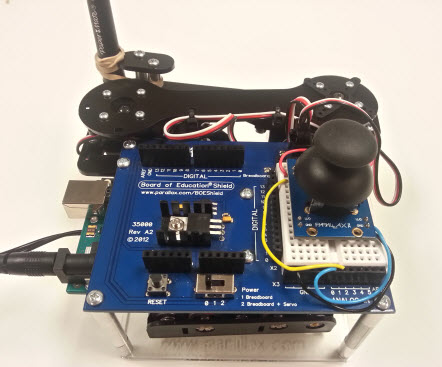
Once you complete the build and load the code, go ahead and power up the unit. Observe its response. Make sure you’re able to bring the arm all the way in, and all the way out by moving the joystick right then left. If you are unable to achieve full motion, adjust the position of the arm by removing the center screw holding each servo horn and placing it in different positions on the servo spline until you achieve the maximum range of motion.

Now you can start experimenting with your robotic servo drawing arm and bring out your inner Picasso!


How Does it Work?

The joystick in this application is essentially two potentiometers. One for the x axis and one for the y axis. As a you push or pull the joystick in any direction you are essentially changing the resistance value of one or both potentiometers.

When resistance changes the joystick outputs a voltage from each of its axis and feeds the variable voltages into two analog to digital converter pins(A0 ,A1) on the Arduino shield and Arduino Uno. 

The Arduino uses it’s built in analog to digital converter(ADC) to convert analog data to digital data. This conversion is called quantization. Once the data is converted to digital, the code can then use it to determine what position each servo should be in to achieve a desired motion and/or position. See the code comments for explanation of the code.


Did You Know?

This project touches on a topic used extensively in the manufacturing industry called Inverse Kinematics.

Inverse Kinematics is a mathematical technique used to plan the movement of robotic joints in order to achieve a specific motion and/or position. Check out Wikipedia to learn more about it.


Printer-friendly version
Putting It All Together
Prev

DISCUSSION FORUMS | PARALLAX INC. STORE

About | Terms of Use | Feedback: learn@parallax.com | Copyright©Parallax Inc. 2024

© 2026 Parallax Learn • Built with GeneratePress