Skip to content
Parallax Learn

Parallax Learn

  • Welcome
  • Tutorials
        • Tutorial Series head tag

          Tutorial Series
        • Tutorial Series

          The special, classroom-ready series pages are organized collections of tutorials for our most popular hardware and/or languages. The tutorials for each topic are conveniently accessible from a single page, shown in the order it is recommended that they be completed.
        • Robotics Series Head tag

          Robotics Series
        • Robotics Series

          • Artificial Intelligence
          • Cybersecurity: Radio Data tutorialCybersecurity
          • cyber:bot + Python
          • cyber:bot + MakeCode
          • Boe-Bot Tutorial SeriesBoe-Bot
          • Arduino Shield-Bot
          • ActivityBot with C TutorialsActivityBot + C
          • ActivityBot with BlocklyProp Tutorial SeriesActivityBot + BlocklyProp
          • Scribbler 3 Tutorial SeriesScribbler 3
        • Electronics & Programming Series Head tag

          Electronics & Programming Series
          • BS2 Board of Education Tutorial SeriesBS2 Board of Education
          • Propeller C-Language BasicsPropeller C Basics
          • FLiP Try-It Kit C Tutorial SeriesFLiP Try-It Kit + C
          • FLiP Try-It Kit BlocklyProp TutorialsFLiP Try-It Kit + BlocklyProp
          • Badge WX Tutorial SeriesBadge WX
          • Propeller BlocklyProp Basics and ProjectsPropeller BlocklyProp Basics
          • View All Tutorial Series »
        • Browse Tutorials
        • Browse Tutorials

          Individual tutorials sorted by robot or kit, and language.
        • By Robot or Kit
          • ActivityBot
          • SumoBot WX
          • Boe-Bot
          • Shield-Bot
          • cyber:bot
          • Badge WX
          • ELEV-8
          • ARLO
        • By Language
        • By Language

          • Propeller C
          • Arduino
          • BlocklyProp
          • PBASIC
          • Python
          • MakeCode
          • View All Tutorials »
  • Educators
  • Reference
  • Downloads
  • Home
  • All Courses

Robotic Drawing Arm Project

Curriculum

  • 1 Section
  • 2 Lessons
  • Lifetime
Expand all sectionsCollapse all sections
  • Robotic Drawing Arm Project
    2
    • 1.0
      Putting It All Together
    • 1.1
      How the Robotic Arm Works

Putting It All Together

This is an easy application to build, however it is assumed that you already have laser-cut the three pieces of plastic that make up the body of the arm using the file provided, or have suitable replacement/stand in parts. For those without access to a laser cutter, you can use the Parts Drawings download to create your own parts using a method of your choice:

  • Robotic Arm Laser Files Download
  • Robotic Arm Parts Drawings
  • Robotic Arm Code Download


Build It

  • Build your retrofit kit as per the PDF instructions for the kit (https://www.parallax.com/sites/default/files/downloads/35000-BOE-Shield-Documentation-v1.2.pdf)
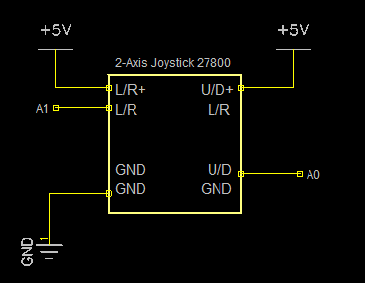
  • Then build the joystick circuit using the following schematic image:
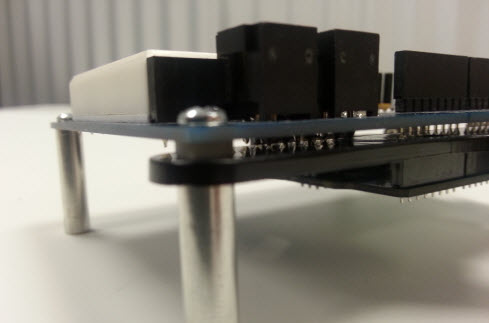
  • In order to attach the base of the robotic arm to the shield, you will need to remove the front mounting screws. Line up the holes on the base with the mounting holes on the shield. Insert a plastic standoff in between the shield and the base of the robotic arm. This will ensure that the base does not touch any solder joints on the bottom side of the shield.
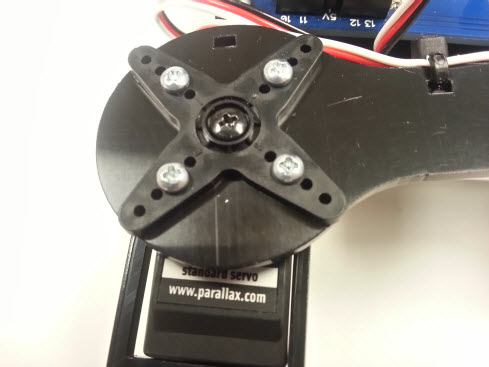
  • Install a Standard Servo onto the shoulder joint of the robotic arm using (4) #4-40 3/8 inch screws and (4) #4-40 nuts. Make sure to include the servo horn. Using (4) #2-56 1/4 inch screws and nuts mount the forearm on top of the servo as shown in the picture below.
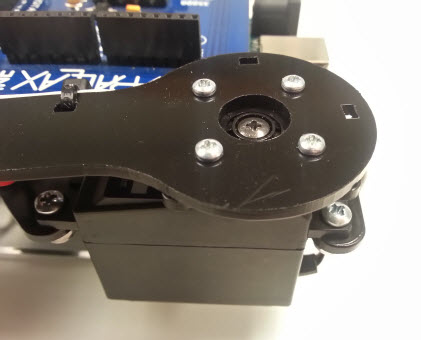
  • Mount a Standard Servo onto the forearm using (4) #4-40 3/8 inch screws and nuts, and then mount them onto the upper arm (the arm attached to base unit) using (4) #2-56 1/4 inch screws and nuts as shown in the following pictures. 
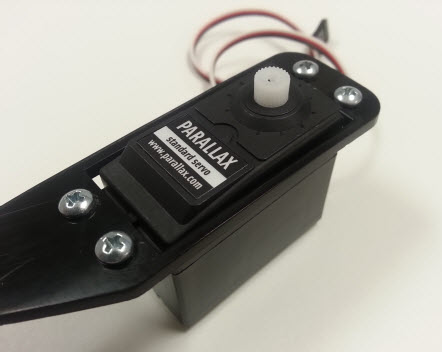
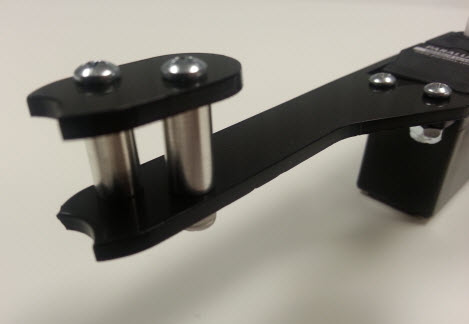
  • Mount the pin holder to the tip of the forearm using (2) #4-40 7/8 inch screws, (2) #4-40 nuts and (2) standoffs. The standoff sizes can be of your choosing.
  • Insert the servo cable belonging to the servo that mounts to the base into servo header P13 and the other servo cable into servo header P12.
  • Connect the batteries and load the code.

Printer-friendly version
How the Robotic Arm Works
Next

DISCUSSION FORUMS | PARALLAX INC. STORE

About | Terms of Use | Feedback: learn@parallax.com | Copyright©Parallax Inc. 2024

© 2026 Parallax Learn • Built with GeneratePress