Skip to content
Parallax Learn

Parallax Learn

  • Welcome
  • Tutorials
        • Tutorial Series head tag

          Tutorial Series
        • Tutorial Series

          The special, classroom-ready series pages are organized collections of tutorials for our most popular hardware and/or languages. The tutorials for each topic are conveniently accessible from a single page, shown in the order it is recommended that they be completed.
        • Robotics Series Head tag

          Robotics Series
        • Robotics Series

          • Artificial Intelligence
          • Cybersecurity: Radio Data tutorialCybersecurity
          • cyber:bot + Python
          • cyber:bot + MakeCode
          • Boe-Bot Tutorial SeriesBoe-Bot
          • Arduino Shield-Bot
          • ActivityBot with C TutorialsActivityBot + C
          • ActivityBot with BlocklyProp Tutorial SeriesActivityBot + BlocklyProp
          • Scribbler 3 Tutorial SeriesScribbler 3
        • Electronics & Programming Series Head tag

          Electronics & Programming Series
          • BS2 Board of Education Tutorial SeriesBS2 Board of Education
          • Propeller C-Language BasicsPropeller C Basics
          • FLiP Try-It Kit C Tutorial SeriesFLiP Try-It Kit + C
          • FLiP Try-It Kit BlocklyProp TutorialsFLiP Try-It Kit + BlocklyProp
          • Badge WX Tutorial SeriesBadge WX
          • Propeller BlocklyProp Basics and ProjectsPropeller BlocklyProp Basics
          • View All Tutorial Series »
        • Browse Tutorials
        • Browse Tutorials

          Individual tutorials sorted by robot or kit, and language.
        • By Robot or Kit
          • ActivityBot
          • SumoBot WX
          • Boe-Bot
          • Shield-Bot
          • cyber:bot
          • Badge WX
          • ELEV-8
          • ARLO
        • By Language
        • By Language

          • Propeller C
          • Arduino
          • BlocklyProp
          • PBASIC
          • Python
          • MakeCode
          • View All Tutorials »
  • Educators
  • Reference
  • Downloads
  • Home
  • All Courses

Running Lights for your ELEV-8 v3

Curriculum

  • 1 Section
  • 10 Lessons
  • Lifetime
Expand all sectionsCollapse all sections
  • Running Lights for your ELEV-8 v3
    10
    • 1.0
      Running Lights – Materials
    • 1.1
      Solder the Surface Mount Parts
    • 1.2
      Solder the Through-Hole Parts
    • 1.3
      Test the Running Lights
    • 1.4
      Edit the FC Firmware for LEDs
    • 1.5
      Install the Running Lights
    • 1.6
      Saftey Test After Customizing
    • 1.7
      Install the Cables
    • 1.8
      Understand and Expand the Running Light Modes
    • 1.9
      Using the Running Lights

Running Lights – Materials

To build and install running lights for your ELEv-8 v3, you will need parts and supplies from several different sources.


Custom Printed Circuit Boards (PCBs)
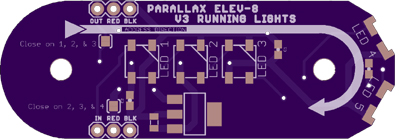
The PCBs are available as a shared project from OSH Park, a community batch PCB service provider.  This PCB must be ordered in multiples of 3.  This means that in order to get 4—one for each boom—you will have to order 6 PCBs.  It may take approximately two weeks for your PCBs to be fabricated since they are made to order.

  • (6) Custom PCBs – https://oshpark.com/shared_projects/Ycc6C6G5


Soldering Supplies

The soldering techniques shown in this project make both traditional soldering with an iron, and also reflow soldering.  A syringe of low-temperature soldering paste makes it easy to surface-mount solder with a hobby-grade heat gun or a small electric frying pan.

  • (1) ChipQuick low-temp solder paste syringe – ChipQuick #SMDLTFP
  • A Heat Source and Heat-Proof Surface:
    • Heat Gun and a ceramic tile or old baking pan*  – OR –
    • Electric Frying Pan*
  • Soldering Iron or Kit – Parallax Basic Soldering Kit #700-10011
  • Solder
  • Protective Eyewear
  • Fine-point tweezers or needle-nosed pliers

*Once an electric frying pan, baking pan, pizza stone, or other kitchen utensil has been used for soldering, never use it for preparing food again! Solder and soldering paste can be hazardous to ingest.


Surface-Mount Electronic Components

To build the running lights, you will be soldering LEDs, capacitors, and voltage regulators to the PCBs.  The quantities shown are for 4 running lights.  To build up six running lights (2 spares), multiply each of the following quantities by 1.5:

  • (2) WS2812B raw LED 10 pack – Digi-Key #15251104-ND, or Adafruit #1665
  • (4) uA78M05 5V Voltage Regulator SOT-223 – Digi-Key #296-12290-1-ND
  • (12) 0.1 uF 0603 Ceramic Capacitors – Digi-Key #490-1542-1-ND
  • (4) 22 uF 0805 Ceramic Capacitors – Digi-Key #1276-2908-1-ND


Additional Hardware

To install the running lights, you will need some additional hardware, header pins, and cables:

  • (1) Saddle Washers 24-pack – Parallax #570-80061
  • (1) ELEV-8 v3 Hardware Pack – Parallax #570-80300
  • (1) 40-pin Single Row Header – Parallax #451-04001
  • (3) 24″ 3-Pin Signal-Power-Ground Cable Extension – Parallax #800-00240
  • (2) 16″ 3-Pin Signal-Power-Ground Cable Extension – Parallax #800-00160


Household Supplies

Finally, to aid in the assembly and install process, you will need:

  • Cotton swabs
  • Paper towels
  • Masking Tape
  • Permanent Marker

Printer-friendly version
Solder the Surface Mount Parts
Next

DISCUSSION FORUMS | PARALLAX INC. STORE

About | Terms of Use | Feedback: learn@parallax.com | Copyright©Parallax Inc. 2024

© 2026 Parallax Learn • Built with GeneratePress