Skip to content
Parallax Learn

Parallax Learn

  • Welcome
  • Tutorials
        • Tutorial Series head tag

          Tutorial Series
        • Tutorial Series

          The special, classroom-ready series pages are organized collections of tutorials for our most popular hardware and/or languages. The tutorials for each topic are conveniently accessible from a single page, shown in the order it is recommended that they be completed.
        • Robotics Series Head tag

          Robotics Series
        • Robotics Series

          • Artificial Intelligence
          • Cybersecurity: Radio Data tutorialCybersecurity
          • cyber:bot + Python
          • cyber:bot + MakeCode
          • Boe-Bot Tutorial SeriesBoe-Bot
          • Arduino Shield-Bot
          • ActivityBot with C TutorialsActivityBot + C
          • ActivityBot with BlocklyProp Tutorial SeriesActivityBot + BlocklyProp
          • Scribbler 3 Tutorial SeriesScribbler 3
        • Electronics & Programming Series Head tag

          Electronics & Programming Series
          • BS2 Board of Education Tutorial SeriesBS2 Board of Education
          • Propeller C-Language BasicsPropeller C Basics
          • FLiP Try-It Kit C Tutorial SeriesFLiP Try-It Kit + C
          • FLiP Try-It Kit BlocklyProp TutorialsFLiP Try-It Kit + BlocklyProp
          • Badge WX Tutorial SeriesBadge WX
          • Propeller BlocklyProp Basics and ProjectsPropeller BlocklyProp Basics
          • View All Tutorial Series »
        • Browse Tutorials
        • Browse Tutorials

          Individual tutorials sorted by robot or kit, and language.
        • By Robot or Kit
          • ActivityBot
          • SumoBot WX
          • Boe-Bot
          • Shield-Bot
          • cyber:bot
          • Badge WX
          • ELEV-8
          • ARLO
        • By Language
        • By Language

          • Propeller C
          • Arduino
          • BlocklyProp
          • PBASIC
          • Python
          • MakeCode
          • View All Tutorials »
  • Educators
  • Reference
  • Downloads
  • Home
  • All Courses
  • Sensors with the micro:bit and Python

Sensors with the micro:bit and Python

2-Axis Joystick

2-Axis Joystick 

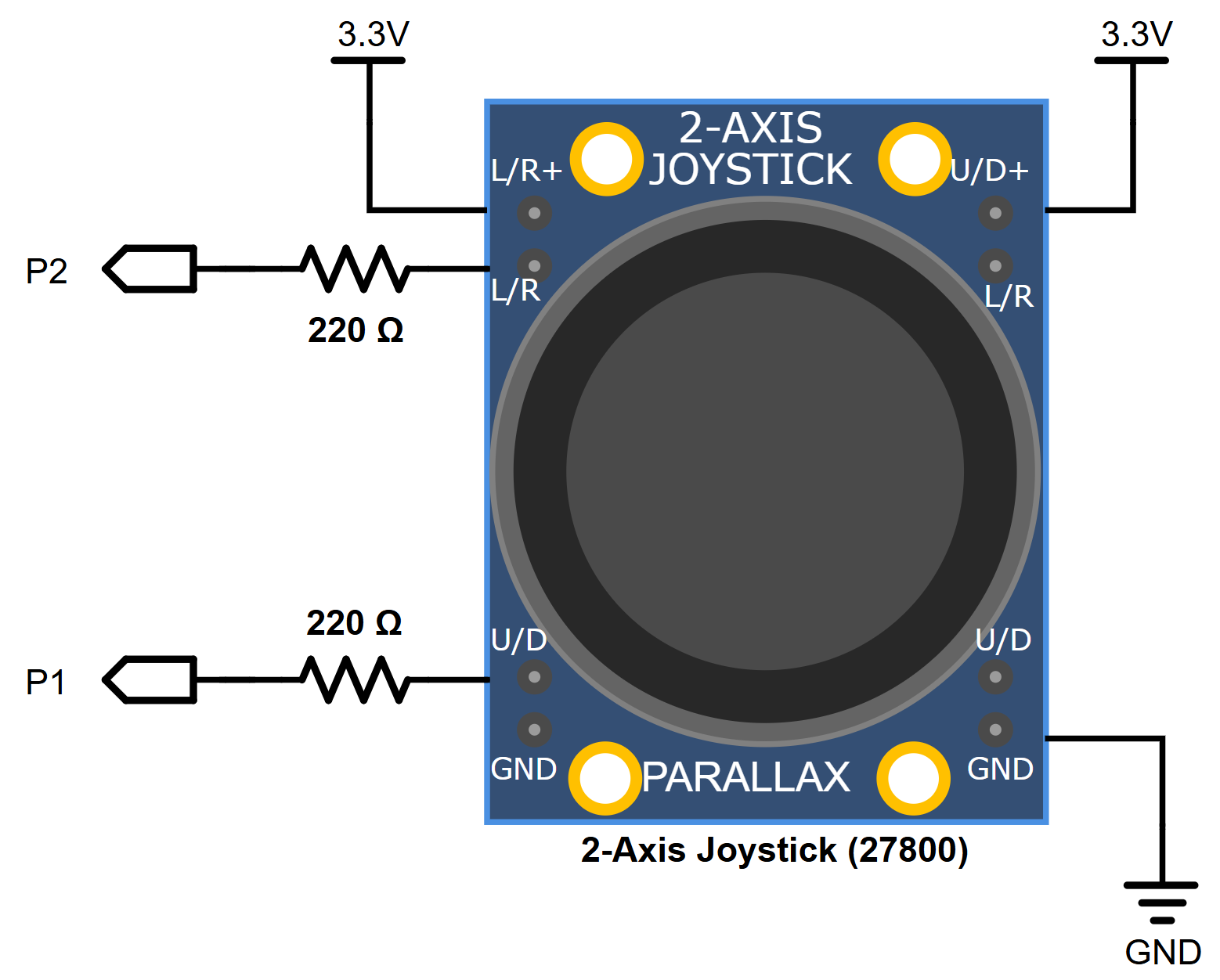
The 2-Axis Joystick’s position is measured by two potentiometers, one for the forward and backward motion and the other for left and right.

Parts

(1) 2-Axis Joystick 27800 
(2) Resistor 220 Ω (red-red-brown-gold)
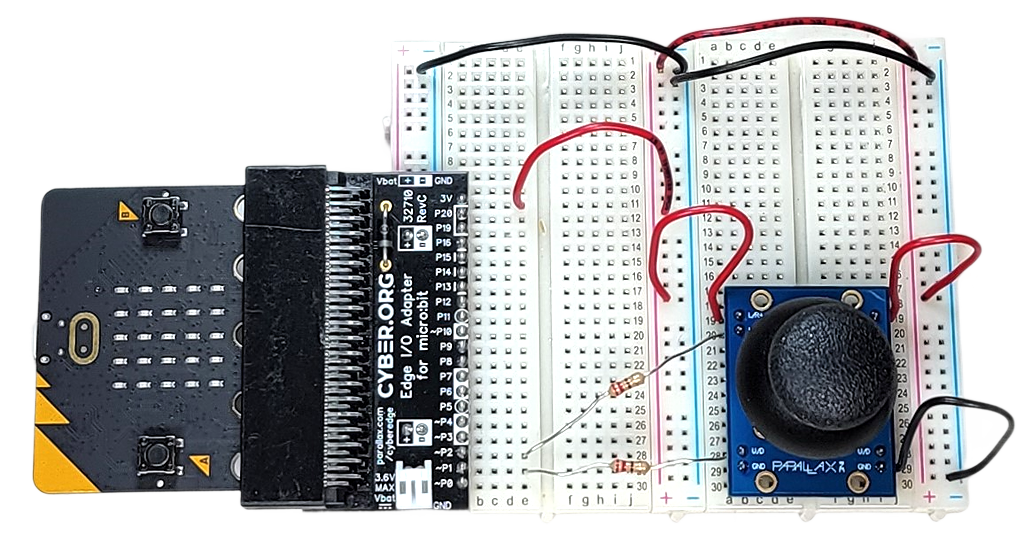
Jumper wires: (2) Red, (1) black

Schematic
Wiring
Script

# joystick-measure-pot-volts-x2
from microbit import *

pin2.set_pull(pin2.NO_PULL)
pin1.set_pull(pin1.NO_PULL)

while True:
    adc_h = pin2.read_analog()
    v_h = adc_h * 3.3 / 1024
    adc_v = pin1.read_analog()
    v_v = adc_v * 3.3 / 1024
    
    s = "h:%.1f" % v_h + "V | " + "v:%.1f" % v_v +"V"
    print(s)
    display.scroll(s)

Tests

Use read_two_line_variable_voltage_sensor at the beginning of this section to measure the sensor’s voltage output.  

After loading the script into the micro:bit, click Show serial in the micro:bit Python Editor.  There, you will see the voltage measurements updated every second.

Script

# joystick-matrix-pixel-control

from microbit import *

def map(val, from_start, from_end, to_start, to_end): 
    return (val-from_start)*(to_end-to_start)\
    /(from_end-from_start)+to_start

pin2.set_pull(pin2.NO_PULL)
pin1.set_pull(pin1.NO_PULL)

while True:
    adc_h = pin2.read_analog()
    h = int(map(adc_h, 0, 1024, 0, 5))
    adc_v = pin1.read_analog()
    v = int(map(adc_v, 0, 1024, 0, 5))
    display.clear()
    display.set_pixel(v, h, 9)
    sleep(20)

Tests

Verify that the “pixel” on the micro:bit module’s 5×5 LED matrix display lights up and indicates the position of the joystick.


Printer-friendly version
Phototransistor Light Sensor
Prev
LaserPING Distance Sensor
Next

DISCUSSION FORUMS | PARALLAX INC. STORE

About | Terms of Use | Feedback: learn@parallax.com | Copyright©Parallax Inc. 2024

© 2026 Parallax Learn • Built with GeneratePress