Skip to content
Parallax Learn

Parallax Learn

  • Welcome
  • Tutorials
        • Tutorial Series head tag

          Tutorial Series
        • Tutorial Series

          The special, classroom-ready series pages are organized collections of tutorials for our most popular hardware and/or languages. The tutorials for each topic are conveniently accessible from a single page, shown in the order it is recommended that they be completed.
        • Robotics Series Head tag

          Robotics Series
        • Robotics Series

          • Artificial Intelligence
          • Cybersecurity: Radio Data tutorialCybersecurity
          • cyber:bot + Python
          • cyber:bot + MakeCode
          • Boe-Bot Tutorial SeriesBoe-Bot
          • Arduino Shield-Bot
          • ActivityBot with C TutorialsActivityBot + C
          • ActivityBot with BlocklyProp Tutorial SeriesActivityBot + BlocklyProp
          • Scribbler 3 Tutorial SeriesScribbler 3
        • Electronics & Programming Series Head tag

          Electronics & Programming Series
          • BS2 Board of Education Tutorial SeriesBS2 Board of Education
          • Propeller C-Language BasicsPropeller C Basics
          • FLiP Try-It Kit C Tutorial SeriesFLiP Try-It Kit + C
          • FLiP Try-It Kit BlocklyProp TutorialsFLiP Try-It Kit + BlocklyProp
          • Badge WX Tutorial SeriesBadge WX
          • Propeller BlocklyProp Basics and ProjectsPropeller BlocklyProp Basics
          • View All Tutorial Series »
        • Browse Tutorials
        • Browse Tutorials

          Individual tutorials sorted by robot or kit, and language.
        • By Robot or Kit
          • ActivityBot
          • SumoBot WX
          • Boe-Bot
          • Shield-Bot
          • cyber:bot
          • Badge WX
          • ELEV-8
          • ARLO
        • By Language
        • By Language

          • Propeller C
          • Arduino
          • BlocklyProp
          • PBASIC
          • Python
          • MakeCode
          • View All Tutorials »
  • Educators
  • Reference
  • Downloads
  • Home
  • All Courses

Sound for the cyber:bot

Curriculum

  • 1 Section
  • 5 Lessons
  • Lifetime
Expand all sectionsCollapse all sections
  • Sound for the cyber:bot
    5
    • 1.1
      Introducing the Piezospeaker
    • 1.2
      Place the Piezospeaker
    • 1.3
      The cyber:bot tone function
    • 1.4
      Notes from Frequencies
    • 1.5
      Songs with Lists

Introducing the Piezospeaker

To emit sound, the cyber:bot uses a device called a piezoelectric speaker (piezospeaker). This speaker can make different tones depending on the rate of high/low electrical signals it receives. The schematic symbol and part drawing are shown below.
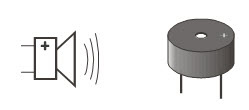
A piezoelectric element is a crystal that changes shape slightly when voltage is applied to it.  Applying high and low voltages alternating at a rapid rate causes the crystal to rapidly change shape.  The resulting vibration in turn vibrates the air around it, and this is what the ear detects as sound.

Frequency Facts

  • The rate or speed at which something changes is said to be its frequency.
  • Frequency can be measured in hertz (Hz) which is the number of times a signal repeats itself in one second. 
  • One kilohertz is one-thousand-times-per-second, abbreviated 1 kHz.
  • Every rate of vibration makes a different tone, or pitch.
  • The human ear is able to detect frequencies in a range from very low pitch (20 Hz) to very high pitch (20 kHz or 20,000 Hz). 

Did you know?

Piezoelectric elements have many uses.  As opposed to sending voltage to the piezoelectric element to make it change shape, when force is applied to a piezoelectric element (which impacts its shape), it actually creates voltage.

Some electronic drum sets use piezoelectric elements to detect when, and how hard, a drummer has hit a sensor.

Some barbeque grills have push button lighters that use a piezoelectric element to cause a spark to start the grill. A spring-loaded hammer inside the button impacts a piezoelectric element to generate a small spark.

Piezoelectric elements, depending on their shape and thickness, have a frequency at which they naturally vibrate.  This natural vibration can be used to create voltages at set frequencies that function as the clock oscillator for many computers and microcontrollers. If you have ever seen a clock or watch that says “quartz”, there is a piezoelectric quartz crystal inside.

Adapted Wikimedia Commons image “Inside Quartz Crystal Tuning Fork” by Chribbe76 [Public domain]


Printer-friendly version
Place the Piezospeaker
Next

DISCUSSION FORUMS | PARALLAX INC. STORE

About | Terms of Use | Feedback: learn@parallax.com | Copyright©Parallax Inc. 2024

© 2026 Parallax Learn • Built with GeneratePress