Skip to content
Parallax Learn

Parallax Learn

  • Welcome
  • Tutorials
        • Tutorial Series head tag

          Tutorial Series
        • Tutorial Series

          The special, classroom-ready series pages are organized collections of tutorials for our most popular hardware and/or languages. The tutorials for each topic are conveniently accessible from a single page, shown in the order it is recommended that they be completed.
        • Robotics Series Head tag

          Robotics Series
        • Robotics Series

          • Artificial Intelligence
          • Cybersecurity: Radio Data tutorialCybersecurity
          • cyber:bot + Python
          • cyber:bot + MakeCode
          • Boe-Bot Tutorial SeriesBoe-Bot
          • Arduino Shield-Bot
          • ActivityBot with C TutorialsActivityBot + C
          • ActivityBot with BlocklyProp Tutorial SeriesActivityBot + BlocklyProp
          • Scribbler 3 Tutorial SeriesScribbler 3
        • Electronics & Programming Series Head tag

          Electronics & Programming Series
          • BS2 Board of Education Tutorial SeriesBS2 Board of Education
          • Propeller C-Language BasicsPropeller C Basics
          • FLiP Try-It Kit C Tutorial SeriesFLiP Try-It Kit + C
          • FLiP Try-It Kit BlocklyProp TutorialsFLiP Try-It Kit + BlocklyProp
          • Badge WX Tutorial SeriesBadge WX
          • Propeller BlocklyProp Basics and ProjectsPropeller BlocklyProp Basics
          • View All Tutorial Series »
        • Browse Tutorials
        • Browse Tutorials

          Individual tutorials sorted by robot or kit, and language.
        • By Robot or Kit
          • ActivityBot
          • SumoBot WX
          • Boe-Bot
          • Shield-Bot
          • cyber:bot
          • Badge WX
          • ELEV-8
          • ARLO
        • By Language
        • By Language

          • Propeller C
          • Arduino
          • BlocklyProp
          • PBASIC
          • Python
          • MakeCode
          • View All Tutorials »
  • Educators
  • Reference
  • Downloads
  • Home
  • All Courses

Sound for the cyber:bot

Curriculum

  • 1 Section
  • 5 Lessons
  • Lifetime
Expand all sectionsCollapse all sections
  • Sound for the cyber:bot
    5
    • 1.1
      Introducing the Piezospeaker
    • 1.2
      Place the Piezospeaker
    • 1.3
      The cyber:bot tone function
    • 1.4
      Notes from Frequencies
    • 1.5
      Songs with Lists

Notes from Frequencies

You can use musical note frequencies in the chart below for the tone function’s f parameter to play music.
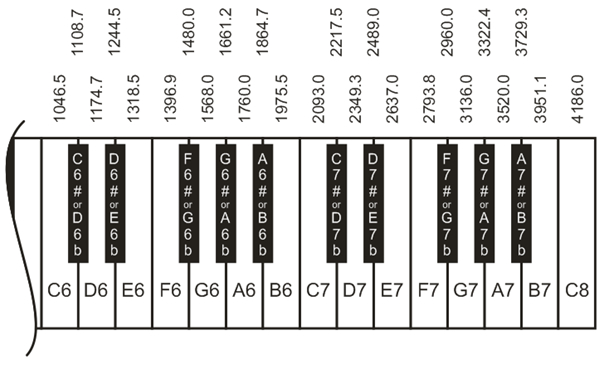
Example:

bot(22).tone(1975.5, 500)

This command plays a B6 note for half of a second.  Using this chart, you are able to create songs with the piezospeaker and the cyber:bot.

The notes to the first line of  the Happy Birthday song go in the following order: D – D – E – D – G – F.  Matching the notes with their frequencies, we can make the following program.

Example script: happy_birthday

This example script plays out the first line of “Happy Birthday.”

  • Set the project’s name to happy_birthday, enter the script below, and then click Save.
  • Click Send to micro:bit.
  • Set PWR to 1.
# happy_birthday

from cyberbot import *

bot(22).tone(2349.3, 125)        #D for an eighth
bot(22).tone(2349.3,  62)        #D for a sixteenth
bot(22).tone(2637.0, 250)        #E for a quarter
bot(22).tone(2349.3, 250)        #C for a quarter
bot(22).tone(3136.0, 250)        #G for a quarter
bot(22).tone(2793.8, 500)        #F for a half
  • Did you hear your cyber:bot play Happy Birthday?
  • Set PWR to 0.

Printer-friendly version
The cyber:bot tone function
Prev
Songs with Lists
Next

DISCUSSION FORUMS | PARALLAX INC. STORE

About | Terms of Use | Feedback: learn@parallax.com | Copyright©Parallax Inc. 2024

© 2026 Parallax Learn • Built with GeneratePress