Skip to content
Parallax Learn

Parallax Learn

  • Welcome
  • Tutorials
        • Tutorial Series head tag

          Tutorial Series
        • Tutorial Series

          The special, classroom-ready series pages are organized collections of tutorials for our most popular hardware and/or languages. The tutorials for each topic are conveniently accessible from a single page, shown in the order it is recommended that they be completed.
        • Robotics Series Head tag

          Robotics Series
        • Robotics Series

          • Artificial Intelligence
          • Cybersecurity: Radio Data tutorialCybersecurity
          • cyber:bot + Python
          • cyber:bot + MakeCode
          • Boe-Bot Tutorial SeriesBoe-Bot
          • Arduino Shield-Bot
          • ActivityBot with C TutorialsActivityBot + C
          • ActivityBot with BlocklyProp Tutorial SeriesActivityBot + BlocklyProp
          • Scribbler 3 Tutorial SeriesScribbler 3
        • Electronics & Programming Series Head tag

          Electronics & Programming Series
          • BS2 Board of Education Tutorial SeriesBS2 Board of Education
          • Propeller C-Language BasicsPropeller C Basics
          • FLiP Try-It Kit C Tutorial SeriesFLiP Try-It Kit + C
          • FLiP Try-It Kit BlocklyProp TutorialsFLiP Try-It Kit + BlocklyProp
          • Badge WX Tutorial SeriesBadge WX
          • Propeller BlocklyProp Basics and ProjectsPropeller BlocklyProp Basics
          • View All Tutorial Series »
        • Browse Tutorials
        • Browse Tutorials

          Individual tutorials sorted by robot or kit, and language.
        • By Robot or Kit
          • ActivityBot
          • SumoBot WX
          • Boe-Bot
          • Shield-Bot
          • cyber:bot
          • Badge WX
          • ELEV-8
          • ARLO
        • By Language
        • By Language

          • Propeller C
          • Arduino
          • BlocklyProp
          • PBASIC
          • Python
          • MakeCode
          • View All Tutorials »
  • Educators
  • Reference
  • Downloads
  • Home
  • All Courses

Sound for the cyber:bot

Curriculum

  • 1 Section
  • 5 Lessons
  • Lifetime
Expand all sectionsCollapse all sections
  • Sound for the cyber:bot
    5
    • 1.1
      Introducing the Piezospeaker
    • 1.2
      Place the Piezospeaker
    • 1.3
      The cyber:bot tone function
    • 1.4
      Notes from Frequencies
    • 1.5
      Songs with Lists

Place the Piezospeaker

It is time to add a piezospeaker to your cyber:bot board.

Parts Required

(1) piezospeaker from the Small Robot Electronics Component Pack.  (Just peel off the “Remove the seal after washing” sticker if it has one).
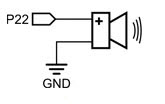
The picture above shows the schematic for the piezospeaker connected to P22. Notice that the cyber:bot board has two slots that fit the piezospeaker, and will connect it to P22.

Long Leads or Short?

The cyber:bot board was designed for a piezospeaker with long leads, like the one on the left. But due to supply chain challenges, some kits may include a piezospeaker with short leads, like the one shown on the right.  Either will work!
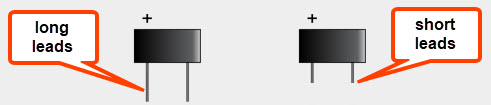
For Long-Lead Piezospeakers

  • Look for the (+) symbol on the top of the piezospeaker case. The positive leg of the speaker is approximately underneath.
  • Gently insert the positive leg into the cyber:bot board hole by the P22 label. The other leg goes into the hole near the GND label.  The pins will go through the board and into sockets underneath.
  • Put the cyber:bot board power switch in position 1 (or 2) when you want to run a program that uses the piezospeaker.
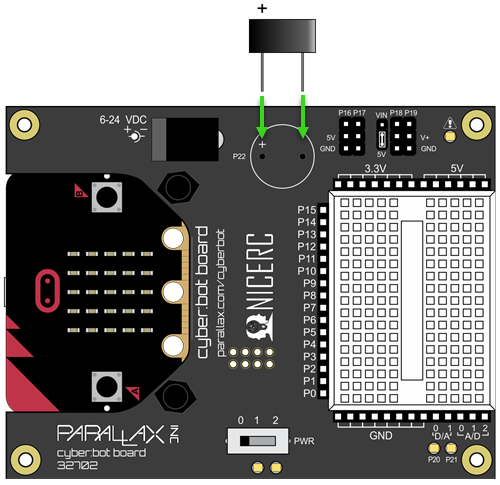
The speaker should stay in place for the rest of the activities as it does not interfere with any other circuits since it’s not positioned on the breadboard.

For Short-Lead Piezospeakers

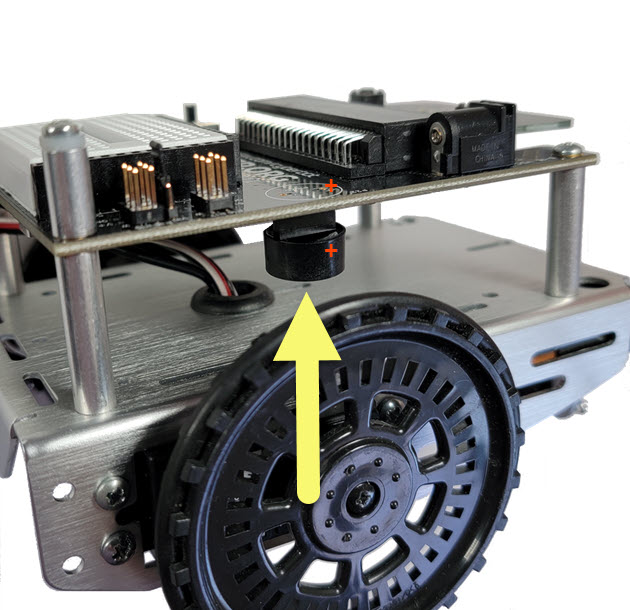
If your piezospeaker has short leads, it may fall out of the socket when inserted from the top of the cyber:bot board. But that is okay, it can still be plugged into the socket from the bottom of the board.

  • Look for the (+) symbol on the top of the piezospeaker case. The positive leg of the speaker is approximately underneath.
  • Look for the 4-pin socket on the underside of the cyber:bot board, directly underneath the piezospeaker label. The piezospeaker leads will go in the outermost holes of this socket.
  • Gently insert the piezospeaker leads into the socket, with the aligning positive lead with the plus symbol on top of the board.
  • Put the cyber:bot board power switch in position 1 (or 2) when you want to run a program that uses the piezospeaker.
Note: you can also build a piezospeaker circuit on the breadboard.
To use a piezospeaker on the breadboard, make sure its legs go in different breadboard rows. Using jumper wires, connect its (+) leg to an I/O pin socket (P4 for example) and connect its other leg to a GND socket. In your scripts, you will need to change bot (22) to bot (4) or the number for whichever pin you used.


Printer-friendly version
Introducing the Piezospeaker
Prev
The cyber:bot tone function
Next

DISCUSSION FORUMS | PARALLAX INC. STORE

About | Terms of Use | Feedback: learn@parallax.com | Copyright©Parallax Inc. 2024

© 2026 Parallax Learn • Built with GeneratePress