Skip to content
Parallax Learn

Parallax Learn

  • Welcome
  • Tutorials
        • Tutorial Series head tag

          Tutorial Series
        • Tutorial Series

          The special, classroom-ready series pages are organized collections of tutorials for our most popular hardware and/or languages. The tutorials for each topic are conveniently accessible from a single page, shown in the order it is recommended that they be completed.
        • Robotics Series Head tag

          Robotics Series
        • Robotics Series

          • Artificial Intelligence
          • Cybersecurity: Radio Data tutorialCybersecurity
          • cyber:bot + Python
          • cyber:bot + MakeCode
          • Boe-Bot Tutorial SeriesBoe-Bot
          • Arduino Shield-Bot
          • ActivityBot with C TutorialsActivityBot + C
          • ActivityBot with BlocklyProp Tutorial SeriesActivityBot + BlocklyProp
          • Scribbler 3 Tutorial SeriesScribbler 3
        • Electronics & Programming Series Head tag

          Electronics & Programming Series
          • BS2 Board of Education Tutorial SeriesBS2 Board of Education
          • Propeller C-Language BasicsPropeller C Basics
          • FLiP Try-It Kit C Tutorial SeriesFLiP Try-It Kit + C
          • FLiP Try-It Kit BlocklyProp TutorialsFLiP Try-It Kit + BlocklyProp
          • Badge WX Tutorial SeriesBadge WX
          • Propeller BlocklyProp Basics and ProjectsPropeller BlocklyProp Basics
          • View All Tutorial Series »
        • Browse Tutorials
        • Browse Tutorials

          Individual tutorials sorted by robot or kit, and language.
        • By Robot or Kit
          • ActivityBot
          • SumoBot WX
          • Boe-Bot
          • Shield-Bot
          • cyber:bot
          • Badge WX
          • ELEV-8
          • ARLO
        • By Language
        • By Language

          • Propeller C
          • Arduino
          • BlocklyProp
          • PBASIC
          • Python
          • MakeCode
          • View All Tutorials »
  • Educators
  • Reference
  • Downloads
  • Home
  • All Courses

Sound for the cyber:bot

Curriculum

  • 1 Section
  • 5 Lessons
  • Lifetime
Expand all sectionsCollapse all sections
  • Sound for the cyber:bot
    5
    • 1.0
      Introducing the Piezospeaker
    • 1.1
      Place the Piezospeaker
    • 1.2
      The cyber:bot tone block
    • 1.3
      Notes from Frequencies
    • 1.4
      Songs with Lists

Songs with Lists

A good way to keep track of notes in a song is to use a list. Sometimes, in other languages, these structures are referred to as an array. For now, they can be thought of as the same thing but there are some behind-the-scenes differences between these two which will be covered at some other time.

A list is a collection of values that can be referred to as a single, cohesive unit. Think about how a song is a single collection comprised of several individual notes. While each note is important, it is all the notes together that make up the song.

Taking the previous example, each of the notes in the project happy_birthday are grouped in order into a list called notes. The lengths of each note are grouped, in order, into another list called lengths.

How Lists Work

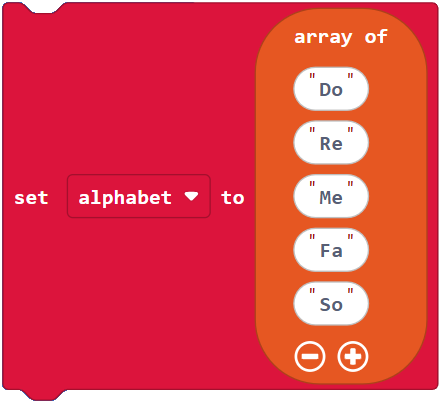
To make use of data stored in a list, each element of a list is referred to by its index. The index of a list is simply the number of each element beginning with zero. So, the first element is referred to as element 0. To refer to element 0 of notes would be the notes get value at (0) block. The code to refer to the fifth element, would be the notes get value at (4) block. Notice how the index appears to be “off by one”. When working with lists, this can be a common mistake.

Element 0 1 2 3 4
Contents “Do” “Re” “Me” “Fa” “So”
Block

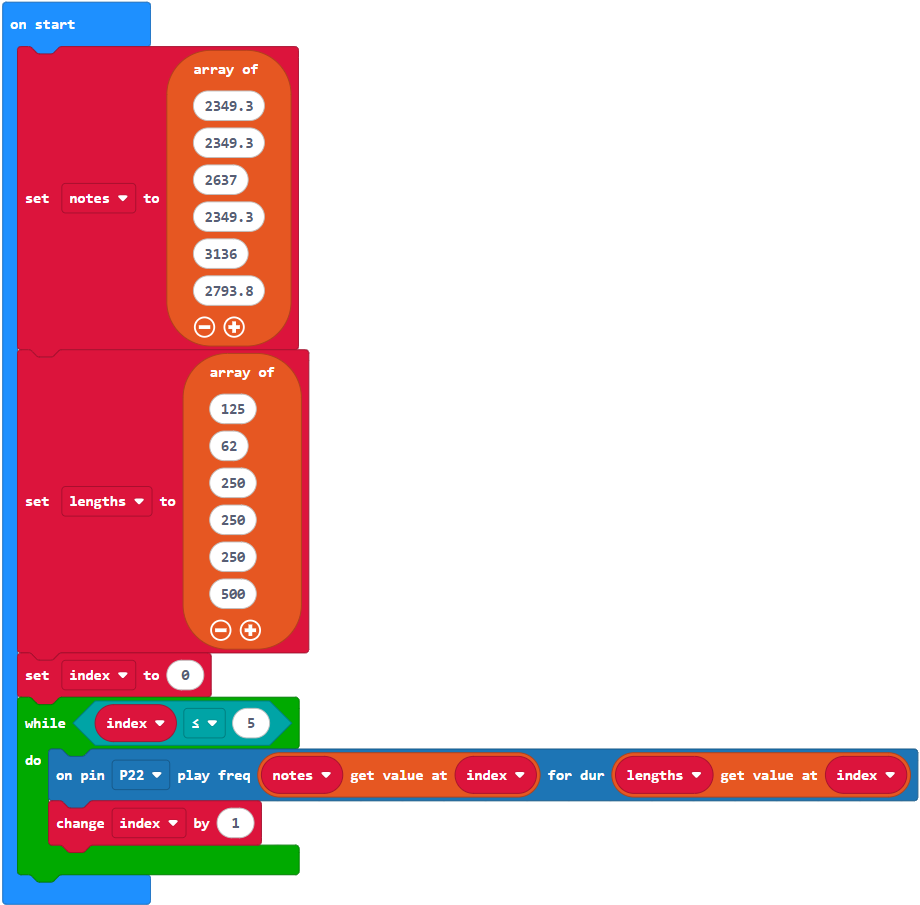
Example project: song_with_list.

With lists, you do not have to hard code numbers for the index. A variable, like index, can stand in for a number and then that variable can be changed as the program runs. Doing this allows blocks to “walk” through a list.

  • Enter and flash song_with_list.

How song_with_list works

In the example above, the variable index is created after the two lists. The while loop checks the value of index each time it repeats, or iterates. As long as index is less than or equal to 5, the loop continues. Inside the loop, the tone block gets the values from each of the arrays depending on the current value of index. The second block in the loop increases the value of index by 1. This occurs over and over until the value of index becomes 6 and the loop stops. (And it’s a good thing it stops there because there is not an element number 6 in either of these lists!)

Your Turn

  • Create a project that plays the first several notes of a song that you choose.

Printer-friendly version

Leave a Comment Cancel reply

Notes from Frequencies
Prev

DISCUSSION FORUMS | PARALLAX INC. STORE

About | Terms of Use | Feedback: learn@parallax.com | Copyright©Parallax Inc. 2024

© 2026 Parallax Learn • Built with GeneratePress