Skip to content
Parallax Learn

Parallax Learn

  • Welcome
  • Tutorials
        • Tutorial Series head tag

          Tutorial Series
        • Tutorial Series

          The special, classroom-ready series pages are organized collections of tutorials for our most popular hardware and/or languages. The tutorials for each topic are conveniently accessible from a single page, shown in the order it is recommended that they be completed.
        • Robotics Series Head tag

          Robotics Series
        • Robotics Series

          • Artificial Intelligence
          • Cybersecurity: Radio Data tutorialCybersecurity
          • cyber:bot + Python
          • cyber:bot + MakeCode
          • Boe-Bot Tutorial SeriesBoe-Bot
          • Arduino Shield-Bot
          • ActivityBot with C TutorialsActivityBot + C
          • ActivityBot with BlocklyProp Tutorial SeriesActivityBot + BlocklyProp
          • Scribbler 3 Tutorial SeriesScribbler 3
        • Electronics & Programming Series Head tag

          Electronics & Programming Series
          • BS2 Board of Education Tutorial SeriesBS2 Board of Education
          • Propeller C-Language BasicsPropeller C Basics
          • FLiP Try-It Kit C Tutorial SeriesFLiP Try-It Kit + C
          • FLiP Try-It Kit BlocklyProp TutorialsFLiP Try-It Kit + BlocklyProp
          • Badge WX Tutorial SeriesBadge WX
          • Propeller BlocklyProp Basics and ProjectsPropeller BlocklyProp Basics
          • View All Tutorial Series »
        • Browse Tutorials
        • Browse Tutorials

          Individual tutorials sorted by robot or kit, and language.
        • By Robot or Kit
          • ActivityBot
          • SumoBot WX
          • Boe-Bot
          • Shield-Bot
          • cyber:bot
          • Badge WX
          • ELEV-8
          • ARLO
        • By Language
        • By Language

          • Propeller C
          • Arduino
          • BlocklyProp
          • PBASIC
          • Python
          • MakeCode
          • View All Tutorials »
  • Educators
  • Reference
  • Downloads
  • Home
  • All Courses

Strings & Characters Primer

Curriculum

  • 1 Section
  • 21 Lessons
  • Lifetime
Expand all sectionsCollapse all sections
  • Strings & Characters Primer
    21
    • 1.1
      About Strings and Characters
    • 1.2
      Strings for Exchanging Data
    • 1.3
      String Features: Indexing and Blocks
    • 1.4
      First String
    • 1.5
      Try This: Display with Variable Labels
    • 1.6
      Characters Inside Strings
    • 1.7
      Try This: Print Alphabets
    • 1.8
      Your Turn: Print ASCII Chart
    • 1.9
      Access Characters
    • 1.10
      Try This: Check String Length
    • 1.11
      Your Turn: Check Every Character
    • 1.12
      String Surgery
    • 1.13
      Try This: Access Substrings
    • 1.14
      Your Turn: Create a Modified String
    • 1.15
      Compare, Find, Check
    • 1.16
      Try This: Find the Substring
    • 1.17
      Your Turn: Exact Match vs Found in String
    • 1.18
      Other Useful Blocks
    • 1.19
      Try This: Accept in Any Case
    • 1.20
      Convert Between Other Data Types
    • 1.21
      Your Turn: String to Int, Math and Back

Try This: Check String Length

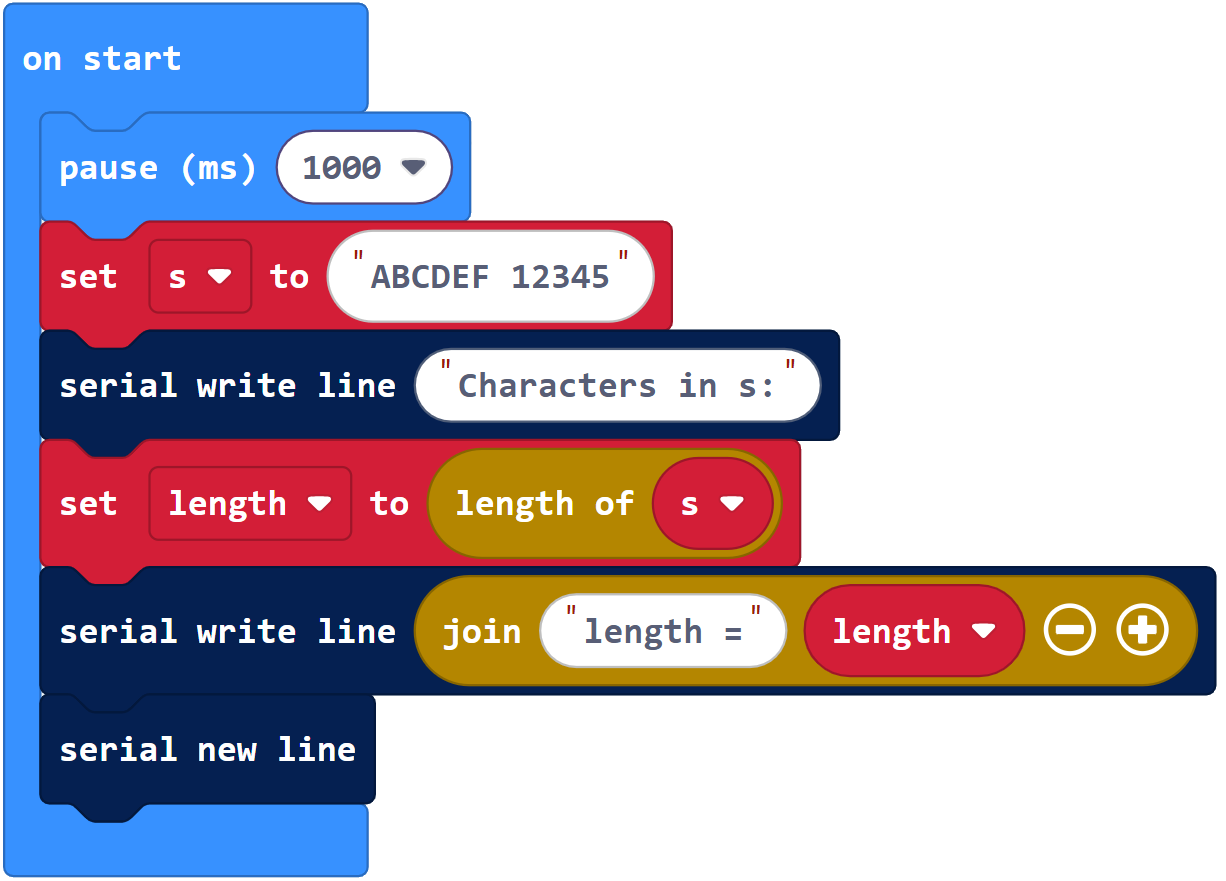
If your project uses an index that’s larger than the string, it’ll cause an exception. To find out how many characters are in a string, Makecode has that built-in function called length of () that returns the number of characters in a string. Your project can check a string’s length, then can use that result in indexing when accessing characters in that string, so that it never tries to access an out of bounds character. This is especially important when each character is indexed in a loop.

Before indexing all the characters in a string, let’s use length of () to verify that there are 12 characters in the string.

Example project: char_access_try_this

  • Enter and name char_access_try_this. 
  • Click the Download button.

  • Check the results in the serial terminal.
  • Verify that it displays length = 12.


Printer-friendly version

Leave a Comment Cancel reply

Access Characters
Prev
Your Turn: Check Every Character
Next

DISCUSSION FORUMS | PARALLAX INC. STORE

About | Terms of Use | Feedback: learn@parallax.com | Copyright©Parallax Inc. 2024

© 2026 Parallax Learn • Built with GeneratePress