Skip to content
Parallax Learn

Parallax Learn

  • Welcome
  • Tutorials
        • Tutorial Series head tag

          Tutorial Series
        • Tutorial Series

          The special, classroom-ready series pages are organized collections of tutorials for our most popular hardware and/or languages. The tutorials for each topic are conveniently accessible from a single page, shown in the order it is recommended that they be completed.
        • Robotics Series Head tag

          Robotics Series
        • Robotics Series

          • Artificial Intelligence
          • Cybersecurity: Radio Data tutorialCybersecurity
          • cyber:bot + Python
          • cyber:bot + MakeCode
          • Boe-Bot Tutorial SeriesBoe-Bot
          • Arduino Shield-Bot
          • ActivityBot with C TutorialsActivityBot + C
          • ActivityBot with BlocklyProp Tutorial SeriesActivityBot + BlocklyProp
          • Scribbler 3 Tutorial SeriesScribbler 3
        • Electronics & Programming Series Head tag

          Electronics & Programming Series
          • BS2 Board of Education Tutorial SeriesBS2 Board of Education
          • Propeller C-Language BasicsPropeller C Basics
          • FLiP Try-It Kit C Tutorial SeriesFLiP Try-It Kit + C
          • FLiP Try-It Kit BlocklyProp TutorialsFLiP Try-It Kit + BlocklyProp
          • Badge WX Tutorial SeriesBadge WX
          • Propeller BlocklyProp Basics and ProjectsPropeller BlocklyProp Basics
          • View All Tutorial Series »
        • Browse Tutorials
        • Browse Tutorials

          Individual tutorials sorted by robot or kit, and language.
        • By Robot or Kit
          • ActivityBot
          • SumoBot WX
          • Boe-Bot
          • Shield-Bot
          • cyber:bot
          • Badge WX
          • ELEV-8
          • ARLO
        • By Language
        • By Language

          • Propeller C
          • Arduino
          • BlocklyProp
          • PBASIC
          • Python
          • MakeCode
          • View All Tutorials »
  • Educators
  • Reference
  • Downloads
  • Home
  • All Courses

Strings & Characters Primer

Curriculum

  • 1 Section
  • 21 Lessons
  • Lifetime
Expand all sectionsCollapse all sections
  • Strings & Characters Primer
    21
    • 1.1
      About Strings and Characters
    • 1.2
      Strings for Exchanging Data
    • 1.3
      String Features: Indexing and Blocks
    • 1.4
      First String
    • 1.5
      Try This: Display with Variable Labels
    • 1.6
      Characters Inside Strings
    • 1.7
      Try This: Print Alphabets
    • 1.8
      Your Turn: Print ASCII Chart
    • 1.9
      Access Characters
    • 1.10
      Try This: Check String Length
    • 1.11
      Your Turn: Check Every Character
    • 1.12
      String Surgery
    • 1.13
      Try This: Access Substrings
    • 1.14
      Your Turn: Create a Modified String
    • 1.15
      Compare, Find, Check
    • 1.16
      Try This: Find the Substring
    • 1.17
      Your Turn: Exact Match vs Found in String
    • 1.18
      Other Useful Blocks
    • 1.19
      Try This: Accept in Any Case
    • 1.20
      Convert Between Other Data Types
    • 1.21
      Your Turn: String to Int, Math and Back

Try This: Display with Variable Labels

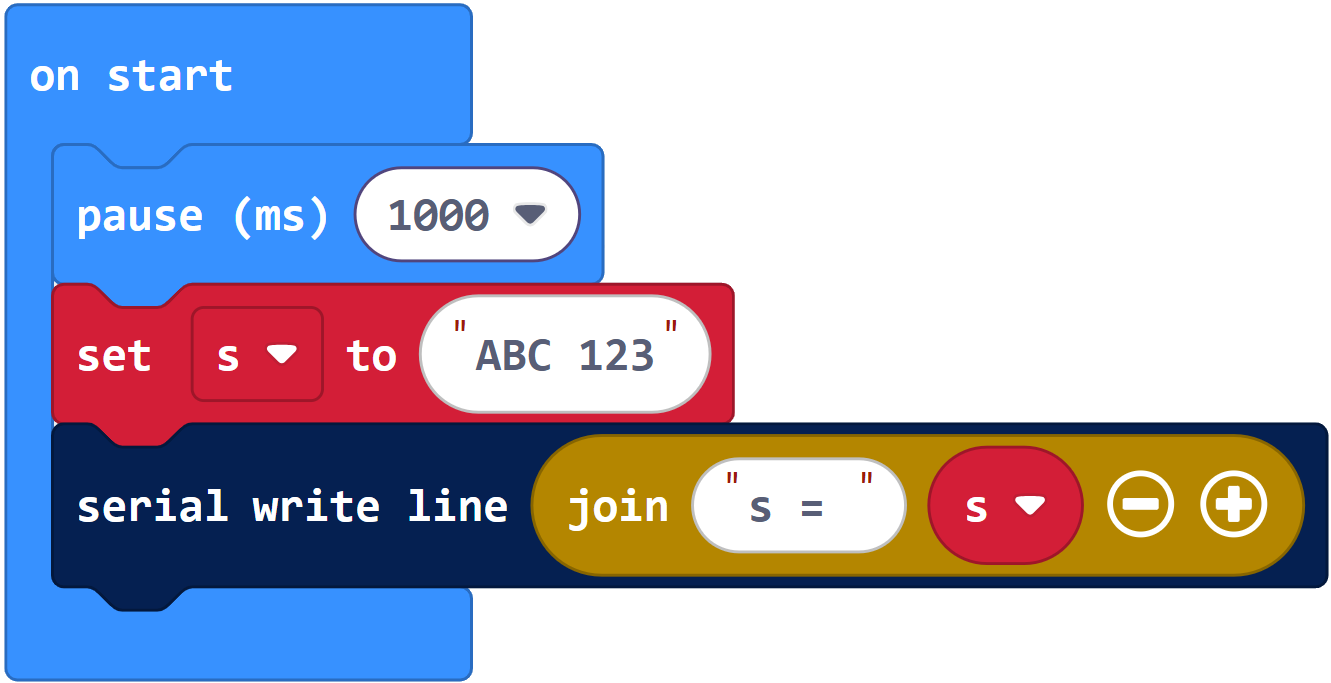
Let’s try modifying the project so that it displays s = ABC 123 instead of just ABC 123 in the terminal. That way, you’ll know that the terminal is displaying the contents of the s variable you created. This is very useful in a project that has many variables!

Example project: first_string_try_this

  • Change project’s name from first_string_intro to first_string_try_this.
  • Change serial write line (s) to serial write line (“s = “, s).
  • Click the Download button.

  • Check the results in the serial terminal.
  • Verify that it displays s = ABC 123


Printer-friendly version

Leave a Comment Cancel reply

First String
Prev
Characters Inside Strings
Next

DISCUSSION FORUMS | PARALLAX INC. STORE

About | Terms of Use | Feedback: learn@parallax.com | Copyright©Parallax Inc. 2024

© 2026 Parallax Learn • Built with GeneratePress