Skip to content
Parallax Learn

Parallax Learn

  • Welcome
  • Tutorials
        • Tutorial Series head tag

          Tutorial Series
        • Tutorial Series

          The special, classroom-ready series pages are organized collections of tutorials for our most popular hardware and/or languages. The tutorials for each topic are conveniently accessible from a single page, shown in the order it is recommended that they be completed.
        • Robotics Series Head tag

          Robotics Series
        • Robotics Series

          • Artificial Intelligence
          • Cybersecurity: Radio Data tutorialCybersecurity
          • cyber:bot + Python
          • cyber:bot + MakeCode
          • Boe-Bot Tutorial SeriesBoe-Bot
          • Arduino Shield-Bot
          • ActivityBot with C TutorialsActivityBot + C
          • ActivityBot with BlocklyProp Tutorial SeriesActivityBot + BlocklyProp
          • Scribbler 3 Tutorial SeriesScribbler 3
        • Electronics & Programming Series Head tag

          Electronics & Programming Series
          • BS2 Board of Education Tutorial SeriesBS2 Board of Education
          • Propeller C-Language BasicsPropeller C Basics
          • FLiP Try-It Kit C Tutorial SeriesFLiP Try-It Kit + C
          • FLiP Try-It Kit BlocklyProp TutorialsFLiP Try-It Kit + BlocklyProp
          • Badge WX Tutorial SeriesBadge WX
          • Propeller BlocklyProp Basics and ProjectsPropeller BlocklyProp Basics
          • View All Tutorial Series »
        • Browse Tutorials
        • Browse Tutorials

          Individual tutorials sorted by robot or kit, and language.
        • By Robot or Kit
          • ActivityBot
          • SumoBot WX
          • Boe-Bot
          • Shield-Bot
          • cyber:bot
          • Badge WX
          • ELEV-8
          • ARLO
        • By Language
        • By Language

          • Propeller C
          • Arduino
          • BlocklyProp
          • PBASIC
          • Python
          • MakeCode
          • View All Tutorials »
  • Educators
  • Reference
  • Downloads
  • Home
  • All Courses

SumoBot or Boe-Bot Tilt-Controller Project

Curriculum

  • 1 Section
  • 3 Lessons
  • Lifetime
Expand all sectionsCollapse all sections
  • SumoBot or Boe-Bot Tilt-Controller Project
    3
    • 1.0
      Build and Test the Circuits
    • 1.1
      Program the Controllers and Bots
    • 1.2
      How the SumoBot Tilt Controller Works

Build and Test the Circuits

Build the Circuits

  • Follow instructions in your XBee adapter documentation for assembling the adapter and socketing the XBee. 
  • Build Memsic2125 and XBee circuits on each HomeWork Board tilt controller.
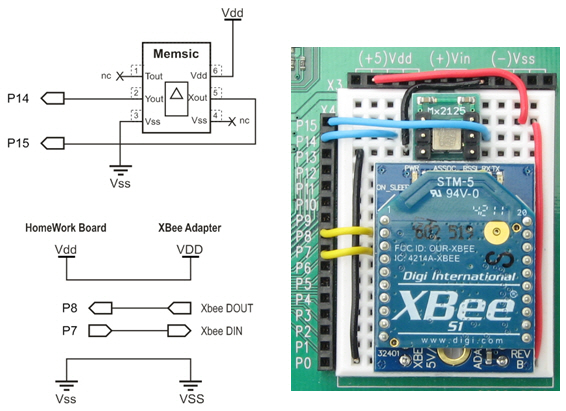
Schematic and Wiring for Tilt Controller  

  • As with the controller, follow instructions in your XBee adapter documentation for assembling the adapter and socketing the XBee. 
  • Build the XBee Receiver circuit on each SumoBot or Boe-Bot.

Schematic and Wiring for SumoBot
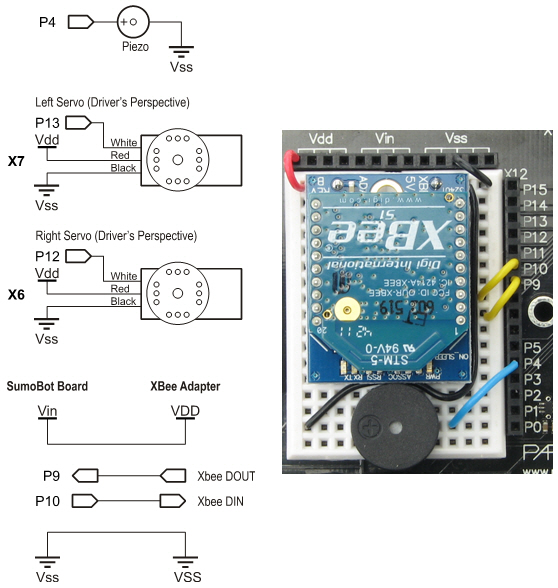
Note: The current photo shows SumoBot Vdd connected to XBee adapter VDD.  It needs to be updated to show SumoBot Vin connected to XBee adapter VDD.  Although the Vin = 6 V supply exceeds the XBee adapter’s stated input range by 1 V, its voltage regulator can handle it.  The benefit is that it adds some headroom to prevent supply voltage fluctuations (like when the motors stall during a SumoBot competition) from causing a brownout condition for the XBee. 

Test the Accelerometer

Let’s make sure your accelerometer is wired correctly first.

  • Use your BASIC Stamp Editor software to load Test Accelerometer.bs2 into one of your HomeWork boards.
  • Watch the Debug Terminal as you tilt your board in various directions.  Hold it level and both x and y values should be in the 2500 range.  Tilt it left/right, and the y axis values should vary.  The more you tilt, the further your measurements will vary from 2500.  In one direction down to about 1875, and up to about 3125 in the other direction.  The x axis should vary the same way as you tilt it either toward or away from you.  If it doesn’t, check your wiring and try again.

Printer-friendly version
Program the Controllers and Bots
Next

DISCUSSION FORUMS | PARALLAX INC. STORE

About | Terms of Use | Feedback: learn@parallax.com | Copyright©Parallax Inc. 2024

© 2026 Parallax Learn • Built with GeneratePress