Skip to content
Parallax Learn

Parallax Learn

  • Welcome
  • Tutorials
        • Tutorial Series head tag

          Tutorial Series
        • Tutorial Series

          The special, classroom-ready series pages are organized collections of tutorials for our most popular hardware and/or languages. The tutorials for each topic are conveniently accessible from a single page, shown in the order it is recommended that they be completed.
        • Robotics Series Head tag

          Robotics Series
        • Robotics Series

          • Artificial Intelligence
          • Cybersecurity: Radio Data tutorialCybersecurity
          • cyber:bot + Python
          • cyber:bot + MakeCode
          • Boe-Bot Tutorial SeriesBoe-Bot
          • Arduino Shield-Bot
          • ActivityBot with C TutorialsActivityBot + C
          • ActivityBot with BlocklyProp Tutorial SeriesActivityBot + BlocklyProp
          • Scribbler 3 Tutorial SeriesScribbler 3
        • Electronics & Programming Series Head tag

          Electronics & Programming Series
          • BS2 Board of Education Tutorial SeriesBS2 Board of Education
          • Propeller C-Language BasicsPropeller C Basics
          • FLiP Try-It Kit C Tutorial SeriesFLiP Try-It Kit + C
          • FLiP Try-It Kit BlocklyProp TutorialsFLiP Try-It Kit + BlocklyProp
          • Badge WX Tutorial SeriesBadge WX
          • Propeller BlocklyProp Basics and ProjectsPropeller BlocklyProp Basics
          • View All Tutorial Series »
        • Browse Tutorials
        • Browse Tutorials

          Individual tutorials sorted by robot or kit, and language.
        • By Robot or Kit
          • ActivityBot
          • SumoBot WX
          • Boe-Bot
          • Shield-Bot
          • cyber:bot
          • Badge WX
          • ELEV-8
          • ARLO
        • By Language
        • By Language

          • Propeller C
          • Arduino
          • BlocklyProp
          • PBASIC
          • Python
          • MakeCode
          • View All Tutorials »
  • Educators
  • Reference
  • Downloads
  • Home
  • All Courses

SumoBot or Boe-Bot Tilt-Controller Project

Curriculum

  • 1 Section
  • 3 Lessons
  • Lifetime
Expand all sectionsCollapse all sections
  • SumoBot or Boe-Bot Tilt-Controller Project
    3
    • 1.0
      Build and Test the Circuits
    • 1.1
      Program the Controllers and Bots
    • 1.2
      How the SumoBot Tilt Controller Works

How the SumoBot Tilt Controller Works

How it Works

If you tilt the HomeWork Board forward a little bit, the robot will roll forward slowly.  If you tilt it forward a lot, it will roll forward quickly. Tilting and rolling backward works the same way.  If you tilt the board to the right or left also, the robot will turn in that direction. 

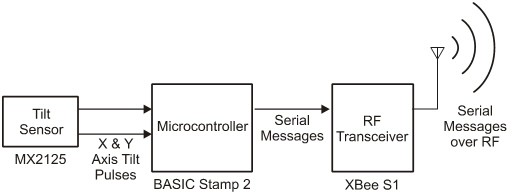
The Memsic 2-axis accelerometer on your HomeWork Board can sense if the board is being held flat, or if it is tilted, how far and in what direction.    It reports these tilts on each axis (front-to-back and side-to-side) as pulses that last certain amounts of time.  The PBASIC program running in the BASIC Stamp HomeWork Board’s onboard BASIC Stamp microcontroller makes it measure these pulses and convert them to numbers.  The program also makes the BASIC Stamp send these numbers as serial messages to the XBee transceiver, which in turn broadcasts these serial messages for the XBee on the robot.
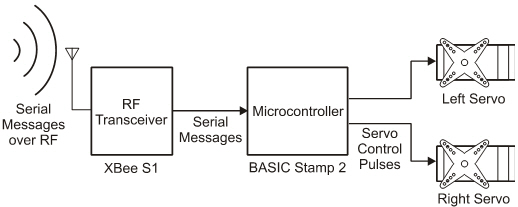
The XBee on the robot receives the serial messages and forwards them to the robot’s BASIC Stamp.  Its program converts the serial messages back to the numbers they represent.  Then, it does some math on the values to figure out the speed and direction it should make the servo turn.  It then sends a series of pulses to the servos.  The amount of time each pulse stays high is what tells the servo what speed and direction to turn.   
Learn much more about how it all works

To learn more about programming your robot for autonomous navigation, try Robotics with the Boe-Bot or the SumoBot Manual along with Applied Robotics with the SumoBot. 

  • To learn how the Memsic Dual-Axis Accelerometer works, try at least the Accelerometer – Getting Started tutorial. 
  • To learn how the Tilt Radio Control application works, see the Stamps in Class Mini Project ’A Tilt-Radio Controller for your Boe-Bot’. 
  • To learn how the BASIC Stamp microcontrollers can communicate with each other using XBee radios,  try the Getting Started with XBee RF Modules textbook.

Printer-friendly version
Program the Controllers and Bots
Prev

DISCUSSION FORUMS | PARALLAX INC. STORE

About | Terms of Use | Feedback: learn@parallax.com | Copyright©Parallax Inc. 2024

© 2026 Parallax Learn • Built with GeneratePress